Waila-1.0.5.jar
11 Feb 2026
Client Not supported Server Required Dependencies No extras listed Listed on Project page
Check the setup 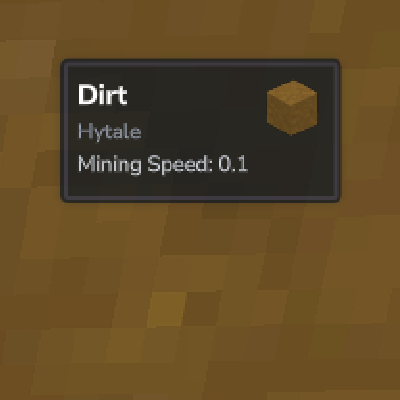
CurseForge · Hytale mod
HWaila is a utility mod for Hytale servers that displays a tooltip at the top of the screen with information about the block the player is currently looking at.
Quick answer
HWaila Waila-1.0.5.jar targets Hytale. Do not install it as a separate client mod. Enable it on the world host—the local server in singleplayer or the dedicated server in multiplayer. No required dependencies listed for this file.
Where it goes
Do not install it as a separate client mod. Enable it on the world host—the local server in singleplayer or the dedicated server in multiplayer.
Put Hytale mods on the world host or dedicated server. Singleplayer runs a local server too; Hytale does not use separate client mods.
Waila-1.0.5.jar. Change the file and its required mods may change too.
This file does not list any required mods. Do not add a library just because a different file uses it.
This file does not list any required or optional project dependencies. Check the creator notes before changing an existing world.
Before you install it
Built for HWaila Waila-1.0.5.jar. Pick another file and the loader, install side or required mods may change.
Use Waila-1.0.5.jar. It targets Hytale; another release may target a different game build or dependency set.
This file does not list any required mods. Do not add a library just because a different file uses it.
Do not install it as a separate client mod. Enable it on the world host—the local server in singleplayer or the dedicated server in multiplayer.
Use the “Get this file” button beside Waila-1.0.5.jar. It opens that exact file at the source.
About this project
Waila is a utility mod for Hytale servers that displays a tooltip at the top of the screen with information about the block the player is currently looking at. It is a server-side implementation of the classic "What Am I Looking At" mod, utilizing Hytale's Custom UI system.
This mod fully supports multi-language servers.
When a player looks at a block, a HUD appears displaying the following information (customizable):
Hytale, Minecraft, etc.).stone).See exactly what you are looking at with real-time updates.
Fully interactive in-game GUI to toggle specific information and adjust HUD position.
You don't need to edit files manually! The mod comes with a built-in UI for configuration.
/waila — Opens the configuration menu.waila.command.waila — Allows access to the /waila command.Inside the menu, every player can customize their own experience:
Mirror Orientation: Flips the HUD layout (Useful for different screen setups).
HUD Scale: Adjust the size of the Waila tooltip.
Offset X / Y: Finely tune the position of the HUD on your screen.
Project description from CurseForge.
Recent files
11 Feb 2026
11 Feb 2026
23 Jan 2026
19 Jan 2026
17 Jan 2026
15 Jan 2026
Looking for an older file? The official CurseForge project page is in Resources.
 mod
modKill a creature and it may leave a shadow. Bind it, and it fights for you: a dark copy with the real animal's health, reach and attacks. Build a squad out of anything you can kill
 mod
mod(Compatible with Update 6) Loot chests for every player without modifying the block and compatible with already generated worlds! You can also create, edit, delete, reset ANY loot chest! Config UI, anti-grief, random, auto reset and more!
 mod
modA complete redstone-style automation system for Hytale — wires, pistons, hoppers, repeaters, observers, torches, pressure plates, ejectors, applicators and more.