Hytale version
Back to mods 
CurseForge · Hytale mod
World Seed Plugin
World Seed Plugin is Hytale Seed lightweight utility plugin (with RTP and Invisibility) built to help players find and share cool Hytale seeds for builds, adventuring, and more.
Choose a version Pick your version below, then grab the matching file.
Quick answer
Which World Seed Plugin release should I use?
Latest stable file WorldSeedPlugin-1.3.0.jar
Game version 0.5
Mod system Built-in Hytale mod system
World Seed Plugin WorldSeedPlugin-1.3.0.jar targets 0.5. Do not install it as a separate client mod. Enable it on the world host—the local server in singleplayer or the dedicated server in multiplayer. No required dependencies listed for this file.
Where it goes
Where should World Seed Plugin be installed in Hytale?
Do not install it as a separate client mod. Enable it on the world host—the local server in singleplayer or the dedicated server in multiplayer.
Separate client mod Not supported
World host / dedicated server Required
Mod system for this release Built-in Hytale mod system
Required install it here Optional supported, not mandatory Not supported do not install here Source doesn’t say do not assume
Put Hytale mods on the world host or dedicated server. Singleplayer runs a local server too; Hytale does not use separate client mods.
What else does World Seed Plugin WorldSeedPlugin-1.3.0.jar need?
WorldSeedPlugin-1.3.0.jar. Change the file and its required mods may change too.
This file does not list any required mods. Do not add a library just because a different file uses it.
This file does not list any required or optional project dependencies. Check the creator notes before changing an existing world.
Before you install it
Add World Seed Plugin without breaking your instance.
Built for World Seed Plugin WorldSeedPlugin-1.3.0.jar. Pick another file and the loader, install side or required mods may change.
- 01
Stick to this file
Use WorldSeedPlugin-1.3.0.jar. It targets 0.5; another release may target a different game build or dependency set.
- 02
Bring the mods it needs
This file does not list any required mods. Do not add a library just because a different file uses it.
- 03
Enable it on the world host
Do not install it as a separate client mod. Enable it on the world host—the local server in singleplayer or the dedicated server in multiplayer.
- 04
Pick the file you checked
Use the “Get this file” button beside WorldSeedPlugin-1.3.0.jar. It opens that exact file at the source.
About this project
What does World Seed Plugin add?




World Seed Plugin is Hytale Seed lightweight utility plugin (with RTP and Invisibility) built to help players find and share cool Hytale seeds for builds, adventuring, and more.
Check out our new mods: Parkour Maker and Procedural Parkour
WorldSeedPlugin (1.3.0) is compatible with latest Hytale versions 0.5.x! If you are playing older versions of Hytale, use WorldSeedPlugin 1.2.0.
New additions (0.5.x):
- Added location saving so when you change worlds, quit, etc., your last location is saved (defaults to spawn on new seed creations).
- Added Create seed UI: you can now use commands or UI to create a seed -
/seed create ui(or access with the/seed listcommand and the create button. - Updated /seed rtp: random teleport has been updated to avoid water spawning.
- Updated tab completion: world names now show in tab completion (seed show/tp/copy/delete commands).
🌎 Hytale World Seed Plugin Commands
You will need permissions to use these commands: /op self etc.
Server owners, check the permissions section below for more control.
If you decide to rtp teleport, it is best to be in creative mode: /gm c or O keyboard shortcut.
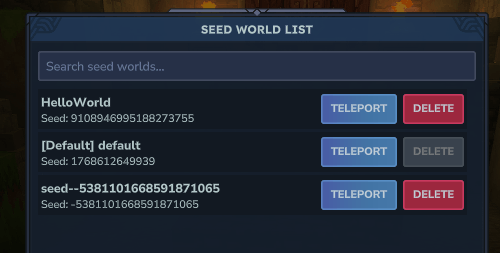
/seed– displays help./seed list– Popup UI to lists all worlds with their seeds. Includes easier access to teleporting to the world. Also has a delete button to delete worlds (note:prevents deleting default world). Includes search bar for names./seed show– displays your current world seed./seed show [WORLDNAME]– displays the chosen world's seed. Use single quotes for spaces./seed copy– Puts the seed into the chat box for easy copy (ctrl+C). You can also hit enter to share it with other players./seed posOR/seed position– Displays your current position./seed pos copyOR/seed position copy– Puts the position you are at into the chat box for easy copy (ctrl+C). You can also hit enter to share it with other players.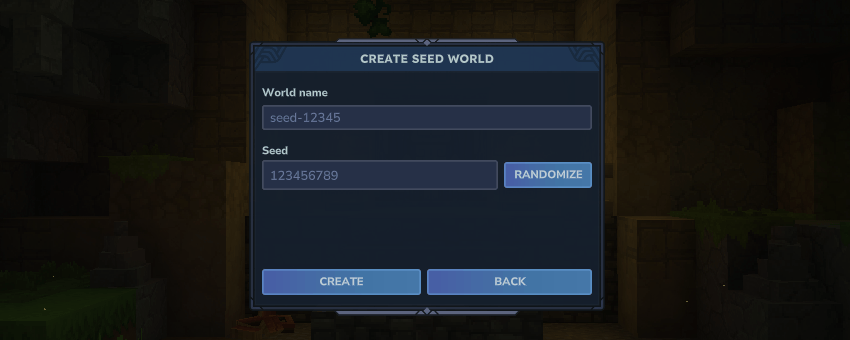
/seed create ui– brings up the UI for Hytale seed creation (hitting create TELEPORTS you)./seed create [seednumber]– Creates a new world AND TELEPORTS you to your new seed world (number needs to be 64 bit)./seed create [seednumber] --worldname='WORLDNAME'– Creates a new world AND TELEPORTS you to your new seed world (number needs to be 64 bit). (Optional) world name to name it (otherwise it defaults to seed number). Use single quotes for spaces./seed create random– Creates a new world AND TELEPORTS you to that new world with a randomized seed number./seed create random --worldname='WORLDNAME'– Creates a new world AND TELEPORTS you to that new world with a randomized seed number. (Optional) world name to name it (otherwise it defaults to seed number). Use single quotes for spaces./seed tp [worldname]– Teleports to that world./seed rtp– Teleports to a random position in the world (please turn on creative as you may end up underwater or near strong enemies)./seed invis– Use to toggle hiding just your character model (good for different camera angle screenshots and such)./seed delete [worldname]– to delete a world. Warning: no confirmation (can also be found in /seed list UI with confirmation).
📃 Server Owner Permissions
Server owners who want to specify who has access to what specific commands, here are the permissions:
/seed(required for all other permissions) - seedplugin.commands.seed/seed show- seedplugin.commands.seed.show/seed show <world>- seedplugin.commands.seed.show.other/seed create(includes create UI) - seedplugin.commands.seed.create/seed copy- seedplugin.commands.seed.copy/seed copy <world>- seedplugin.commands.seed.copy.other/seed list- seedplugin.commands.seed.list/seed tp <world>(includes UI button) - seedplugin.commands.seed.teleport/seed rtp- seedplugin.commands.seed.rtp/seed pos- seedplugin.commands.seed.position/seed pos copy- seedplugin.commands.seed.position.copy/seed invis- seedplugin.commands.seed.invisibility/seed delete(includes UI button) - seedplugin.commands.seed.delete
📥 Installing this Plugin
WorldSeedPlugin (1.3.0) is compatible with latest Hytale versions 0.5.x! If you are playing older versions of Hytale, use WorldSeedPlugin 1.2.0.
- Exit to the main menu, quit, or stop your server.
- Download and drop the
WorldSeedPlugin(version).jarfile into the Mods folder (of either your server or your single player world). - Start the server back up and run /seed to test (need /op self permissions).
- If running a single player world, right click your world and toggle the mod on and save. Load in and run /seed to test (need /op self permissions).
🏁 Usage License Permissions
Feel free to include this plugin/mod in other Curseforge modpacks, servers, etc., and use this mod in videos. It would be highly appreciated to link back to this plugin/mod page but not required.
Do NOT re-upload this plugin/mod by itself to any other websites, etc.
Do NOT claim it as your own.
🥳 Our Other Mods
Follow us to keep an eye out for more upcoming mods.
Use creator code caldera to help support our mod creation.
- Parkour Maker Plugin create and share custom Hytale Parkour maps (with browser and leaderboards).
- Procedural Parkour Plugin play procedurally generated Hytale parkour paths where you want.
- World Seed Plugin enhance Hytale seed finding and other related abilities.
⭐ Best Hytale Seeds
After finding awesome seeds, you can share them at besthytaleseeds.com.
Build Parkour on cool seeds with Parkour Maker Plugin and share at hytaleparkour.com.

Project description from CurseForge.
Pick your setup
World Seed Plugin releases for each Hytale build.
Choose the version and loader you play, then open the matching release.
Check the dependencies, then try the file in a copied instance before changing a world you care about.
Recent files
World Seed Plugin releases and Hytale builds
WorldSeedPlugin-1.3.0.jar
28 May 2026
Client Not supported Server Required Dependencies No extras listed Listed on Project page
Check the 0.5 setup 0.5 release
WorldSeedPlugin-1.2.0.jar
30 Mar 2026
Client Not supported Server Required Dependencies No extras listed Listed on Project page
Check the setup WorldSeedPlugin-1.1.0.jar
24 Feb 2026
Client Not supported Server Required Dependencies No extras listed Listed on Project page
Check the setup WorldSeedPlugin-1.0.3.jar
24 Jan 2026
Client Not supported Server Required Dependencies No extras listed Listed on Project page
Check the setup SeedPlugin-1.0.2.jar
24 Jan 2026
Client Not supported Server Required Dependencies No extras listed Listed on Project page
Check the setup SeedPlugin-1.0.1.jar
19 Jan 2026
Client Not supported Server Required Dependencies No extras listed Listed on Project page
Check the setup SeedPlugin-1.0.0.jar
17 Jan 2026
Client Not supported Server Required Dependencies No extras listed Listed on Project page
Check the setup Looking for an older file? The official CurseForge project page is in Resources.
 mod
mod CurseForge · Hytale
Endless Warlock V2
🔮Adds a dark ranged Warlock class with staff scaling, life steal, mana sustain, companions and Endless Leveling progression paths.
 mod
mod CurseForge · Hytale
Menu Info Pages
Create beautiful in-game guides, tutorials and information pages with a native Hytale-style UI, JSON configuration, images, sections and interactive buttons.
 mod
mod CurseForge · Hytale
Dynamic Seasons
Adds 4 Seasons to the world, Greenhouse blocks, Seasonal Farming, Seasonal Fishing, Customizable Weather. It also adds dynamic Snow, (WIP) temperature system, Configurable Settings, and an optional Seasons Spellbook.