DamageIndicator-0.0.7.jar
17 Feb 2026
Client Not supported Server Required Dependencies No extras listed Listed on Project page
Check the setup 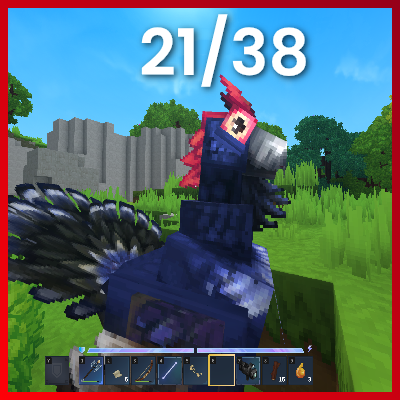
CurseForge · Hytale mod
Will show the current and max health above entities when they get damaged. Will disappear after 1 second. Also includes a nice hud element!
Quick answer
DamageIndicator-0.0.7.jar targets Hytale. Do not install it as a separate client mod. Enable it on the world host—the local server in singleplayer or the dedicated server in multiplayer. No required dependencies listed for this file.
Where it goes
Do not install it as a separate client mod. Enable it on the world host—the local server in singleplayer or the dedicated server in multiplayer.
Put Hytale mods on the world host or dedicated server. Singleplayer runs a local server too; Hytale does not use separate client mods.
DamageIndicator-0.0.7.jar. Change the file and its required mods may change too.
This file does not list any required mods. Do not add a library just because a different file uses it.
This file does not list any required or optional project dependencies. Check the creator notes before changing an existing world.
Before you install it
Built for DamageIndicator-0.0.7.jar. Pick another file and the loader, install side or required mods may change.
Use DamageIndicator-0.0.7.jar. It targets Hytale; another release may target a different game build or dependency set.
This file does not list any required mods. Do not add a library just because a different file uses it.
Do not install it as a separate client mod. Enable it on the world host—the local server in singleplayer or the dedicated server in multiplayer.
Use the “Get this file” button beside DamageIndicator-0.0.7.jar. It opens that exact file at the source.
About this project
Ever wanted to see how much health a Mob has?
Well now you can!
Just drop it in and it will work out of the box!

You also get a nice little Hud Element (Version 0.0.2+):
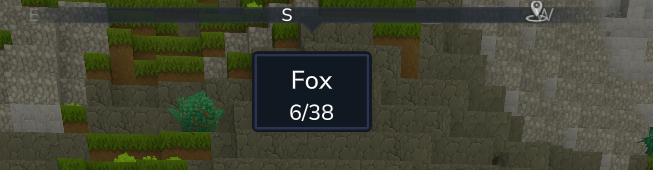
The Hud-Element can be toggled with:
/dmgindicator togglehud (This persists across restarts | This is per player)
The Nameplate-Element can be toggled with:
/dmgindicator togglenameplate (This persists across restarts | This is per player)
You can change the position of the Hud-Element with this command:
/dmgindicator sethudposition <position>
Valid positions are: TOP, BOTTOM, LEFT, RIGHT, TOPLEFT, TOPRIGHT, BOTTOMLEFT, BOTTOMRIGHT
Yeah.. that's it..
Project description from CurseForge.
Recent files
17 Feb 2026
27 Jan 2026
27 Jan 2026
25 Jan 2026
23 Jan 2026
19 Jan 2026
17 Jan 2026
Looking for an older file? The official CurseForge project page is in Resources.
 mod
modThe Skylight Zone: Gimme Da' Loot is a Drop-List Addon for (Drops/Lootbags). - It Adds 3 New 'Lootbags' that have the chance to reward the player with Loot. The Mod now Also Includes 28 new NPCs.
 mod
modWalk the path of a Xianxia cultivator. Meditate for Spirit Qi, break through 7 realms, found a sect, inscribe talismans, wake a weapon spirit, breed spirit beasts, brew pills, survive heavenly tribulation -- then ascend past the peak itself.
 mod
modThe core mod for many of my future Hytale modding and adventure map-making endeavors, featuring many custom magic items, potions, explosives, and more.