Hytale version
Back to mods 
CurseForge · Hytale mod
HytaTrade
A lightweight, player-to-player trading system for Hytale servers.
Choose a version Pick your version below, then grab the matching file.
Quick answer
Which HytaTrade release should I use?
Latest stable file HytaTrade-1.1.0.jar
Game version 0.5
Mod system Built-in Hytale mod system
HytaTrade-1.1.0.jar targets 0.5. Do not install it as a separate client mod. Enable it on the world host—the local server in singleplayer or the dedicated server in multiplayer. No required dependencies listed for this file.
Where it goes
Where should HytaTrade be installed in Hytale?
Do not install it as a separate client mod. Enable it on the world host—the local server in singleplayer or the dedicated server in multiplayer.
Separate client mod Not supported
World host / dedicated server Required
Mod system for this release Built-in Hytale mod system
Required install it here Optional supported, not mandatory Not supported do not install here Source doesn’t say do not assume
Put Hytale mods on the world host or dedicated server. Singleplayer runs a local server too; Hytale does not use separate client mods.
What else does HytaTrade-1.1.0.jar need?
HytaTrade-1.1.0.jar. Change the file and its required mods may change too.
This file does not list any required mods. Do not add a library just because a different file uses it.
This file does not list any required or optional project dependencies. Check the creator notes before changing an existing world.
Before you install it
Add HytaTrade without breaking your instance.
Built for HytaTrade-1.1.0.jar. Pick another file and the loader, install side or required mods may change.
- 01
Stick to this file
Use HytaTrade-1.1.0.jar. It targets 0.5; another release may target a different game build or dependency set.
- 02
Bring the mods it needs
This file does not list any required mods. Do not add a library just because a different file uses it.
- 03
Enable it on the world host
Do not install it as a separate client mod. Enable it on the world host—the local server in singleplayer or the dedicated server in multiplayer.
- 04
Pick the file you checked
Use the “Get this file” button beside HytaTrade-1.1.0.jar. It opens that exact file at the source.
About this project
What does HytaTrade add?
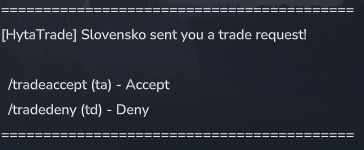
A lightweight, player-to-player trading system for Hytale servers. Enable safe and secure item exchanges between players with dual confirmation, cooldowns, and comprehensive trade management.
✨ Features
- Safe Trading - Dual confirmation system ensures both parties agree before items are exchanged
- Request System - Send trade requests to other players with configurable timeout
- Item Management - Add items directly from your hand, remove items by index
- Trade Overview - View complete trade status showing both players' offered items
- Cooldown System - Prevent trade spam with configurable cooldown between trades
- Distance Limit - Optional maximum distance requirement for trading
- Cancel Protection - Items are safely returned if trade is cancelled
📦 Installation
upload plugin to server folder mods
restart server
Trade Commands Guide
/trade <player> – Sent by the first player to request a trade.
/tradeaccept – Used by the second player to accept the trade request.
/tradeadd – Used by the first player to add the item currently held in hand to the trade.
/tradeconfirm – Used by the second player to confirm and complete the trade.
| Command | Alias | Description |
|---|---|---|
| /trade | - | Send a trade request to another player |
| /tradeaccept | /ta | Accept an incoming trade request |
| /tradedeny | /td | Deny an incoming trade request |
| /tradeadd | /tadd | Add the item in your hand to the trade |
| /traderemove | /trem | Remove an item from your trade offer by index |
| /tradelist | /tlist | Display current trade status and all offered items |
| /tradeconfirm | /tok | Confirm your side of the trade |
| /tradecancel | - | Cancel the current trade |
| /tradehelp | /thelp | Show help information |
The plugin is still in development. Please report any bugs. Thank you.
Project description from CurseForge.
Pick your setup
HytaTrade releases for each Hytale build.
Choose the version and loader you play, then open the matching release.
Check the dependencies, then try the file in a copied instance before changing a world you care about.
Recent files
HytaTrade releases and Hytale builds
HytaTrade-1.1.0.jar
28 May 2026
Client Not supported Server Required Dependencies No extras listed Listed on Project page
Check the 0.5 setup 0.5 release
HytaTrade-1.0.0.jar
17 Jan 2026
Client Not supported Server Required Dependencies No extras listed Listed on Project page
Check the setup Looking for an older file? The official CurseForge project page is in Resources.
 mod
mod CurseForge · Hytale
Faun & Flora - Regrowth
adds a natural response to deforestation and a regrowth system for trees, wild plants, mushrooms...
 mod
mod CurseForge · Hytale
OceanReef Mace
OceanReef Mace Like the Ocean Waves
 mod
mod CurseForge · Hytale
Biome's Compass
Biome's Compass adds a brand-new craftable item to your game that allows you to locate biome locations with ease!