HyOptimizer-3.6.6.jar
24 Feb 2026
Client Not supported Server Required Dependencies No extras listed Listed on Project page
Check the setup 
CurseForge · Hytale mod
The Ultimate Utility for Console Organization & Memory Efficiency
Quick answer
HyOptimizer-3.6.6.jar targets Hytale. Do not install it as a separate client mod. Enable it on the world host—the local server in singleplayer or the dedicated server in multiplayer. No required dependencies listed for this file.
Where it goes
Do not install it as a separate client mod. Enable it on the world host—the local server in singleplayer or the dedicated server in multiplayer.
Put Hytale mods on the world host or dedicated server. Singleplayer runs a local server too; Hytale does not use separate client mods.
HyOptimizer-3.6.6.jar. Change the file and its required mods may change too.
This file does not list any required mods. Do not add a library just because a different file uses it.
This file does not list any required or optional project dependencies. Check the creator notes before changing an existing world.
Before you install it
Built for HyOptimizer-3.6.6.jar. Pick another file and the loader, install side or required mods may change.
Use HyOptimizer-3.6.6.jar. It targets Hytale; another release may target a different game build or dependency set.
This file does not list any required mods. Do not add a library just because a different file uses it.
Do not install it as a separate client mod. Enable it on the world host—the local server in singleplayer or the dedicated server in multiplayer.
Use the “Get this file” button beside HyOptimizer-3.6.6.jar. It opens that exact file at the source.
About this project
The Ultimate Toolkit for Console Clarity, Memory Management & Server Metrics
Version: 3.6.2 (Latest Release - Feb 2026)
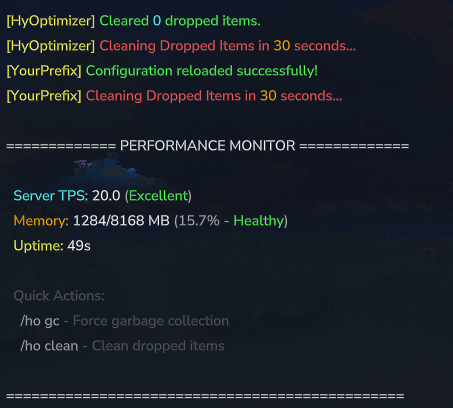
PLEASE READ BEFORE UPDATING: To prevent accidental removal of decorative entities (like Armor Stands or Custom Props), the Item Cleaner is now DISABLED by default (enableItemCleaner: false).
Before enabling it, please:
Check your config: Set removeCustomEntities: false to protect named/custom mobs.
Update Protected Items: Add any specific items to the protectedItems list (do NOT use the hytale: prefix).
Test: Run a manual cleanup /ho clean in a safe area first.
Development of HyOptimizer and HyDamageEditor takes a significant amount of time and effort. While these tools will always remain free for the community, donations are greatly appreciated and help fuel future updates, new features, and dedicated support!
If these tools have helped your server run smoother or made your life as an admin easier, consider buying me a coffee:
Thank you for supporting independent Hytale development! 🚀
HyOptimizer is a specialized, high-performance utility designed to eliminate the four primary obstacles to a smooth Hytale server: Console Noise, Memory Leaks, Entity Lag, and Lack of Real-Time Metrics.
By merging surgical log filtration, aggressive RAM recovery, a thread-safe entity cleanup system, and an all-new performance monitor, HyOptimizer ensures your server remains efficient and your logs stay readable. Version 3.6.2 introduces critical safety protocols for builds, a strict permission system, and multi-language support.
Get a comprehensive snapshot of your server’s health with a professional, color-coded chat interface.
Chat-Based Display: A stable and cross-client compatible alternative to problematic HUDs.
Dynamic Color Coding:
🔵 Cyan: Headers and category labels.
💛 Gold/Yellow: Memory stats and uptime tracking.
⚪ White: High-contrast data values.
🎨 Status Indicators: Green (Healthy) → Yellow (Moderate) → Red (Critical).
Streamlined Access: Use /ho for an immediate performance overview.
Maintain high TPS by wiping dropped items without risking server instability or ruining builds.
Safety First: Disabled by default to prevent accidents.
Custom Entity Protection: New setting removeCustomEntities: false ensures named mobs and special entities are ignored.
Smart Whitelist: Protect valuable resources (e.g., "ores", "sword") via the protectedItems list.
Fail-Safe Architecture: Automatically skips cleanup cycles if the world thread is overloaded.
Clean up your console by suppressing the relentless flood of engine-level warnings.
26 Active Filters: Native coverage for InteractionChain, Missing interaction, NPC overpopulation, and FileSystemException errors.
Readable Logs: Intercepts "garbage" protocol hashes and ensures all logs are plain, readable text.
Regex Flexibility: Add your own custom patterns to config.json to block specific strings.
Security is paramount. Version 3.6.2 implements strict permission nodes for every command, compatible with Hytale's native permission system.
Granular Control: Assign specific rights like hyoptimizer.* and hyoptimizer.clean
Manifest Registered: Nodes are properly registered for better compatibility with external managers.
Built-in Languages: Switch between English ("en") and Spanish ("es") instantly in the config.
Extensible: Easy to add more languages via the Messages system.
| Command | Action | Permission Node |
|---|---|---|
/ho |
Opens the performance monitor (Default) | hyoptimizer.monitor |
/ho gc |
Manually triggers a RAM optimization cycle | hyoptimizer.gc |
/ho clean |
Instantly removes non-protected ground items | hyoptimizer.clean |
/ho reload |
Hot-reloads configuration and filters | hyoptimizer.reload |
<button class="mdc-icon-button mat-mdc-icon-button mat-mdc-button-base mat-mdc-tooltip-trigger copy-button mat-unthemed ng-star-inserted" aria-label="Copy table" data-test-id="copy-table-button"></button>
Note: Server Operators (OP) have full access to all commands by default.
config.json)Note: In v3.6.2, do NOT use the hytale: prefix for protected items.
JSON
<button class="mdc-icon-button mat-mdc-icon-button mat-mdc-button-base mat-mdc-tooltip-trigger copy-button ng-tns-c3630790347-87 mat-unthemed ng-star-inserted" aria-label="Copy code"></button>
{
  "configVersion": 6,
  "language": "en",
  "prefix": "&e[HyOptimizer]",
  "primaryColor": "&a",
  "secondaryColor": "&b",
  "warningColor": "&c",
  "infoColor": "&7",

  "enableAutoGc": true,
  "autoGcIntervalSeconds": 30,
  "useCriticalGcStrategy": false,
  "memoryThreshold": 0.0,

  "enableItemCleaner": false,
  "removeCustomEntities": false,
  "itemCleanerIntervalSeconds": 300,
  "warningIntervals": [ 60, 30, 5 ],

  "protectedItems": [
    "soil_dirt",
    "diamond",
    "emerald"
  ],

  "blockedPatterns": [
    "missing or invalid manifest.json",
    "Took too long to .* process chunk",
    "InteractionChain",
    "Removing NPC .* due to overpopulation",
    "FileSystemException.*The process cannot access the file",
    "...and 20+ more!"
  ]
}
Stop your Hytale Server.
Clean Install: Delete any old HyOptimizer.jar and the mods/HyOptimizer folder to ensure a clean v3.6.2 environment.
Deploy: Place the new HyOptimizer-3.6.2.jar into your mods folder.
Launch: Restart your server.
🛡️ Build Safety: Item cleaner disabled by default; added removeCustomEntities toggle.
🐛 Fix: protectedItems now works correctly (removed requirement for prefixes).
🔒 Permissions: Added strict permission nodes (hyoptimizer.*) and manifest registration.
🌍 Languages: Added native Spanish support ("language": "es").
☕ Compatibility: Fixed Java 21 UnsupportedClassVersionError issues.
The Hytale Early Access environment is naturally "loud"—it logs every minor detail and consumes RAM aggressively. This makes it hard to identify actual game-breaking errors. HyOptimizer silences the noise and manages the bloat, letting you focus on your community while we handle the engine's "mess" in the background.
v3.6.2 (Feb 2026): Build safety protocols, Permission system overhaul, Language support.
v3.5.0: Chat monitor, branding customization, 26+ filters.
v3.0.0: Chat color support, thread-safe cleaning.
v1.0.0: Initial release.
Project description from CurseForge.
Recent files
24 Feb 2026
24 Feb 2026
24 Feb 2026
13 Feb 2026
9 Feb 2026
8 Feb 2026
8 Feb 2026
31 Jan 2026
30 Jan 2026
25 Jan 2026
20 Jan 2026
20 Jan 2026
Looking for an older file? The official CurseForge project page is in Resources.
 mod
modThe ultimate Ghost Block Removal Tool for Hytale!
 mod
mod🌙 A lightweight and configurable sleep system that lets Hytale servers skip the night when enough players are sleeping.
 mod
mod👻Automatically detects and safely removes ghost blocks on Hytale servers.👻