Back to mods
Weapon Stats Viewer project artwork

CurseForge · Hytale mod

Weapon Stats Viewer

Displays detailed weapon stats, damage, and rarities directly in your inventory and Blacksmith Anvil. Includes mod compatibility and a custom /weapons browser GUI

Choose a version Pick your version below, then grab the matching file.

Quick answer

Which Weapon Stats Viewer release should I use?

Updated 7 months ago
Latest stable file WeaponStatsViewer-1.7.0.jar
Game version Not listed
Mod system Built-in Hytale mod system

Weapon Stats Viewer WeaponStatsViewer-1.7.0.jar targets Hytale. Do not install it as a separate client mod. Enable it on the world host—the local server in singleplayer or the dedicated server in multiplayer. No required dependencies listed for this file.

Where it goes

Where should Weapon Stats Viewer be installed in Hytale?

Do not install it as a separate client mod. Enable it on the world host—the local server in singleplayer or the dedicated server in multiplayer.

Separate client mod Not supported
World host / dedicated server Required
Mod system for this release Built-in Hytale mod system
Required install it here Optional supported, not mandatory Not supported do not install here Source doesn’t say do not assume

Put Hytale mods on the world host or dedicated server. Singleplayer runs a local server too; Hytale does not use separate client mods.

What else does Weapon Stats Viewer WeaponStatsViewer-1.7.0.jar need?

WeaponStatsViewer-1.7.0.jar. Change the file and its required mods may change too.

No required dependencies listed for this file

This file does not list any required mods. Do not add a library just because a different file uses it.

This file does not list any required or optional project dependencies. Check the creator notes before changing an existing world.

Before you install it

Add Weapon Stats Viewer without breaking your instance.

Built for Weapon Stats Viewer WeaponStatsViewer-1.7.0.jar. Pick another file and the loader, install side or required mods may change.

  1. 01

    Stick to this file

    Use WeaponStatsViewer-1.7.0.jar. It targets Hytale; another release may target a different game build or dependency set.

  2. 02

    Bring the mods it needs

    This file does not list any required mods. Do not add a library just because a different file uses it.

  3. 03

    Enable it on the world host

    Do not install it as a separate client mod. Enable it on the world host—the local server in singleplayer or the dedicated server in multiplayer.

  4. 04

    Pick the file you checked

    Use the “Get this file” button beside WeaponStatsViewer-1.7.0.jar. It opens that exact file at the source.

About this project

What does Weapon Stats Viewer add?

Weapon Stats Viewer

Browse all Hytale weapons with detailed damage statistics, organized by type and rarity.

VersionLanguages


📋 Description

Displays detailed weapon stats, damage, and rarities directly in your inventory and Blacksmith Anvil. Includes full mod compatibility and a custom /weapons browser GUI.
Status

[Version 1.7.0] Extended Mod Compatibility

image

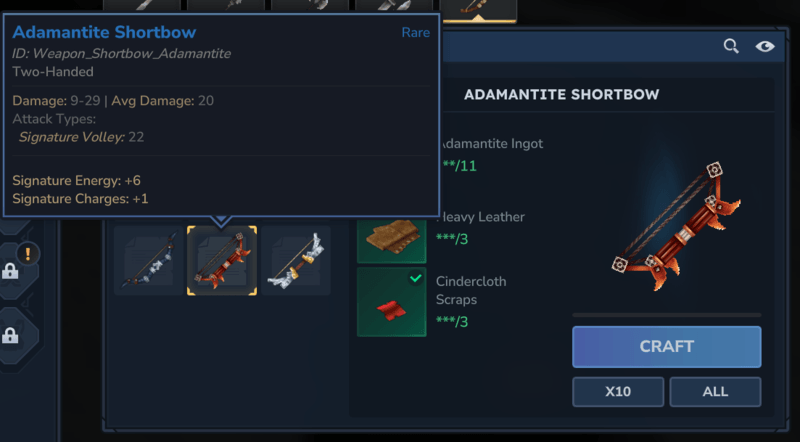
Damage range information (Min-Max damage) for craftable bows (Shortbows and Crossbows)

image


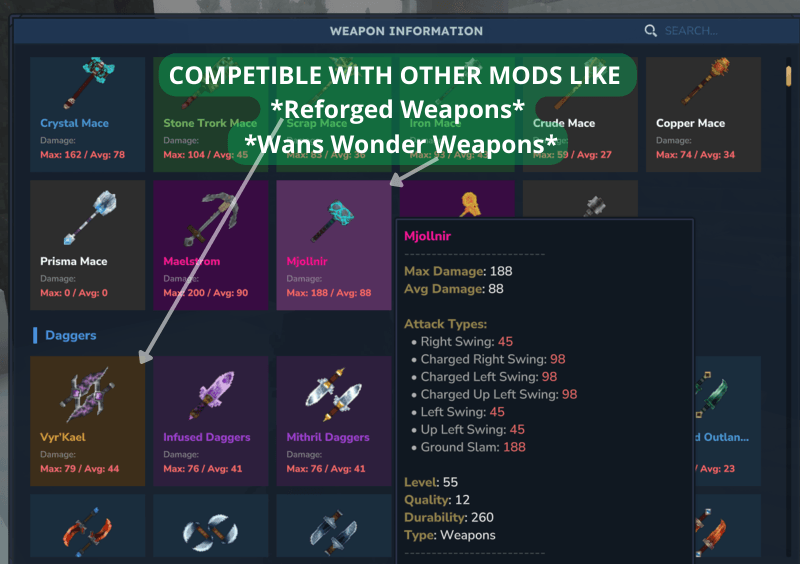
CUSTOM UI WITH COMMAND

image

✨ Features

  • Interactive Weapon Browser: Beautiful custom UI with weapon cards organized by type
  • Detailed Statistics: View max/average damage, quality, level, and durability for each weapon
  • Attack Type Breakdown: See detailed damage for each attack type (Swing, Thrust, Special attacks, etc.)
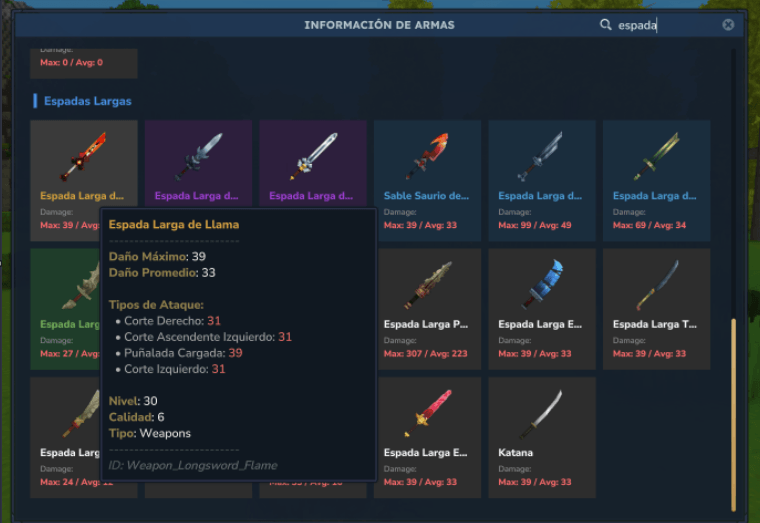
  • Bilingual Support: Fully translated interface in English and Spanish
  • Smart Search: Search weapons by name, material (copper, iron, mithril, etc.), or type
  • Rarity-Based Organization: Weapons sorted by quality (Legendary → Epic → Rare → Uncommon → Common)
  • Visual Quality Indicators: Color-coded backgrounds and titles based on item rarity
  • Weapon Categories: Organized by type (Swords, Daggers, Axes, Bows, Shields, Arrows, etc.)
  • In-game Configuration via Commands: Instantly enable/disable public access to /weapons without server restart
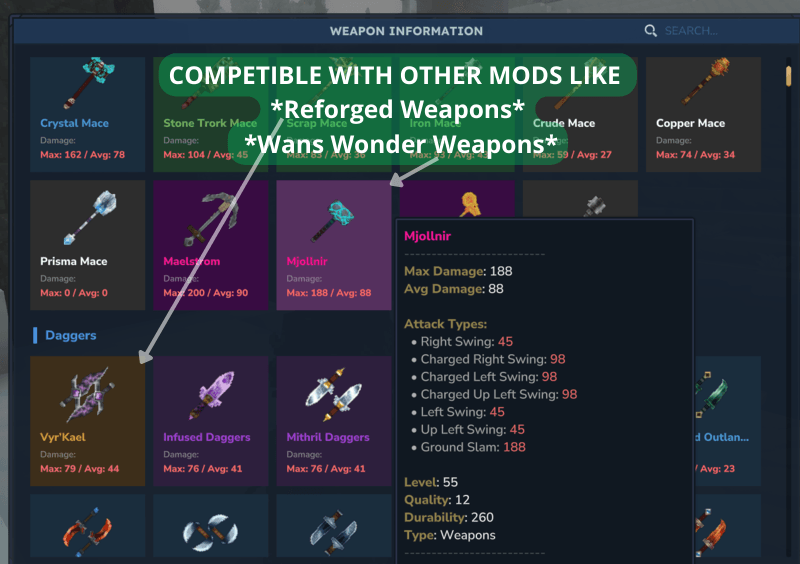
  • 🛠️ Universal Mod Compatibility The /weapons command is no longer limited to base game items! The plugin now correctly identifies and detects weapons from other installed mods (like Reforged Weapons, Wans Wonder Weapons, etc.) and displays their damage statistics automatically.

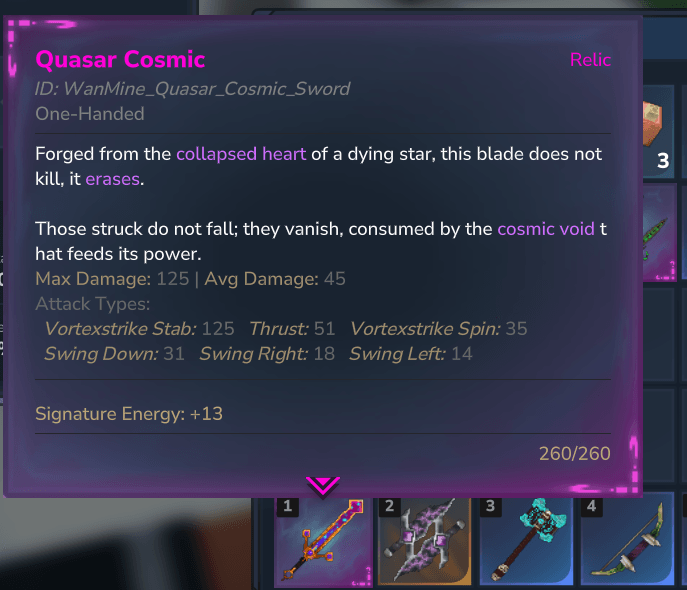
New Feature Weapon damage stats in tooltips

You can now view damage statistics and attack types for all weapons directly from:

  • Blacksmith's Anvil tooltips
  • Player inventory

🎮 Custom UI Usage

Commands

  • /weapons - Opens the weapon browser interface (enabled for all players by default)
image

NEW ADMIN Commands

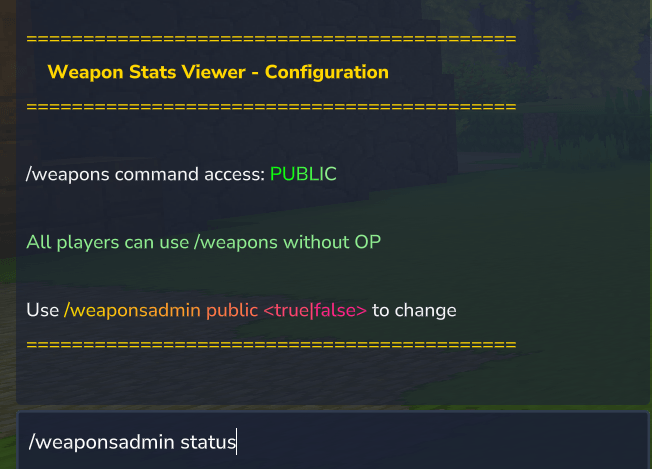
  • /weaponsadmin status - Show current plugin configuration (OP only)
image

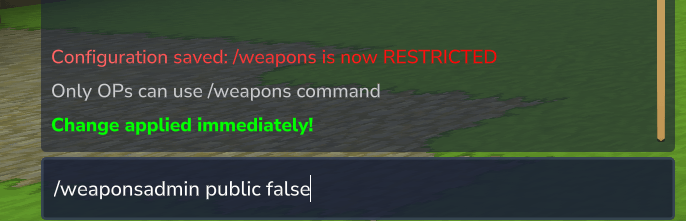
  • /weaponsadmin public <true|false> - Enable/disable public access to /weapons command (OP only)

    Welcome Message: Added /weaponsadmin welcome <true|false> command to enable or disable welcome message
image

Interface Features

  • Search Bar: Filter weapons by name, material, or type
  • Weapon Cards: Click any weapon to view detailed tooltip
  • Damage Display: Max and average damage shown directly on cards
  • Quality Colors:
    • 🟠 Legendary: Orange background
    • 🟣 Epic: Purple background
    • 🔵 Rare: Blue background
    • 🟢 Uncommon: Green background
    • ⚪ Common: Gray background

Tooltips

Hover over any weapon card to see:

  • Item Name (with quality color)
  • Max Damage / Average Damage
  • Level Requirement
  • Quality (Common/Uncommon/Rare/Epic/Legendary)
  • Durability
  • Attack Types (detailed breakdown of each attack)
  • Item ID

🌍 Supported Languages

  • English (en, en-US)
  • Spanish (es, es-ES)

The mod automatically detects your game language and displays the interface accordingly.

Search Keywords (Spanish)

You can search using Spanish material names:

  • Cobre (Copper)
  • Hierro (Iron)
  • Cobalto (Cobalt)
  • Mitril (Mithril)
  • Adamantita (Adamantite)
  • Torio (Thorium)
  • Ónix / Onixio (Onyxium)

🛠️ Technical Details

  • Hytale Version: *
  • Dependencies: Algún mod de traducción a español, yo he usado uno mio propio pero cualquier de los subidos por otro servirá.
  • Language: Java
  • Build System: Maven

Features Implementation

  • Custom UI using InteractiveCustomUIPage
  • Dynamic JSON parsing from weapon asset files
  • Intelligent caching system for performance
  • Real-time damage calculation from InteractionVars
  • Custom gradient text rendering
  • Multi-term search with partial matching

📊 Weapon Categories

The mod organizes weapons into the following categories:

  • Swords (Espadas)
  • Longswords (Espadas Largas)
  • Daggers (Dagas)
  • Axes (Hachas)
  • Battleaxes (Hachas de Batalla)
  • Maces (Mazas)
  • Spears (Lanzas)
  • Staffs (Bastones)
  • Wands (Varitas)
  • Shortbows (Arcos Cortos)
  • Crossbows (Ballestas)
  • Shields (Escudos)
  • Arrows (Flechas)
  • Claws (Garras)
  • Clubs (Garrotes)
  • Spellbooks (Libros de Hechizos)
  • Blowguns (Cerbatanas)
  • Guns (Armas de Fuego)
  • Kunai (Kunais)

� Manual Installation

If you're installing from CurseForge, the mod will be installed automatically. These steps are only needed for manual installation:

  1. Download WeaponStatsViewer-1.5.1.jar
  2. Navigate to your Hytale mods folder: %APPDATA%\Hytale\UserData\Mods\
  3. Place the JAR file in the Mods folder
  4. Start your Hytale server
  5. Join the server and use /weapons command

🐛 Known Issues

  • Some shields may not display background colors correctly (under investigation)

  • Arrows may display incorrect damage values.


🙏 Credits

Thanks to the Hytale modding community and Hypixel Studios for making modding possible.


Enjoy browsing weapons! Use /weapons to get started.

---

Weapon Stats Viewer

Explora todas las armas de Hytale con estadísticas detalladas de daño, organizadas por tipo y rareza.


📋 Descripción

Weapon Stats Viewer es un mod para Hytale que proporciona una interfaz interactiva para explorar todas las armas disponibles en el juego. Visualiza estadísticas detalladas de daño, tipos de ataque y propiedades de objetos sin tener que fabricar o encontrar cada arma.
image

✨ Características

  • Navegador Interactivo de Armas: Hermosa interfaz personalizada con tarjetas de armas organizadas por tipo
  • Estadísticas Detalladas: Visualiza daño máximo/promedio, calidad, nivel y durabilidad de cada arma
  • Desglose de Tipos de Ataque: Observa el daño detallado de cada tipo de ataque (Golpe, Estocada, Ataques Especiales, etc.)
  • Soporte Bilingüe: Interfaz completamente traducida en inglés y español
  • Búsqueda Inteligente: Busca armas por nombre, material (cobre, hierro, mitril, etc.) o tipo
  • Organización por Rareza: Armas ordenadas por calidad (Legendario → Épico → Raro → Poco Común → Común)
  • Indicadores Visuales de Calidad: Fondos y títulos con códigos de color según la rareza del objeto
  • Categorías de Armas: Organizadas por tipo (Espadas, Dagas, Hachas, Arcos, Escudos, Flechas, etc.)

🎮 Uso

Comandos

  • /weapons - Abre la interfaz del navegador de armas(Activado por defecto para todos)

Comando de AMIN

  • /weaponsadmin status - Muestra la configuración actual del plugin (Solo OP)
  • /weaponsadmin public <true|false> - Activa/desactiva el comando /weapons para todos (Solo OP)

Características de la Interfaz

  • Barra de Búsqueda: Filtra armas por nombre, material o tipo
  • Tarjetas de Armas: Haz clic en cualquier arma para ver el tooltip detallado
  • Visualización de Daño: Daño máximo y promedio mostrados directamente en las tarjetas
  • Colores de Calidad:
    • 🟠 Legendario: Fondo naranja
    • 🟣 Épico: Fondo morado
    • 🔵 Raro: Fondo azul
    • 🟢 Poco Común: Fondo verde
    • ⚪ Común: Fondo gris

Tooltips

Pasa el cursor sobre cualquier tarjeta de arma para ver:

  • Nombre del Objeto (con color de calidad)
  • Daño Máximo / Daño Promedio
  • Requisito de Nivel
  • Calidad (Común/Poco Común/Raro/Épico/Legendario)
  • Durabilidad
  • Tipos de Ataque (desglose detallado de cada ataque)
  • ID del Objeto

🌍 Idiomas Soportados

  • Inglés (en, en-US)
  • Español (es, es-ES)

El mod detecta automáticamente el idioma del juego y muestra la interfaz en consecuencia.

Palabras Clave de Búsqueda (Español)

Puedes buscar usando nombres de materiales en español:

  • Cobre (Copper)
  • Hierro (Iron)
  • Cobalto (Cobalt)
  • Mitril (Mithril)
  • Adamantita (Adamantite)
  • Torio (Thorium)
  • Ónix / Onixio (Onyxium)

🛠️ Detalles Técnicos

  • Versión de Hytale: *
  • Dependencias: Ninguna (Solo API vanilla de Hytale)
  • Lenguaje: Java
  • Sistema de Construcción: Maven

Implementación de Características

  • Interfaz personalizada usando InteractiveCustomUIPage
  • Análisis dinámico de archivos JSON de armas
  • Sistema de caché inteligente para rendimiento
  • Cálculo de daño en tiempo real desde InteractionVars
  • Renderizado de texto con gradiente personalizado
  • Búsqueda multi-término con coincidencia parcial

📊 Categorías de Armas

El mod organiza las armas en las siguientes categorías:

  • Swords (Espadas)
  • Longswords (Espadas Largas)
  • Daggers (Dagas)
  • Axes (Hachas)
  • Battleaxes (Hachas de Batalla)
  • Maces (Mazas)
  • Spears (Lanzas)
  • Staffs (Bastones)
  • Wands (Varitas)
  • Shortbows (Arcos Cortos)
  • Crossbows (Ballestas)
  • Shields (Escudos)
  • Arrows (Flechas)
  • Claws (Garras)
  • Clubs (Garrotes)
  • Spellbooks (Libros de Hechizos)
  • Blowguns (Cerbatanas)
  • Guns (Armas de Fuego)
  • Kunai (Kunais)

� Instalación Manual

Si estás instalando desde CurseForge, el mod se instalará automáticamente. Estos pasos solo son necesarios para instalación manual:

  1. Descarga WeaponStatsViewer-1.5.1.jar
  2. Navega a tu carpeta de mods de Hytale: %APPDATA%\Hytale\UserData\Mods\
  3. Coloca el archivo JAR en la carpeta Mods
  4. Inicia tu servidor de Hytale
  5. Únete al servidor y usa el comando /weapons

�👤 Autor

Woxtz

  • Versión: 1.5.0

🐛 Problemas Conocidos

  • Algunos escudos pueden no mostrar correctamente los colores de fondo (bajo investigación para)

WIP

  • En una próxima actualización se podrá quitar el mensaje por defecto al entrar en una partida.

🙏 Créditos

Gracias a la comunidad de modding de Hytale y a Hypixel Studios por hacer posible el modding durante la beta.


¡Disfruta explorando armas! Usa /weapons para comenzar.

Project description from CurseForge.

Recent files

Weapon Stats Viewer releases and Hytale builds

12 of 12 releases match

Looking for an older file? The official CurseForge project page is in Resources.