Hytale version
Back to mods 
CurseForge · Hytale mod
OrbTek (Previously H Industries)
An industrialization and automation mod for Hytale
Choose a version Pick your version below, then grab the matching file.
Quick answer
Which OrbTek (Previously H Industries) release should I use?
Latest stable file HytaleIndustries-0.2.4.jar
Game version 0.5
Mod system Built-in Hytale mod system
OrbTek (Previously H Industries) HytaleIndustries-0.2.4.jar targets 0.5. Do not install it as a separate client mod. Enable it on the world host—the local server in singleplayer or the dedicated server in multiplayer. No required dependencies listed for this file.
Where it goes
Where should OrbTek (Previously H Industries) be installed in Hytale?
Do not install it as a separate client mod. Enable it on the world host—the local server in singleplayer or the dedicated server in multiplayer.
Separate client mod Not supported
World host / dedicated server Required
Mod system for this release Built-in Hytale mod system
Required install it here Optional supported, not mandatory Not supported do not install here Source doesn’t say do not assume
Put Hytale mods on the world host or dedicated server. Singleplayer runs a local server too; Hytale does not use separate client mods.
What else does OrbTek (Previously H Industries) HytaleIndustries-0.2.4.jar need?
HytaleIndustries-0.2.4.jar. Change the file and its required mods may change too.
This file does not list any required mods. Do not add a library just because a different file uses it.
This file does not list any required or optional project dependencies. Check the creator notes before changing an existing world.
Before you install it
Add OrbTek (Previously H Industries) without breaking your instance.
Built for OrbTek (Previously H Industries) HytaleIndustries-0.2.4.jar. Pick another file and the loader, install side or required mods may change.
- 01
Stick to this file
Use HytaleIndustries-0.2.4.jar. It targets 0.5; another release may target a different game build or dependency set.
- 02
Bring the mods it needs
This file does not list any required mods. Do not add a library just because a different file uses it.
- 03
Enable it on the world host
Do not install it as a separate client mod. Enable it on the world host—the local server in singleplayer or the dedicated server in multiplayer.
- 04
Pick the file you checked
Use the “Get this file” button beside HytaleIndustries-0.2.4.jar. It opens that exact file at the source.
About this project
What does OrbTek (Previously H Industries) add?
OrbTek – Automating Orbis (Because Efficiency is Mandatory) ✨
Welcome, test subject-I mean, valued OrbTek Personal Worker.
Congratulations on being selected for the OrbTek Orientation Program. Please note that this document is optimized for cognitive enhancement. If you find the words moving on the page or feel a sudden urge to eat dirt, please consult your nearest OrbTek physician for immediate termination-of your contract, obviously.
🔬 Overview
OrbTek (formerly known by the primitive name "Hytale Industries") provides advanced configurable item pipes and energy systems. We move things from Point A to Point B so you can focus on more important tasks, like standing around or picking your nose. Our pipes are direction-aware, multi-block compatible, and significantly more logical than the average Orbis inhabitant.
🚀 Your Journey with OrbTek (Initial Onboarding)
To begin your mandatory contribution to Orbis-wide efficiency, you must first construct the Machinist's Workbench.
It provides everything you need to succeed, as long as you provide the raw materials. Every advanced OrbTek component is birthed from this single, magnificent table.
- Craft a Machinist's Workbench: Available in your standard crafting menu. If you can't find it, don't worry, searching is a complex skill.
- Interact with the Workbench: Behold a list of technologies far superior to anything you could have devised on your own.
- Profit (for OrbTek): Start automating. The rumble of a working factory is much more pleasant than the sound of human exertion.
We provide the infrastructure and the intellectual superiority; your function is merely to ensure they are placed in the correct spatial coordinates. Do try not to drop them.
⚡ The Power System
Burning Generator
A simple but effective way to turn trees into progress.
- Converts logs, charcoal, or anything with "fuel value" into HE (HyEnergy).
- Internal buffer: 10,000 HE.
- Can be automated with cables, because we know you have a busy schedule of doing nothing.
Small Battery
A box that holds energy. It's like a battery, but with the OrbTek seal of quality.
- Stores large amounts of HE.
- Interface allows you to observe the numbers increasing. Truly a peak human experience.
Powered Furnace
Smelts things using HE, saving you from the drudgery of manual labor.
- Uses standard furnace recipes.
- 10k HE buffer.
- Note: The developer is currently optimizing the UI to show your inventory and the furnace simultaneously. We call this a "work in progress" to keep you on your toes.
🛠 Logistics
Item Pipes & Power Cables
The veins of your factory. Press F to open the configuration UI.
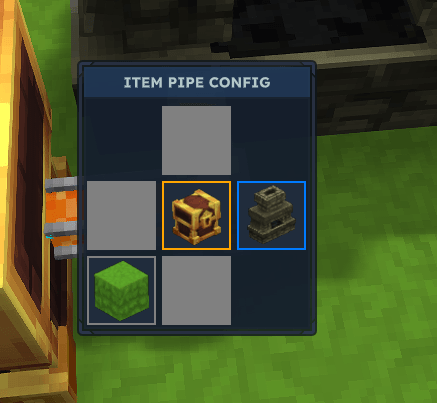
Face Modes:
- Default (Blueish): Flow into this face. It’s the path of least resistance.
- Extract (Orangeish): Sucks items/energy out. (Pipes: 4 items/s | Cables: 250 HE/s).
- None (Grey): Disables the face. Use this to prevent your machines from unnecessary gossip.
- Multiblock Support: Our pipes are advanced enough to find the "true" center of a multiblock furnace. You just have to place it nearby.
- Smart Extraction: We only pull from output slots. We wouldn't want to accidentally steal your fuel and leave you in the dark, would we?
🏗 High-Level Automation Tools
Chunk Loader
Keeps the world existing even when you aren't looking at it.
- Background Mode: Low priority. The world ticks at a relaxed pace (keeps chunk loosely loaded but not a full speed).
- Active Mode: Full speed. May cause your server to exert itself.
The Quarry (Work In Progress)
A giant hole-maker.
- Set Width, Depth, and Y-level.
- Automatically outputs to whatever container you've placed directly above it.
- Air blocks are mined 10x faster because, well, they're air.
- Recommendation: Place a Chunk Loader nearby so it doesn't stop working the moment you get distracted.
📝 Roadmap (The Future is Coming)
- Automated machines (To increase efficiency)
- Solar panels (Energy from the sky!)
- Automated farming (Because manual harvesting is so last century)
🔧 Troubleshooting
- It won't connect: Check if you set the face to None. That would be a simple oversight (or very possibly a bug).
- It's broken: This is a Work In Progress. If you find a bug, report it. We value your feedback… mostly.
OrbTek: Science. Progress. Efficiency. Mostly Science.
Project description from CurseForge.
Pick your setup
OrbTek (Previously H Industries) releases for each Hytale build.
Choose the version and loader you play, then open the matching release.
Check the dependencies, then try the file in a copied instance before changing a world you care about.
Recent files
OrbTek (Previously H Industries) releases and Hytale builds
HytaleIndustries-0.2.4.jar
20 Jul 2026
Client Not supported Server Required Dependencies No extras listed Listed on Project page
Check the 0.5 setup 0.5 release
HytaleIndustries-0.2.3.jar
2 Jul 2026
Client Not supported Server Required Dependencies No extras listed Listed on Project page
Check the 0.5 setup 0.5 release
HytaleIndustries-0.2.2.jar
1 Jul 2026
Client Not supported Server Required Dependencies No extras listed Listed on Project page
Check the 0.5 setup 0.5 release
HytaleIndustries-0.2.1.jar
1 Jul 2026
Client Not supported Server Required Dependencies No extras listed Listed on Project page
Check the 0.5 setup 0.5 release
HytaleIndustries-0.1.6.jar
24 Jan 2026
Client Not supported Server Required Dependencies No extras listed Listed on Project page
Check the setup HytaleIndustries-0.1.4.jar
23 Jan 2026
Client Not supported Server Required Dependencies No extras listed Listed on Project page
Check the setup HytaleIndustries-0.1.3.jar
21 Jan 2026
Client Not supported Server Required Dependencies No extras listed Listed on Project page
Check the setup HytaleIndustries-0.1.0.jar
20 Jan 2026
Client Not supported Server Required Dependencies No extras listed Listed on Project page
Check the setup HytaleIndustries-0.0.3.jar
18 Jan 2026
Client Not supported Server Required Dependencies No extras listed Listed on Project page
Check the setup Looking for an older file? The official CurseForge project page is in Resources.
 mod
mod CurseForge · Hytale
Comes Alive (HCA)
Villagers with their own name, face and personality that you can befriend, marry, hire and raise a family with — in villages you build, rank up and govern by decree.
 mod
mod CurseForge · Hytale
LightConfig
Smart, command-controlled lamps with trigger blocks, day/night automation, and full claim protection.
 mod
mod CurseForge · Hytale
FullTeleporters
Link, name, share and manage your teleporters your way. No config files. No complexity. Just warp.