Hytale version
Back to mods 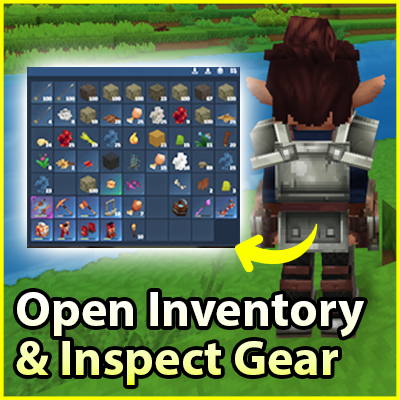
CurseForge · Hytale mod
Open Inventory & Inspect Gear
Open player inventories, inspect gear safely, and interact with backpacks. Includes admin tools, offline access, permissions, distance limits, configurable sections, and multi-language support
Choose a version Pick your version below, then grab the matching file.
Quick answer
Which Open Inventory & Inspect Gear release should I use?
Latest stable file OpenInventory-1.3.4.jar
Game version 0.6
Mod system Built-in Hytale mod system
Open Inventory & Inspect Gear OpenInventory-1.3.4.jar targets 0.6. Do not install it as a separate client mod. Enable it on the world host—the local server in singleplayer or the dedicated server in multiplayer. No required dependencies listed for this file.
Where it goes
Where should Open Inventory & Inspect Gear be installed in Hytale?
Do not install it as a separate client mod. Enable it on the world host—the local server in singleplayer or the dedicated server in multiplayer.
Separate client mod Not supported
World host / dedicated server Required
Mod system for this release Built-in Hytale mod system
Required install it here Optional supported, not mandatory Not supported do not install here Source doesn’t say do not assume
Put Hytale mods on the world host or dedicated server. Singleplayer runs a local server too; Hytale does not use separate client mods.
What else does Open Inventory & Inspect Gear OpenInventory-1.3.4.jar need?
OpenInventory-1.3.4.jar. Change the file and its required mods may change too.
This file does not list any required mods. Do not add a library just because a different file uses it.
This file does not list any required or optional project dependencies. Check the creator notes before changing an existing world.
Before you install it
Add Open Inventory & Inspect Gear without breaking your instance.
Built for Open Inventory & Inspect Gear OpenInventory-1.3.4.jar. Pick another file and the loader, install side or required mods may change.
- 01
Stick to this file
Use OpenInventory-1.3.4.jar. It targets 0.6; another release may target a different game build or dependency set.
- 02
Bring the mods it needs
This file does not list any required mods. Do not add a library just because a different file uses it.
- 03
Enable it on the world host
Do not install it as a separate client mod. Enable it on the world host—the local server in singleplayer or the dedicated server in multiplayer.
- 04
Pick the file you checked
Use the “Get this file” button beside OpenInventory-1.3.4.jar. It opens that exact file at the source.
About this project
What does Open Inventory & Inspect Gear add?
🧰 Open Inventory & Inspect Gear
Open Inventory & Inspect Gear is a light, simple and powerful mod that lets you open / check / inspect a player’s inventory, inspect their equipment, and interact with their backpack.
Whether you’re an administrator or a player, this mod provides powerful but secure tools:
- open a player’s inventory,
- open their backpack while standing behind them,
- inspect their equipment in read-only, with no possibility of stealing.
Every feature is fully configurable: you can enable or disable commands, show or hide sections (backpack, storage, hotbar, armor, utility), and fine-tune permissions, distance limits, and language localization.
Backpack and inspect commands can target the nearest player by default, or a specific player if specified.
You can also force your player to specify a player via configuration.
✨ Features
- ✅ Open another player's inventory with a simple command.
- 🎒 Open a nearby player's backpack from behind.
- 🛡️ Inspect a player's equipment in read-only (no stealing possible).
- 🎯 Commands target the nearest player by default, with optional player argument.
- ⚙️ Fully configurable commands (can be disabled individually).
- ⚙️ Configurable sections: backpack, storage, hotbar, armor, utility.
- 👑 Admin command that ignores config and shows everything.
- 👑 Admins can manage the inventory of offline players
- 🔄 Reload config without restarting.
- 🌍 Editable language files: EN / FR / DE / ES / IT / RU / PT / TR / PH (by ChatGPT sorry).
- 🔐 Permissions per command and per feature.
- 🚀 Optimized performance & permission handling.
🕑 Future Plans
- Display the player’s name in menus
- Open Backpack or Inspect without using a command, by interacting directly with the player
- Display the slot type on each slot
- Properly separate each section with a label
🐞 Bug Reports & Suggestions
Found a bug, have an idea, or want to request a feature?
- ✅ Best way: join my Discord and post in the appropriate channel
⌨️ All commands
By default, backpack and inspect commands target the nearest player.
You can specify a player name, and optionally force this behavior in the config.
| Command | Description |
|---|---|
/openinv [player] |
Opens the target player's inventory |
/invadmin [player] |
Opens the full inventory regardless of config |
/backpack [player] |
Opens the target or nearest player's backpack |
/inspect [player] |
Inspects the target or nearest player's equipment (read-only) |
/openinv reload |
Reloads the plugin configuration |
🔐 Permissions
Permissions are properly linked and enforced per command and interaction.
| Command | Permission |
|---|---|
/openinv [player] |
openinv.use |
/backpack |
openinv.interact |
/inspect |
openinv.inspect |
/invadmin [player] |
openinv.admin |
/openinv reload |
openinv.reload |
| Feature | Permission |
|---|---|
| Bypass inv distance limits | openinv.distance.bypass |
| Bypass interaction blocking | openinv.blocking.bypass |
| Bypass inspect distance limits | openinv.inspect.distance.bypass |
⚙️ Configuration file
The configuration file is organized by sections.
Each command, interaction, permission, distance rule and visible inventory section can be fully customized.
settings
pluginEnable: enables or disables the pluginprefix: prefix added before plugin messageslanguage: existing language file (EN / FR / DE / ES / IT / RU / PT / TR / PH)
commands
commandDefault: main command to open inventorycommandAliases: aliases for main commandcommandAdmin: admin commandcommandAdminAliases: admin command aliasescommandBackpack: backpack commandcommandBackpackAliases: backpack command aliasescommandInspect: inspect commandcommandInspectAliases: inspect command aliases
permission
permissionUse: permission for/openinv [player]permissionReload: permission for reload commandpermissionAdmin: permission for admin inventory
🧩 Open Command Settings
Settings section called invBasicCommandSettings applied to the main inventory opening command.
blockingInteractionInInventories
blockingWhenInventoryOpen: blocks interactions when inventory is openblockingInteractionPermission: permission to bypass blocking
distanceLimitations
enableDistanceLimitations: enable distance checksmaxDistanceBlocks: maximum distance allowedbypassInvDistancePermission: permission to bypass distance limits
whatToShowWhenUse (true/false)
showBackpackshowStorageshowHotbarshowArmorshowUtility
🔎 Inspect Interaction
Inspect mode config section called inspectInteraction. Allows safe equipment viewing only, with no interaction or item stealing possible.
enabled: enables inspectionenableDistanceLimitations: enable distance checksmaxDistanceBlocks: max allowed distancepermission: required permissionbypassInspectDistancePermission: permission to bypass inspect distance limitsforcePlayerArgument: require explicit player name instead
whatToShowWhenInspect (true/false)
showBackpackshowStorageshowHotbarshowArmorshowUtility
🎒 Backpack Interaction
Backpack config section called backpackInteraction. Provide access is secure, distance-limited, and configurable.
enabled: enables backpack interactionmaxDistanceBlocks: max interaction distanceminBehindAngleDegrees: minimum angle behind targetpermission: required permissionblockingInteractionInBackpack: opens backpack in read-onlyforcePlayerArgument: require explicit player name
whatToShowWhenOpenBackpack (true/false)
showBackpackshowStorageshowHotbarshowArmorshowUtility
🌍 Language Files
On first launch, the plugin generates lang_EN.json.
Changing the language setting will automatically generate the corresponding file (e.g. lang_FR.json). I’ve used ChatGPT to translate multiple languages in order to improve accessibility. But all messages are fully editable.
🧩 Checkout my mods
If you enjoy Open Inventory & Inspect Gear, you might like my other mods too :
👉 I try to keep my mods easy to use, lightweight, configurable and server-friendly.
Project description from CurseForge.
Pick your setup
Open Inventory & Inspect Gear releases for each Hytale build.
Choose the version and loader you play, then open the matching release.
Hytale version
0.5
1 loader buildCheck the dependencies, then try the file in a copied instance before changing a world you care about.
Recent files
Open Inventory & Inspect Gear releases and Hytale builds
OpenInventory-1.3.4.jar
27 Aug 2026
Client Not supported Server Required Dependencies No extras listed Listed on Project page
Check the 0.6 setup 0.6 release
OpenInventory-1.3.3.jar
27 Apr 2026
Client Not supported Server Required Dependencies No extras listed Listed on Project page
Check the 0.5 setup 0.5 release
OpenInventory-1.3.2.jar
17 Feb 2026
Client Not supported Server Required Dependencies No extras listed Listed on Project page
Check the setup OpenInventory-1.3.1.jar
13 Feb 2026
Client Not supported Server Required Dependencies No extras listed Listed on Project page
Check the setup OpenInventory-1.3.0.jar
4 Feb 2026
Client Not supported Server Required Dependencies No extras listed Listed on Project page
Check the setup OpenInventory-1.2.3.jar
31 Jan 2026
Client Not supported Server Required Dependencies No extras listed Listed on Project page
Check the setup OpenInventory-1.2.2.jar
27 Jan 2026
Client Not supported Server Required Dependencies No extras listed Listed on Project page
Check the setup OpenInventory-1.2.1.jar
26 Jan 2026
Client Not supported Server Required Dependencies No extras listed Listed on Project page
Check the setup OpenInventory-1.2.0.jar
24 Jan 2026
Client Not supported Server Required Dependencies No extras listed Listed on Project page
Check the setup OpenInventory-1.1.0.jar
22 Jan 2026
Client Not supported Server Required Dependencies No extras listed Listed on Project page
Check the setup OpenInventory-1.0.0.jar
21 Jan 2026
Client Not supported Server Required Dependencies No extras listed Listed on Project page
Check the setup Looking for an older file? The official CurseForge project page is in Resources.
 mod
mod CurseForge · Hytale
Forces of Gravium
Gravity-powered automation using Push, Pull, and smart logic networks.
 mod
mod CurseForge · Hytale
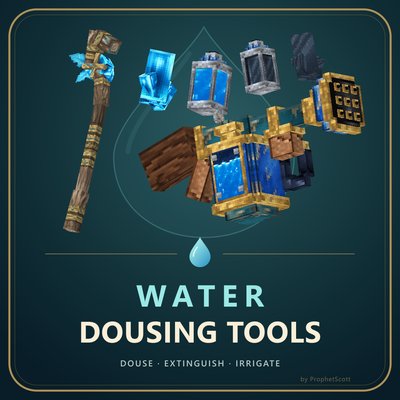
Water Dousing Tools
Water your crops, extinguish fires, cool lava, and tinker with tools and machinery. (Check Curseforge Page for detailed feature overview)
 mod
mod CurseForge · Hytale
Easy Homes
Easy Homes adds a clean /home GUI for setting and teleporting to your home, bed, or spawn, with overwrite protection, saved coordinates, persistent homes, and no permission setup required.