MovingHeadsPlugin-0.3.0.jar
18 Feb 2026
Client Not supported Server Required Dependencies No extras listed Listed on Project page
Check the setup 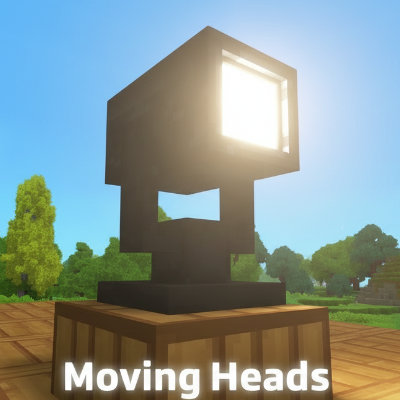
CurseForge · Hytale mod
Create your custom shows! Fully functional moving heads with custom light show sequences.
Quick answer
Moving Head Spot Lights MovingHeadsPlugin-0.3.0.jar targets Hytale. Do not install it as a separate client mod. Enable it on the world host—the local server in singleplayer or the dedicated server in multiplayer. No required dependencies listed for this file.
Where it goes
Do not install it as a separate client mod. Enable it on the world host—the local server in singleplayer or the dedicated server in multiplayer.
Put Hytale mods on the world host or dedicated server. Singleplayer runs a local server too; Hytale does not use separate client mods.
MovingHeadsPlugin-0.3.0.jar. Change the file and its required mods may change too.
This file does not list any required mods. Do not add a library just because a different file uses it.
This file does not list any required or optional project dependencies. Check the creator notes before changing an existing world.
Before you install it
Built for Moving Head Spot Lights MovingHeadsPlugin-0.3.0.jar. Pick another file and the loader, install side or required mods may change.
Use MovingHeadsPlugin-0.3.0.jar. It targets Hytale; another release may target a different game build or dependency set.
This file does not list any required mods. Do not add a library just because a different file uses it.
Do not install it as a separate client mod. Enable it on the world host—the local server in singleplayer or the dedicated server in multiplayer.
Use the “Get this file” button beside MovingHeadsPlugin-0.3.0.jar. It opens that exact file at the source.
About this project
This mod adds real, functional moving heads to the game. You can use the new gui or commands to build your very own custom moving sequences and shows based on eight preset animations (more animations are expected to be released soon)!
You can also add your own custom music to the animation!
To create a new animation let's start from the uʍop ǝpᴉsdn 🔦🚲:
The main command to create animations is /mh gui. The four tabs/steps in the gui guide you trough the process creating a new animation.
Following guide shows only a small set of available commands for each step. Refer to the /help command to familiarise yourself with all the available commands.
A SceneGroup is a 'container' that can hold multiple blocks. For example, you could put all the spots on the stage in one group and put the rest in another 'side' group.
Create a new scene group directly in the gui clicking the "plus" button.
Next, we focus on each spot on the stage in turn and add them with the command /mh sc add stage. This command adds the block you are looking at to the group.
To view all added block type /mh sc show stage. All block will be shown up using blue particles.
Let's test! /mh sc play stage Up
A Stateframe combines states and SceneGroups. It determines which animation is played for each Scenegroup. You can create multiple reusable StateFrames, such as 'stageUp', 'stageDown' and 'stageParty1'.
If you want the animation repeat for X times make use of the "Iterations"-Property.
An AnimationNode plays all the added StateFrames simultaneously. So let's create a new one and add the StateFrames that we have made using the dropdown on top of the Save-Button.
The selected will be set at the same time to their predefined SceneGroups.
Let's test! /mh annode play [name]
Almost done! Finally we have to define a new Animation.
Now add all the AnimationNodes you want. Animations play each node sequentially, while state frames within an AnimationNode are played in parallel. This allows for highly flexible animation combinations.
Let the party begin! /mh an play demo
Let's add some nice music to the animation: /mh annode addsound Custom_Music 10 10 10
"10 10 10" is the block location the sound should be sourced.
The animations are initiated by block state changes. Currently we have 11 animations and 2 additional states without an animation.
Distributed under the MIT License. See LICENSE for more information.
HyUi is included in delivered jar file.
Project description from CurseForge.
Recent files
18 Feb 2026
11 Feb 2026
1 Feb 2026
27 Jan 2026
Looking for an older file? The official CurseForge project page is in Resources.
 mod
modVandoria Storage Q-Stash adds quick inventory sorting, secure container ownership, shared access controls, an interactive management menu, and seven craftable labeled storage chests to Hytale.
 mod
modA Custom Enchants plugin that adds cool enchants applyable to armor and weapons.
 mod
modA central storage Indexer that browses and routes items across all your chests through transparent pipes — watch the items travel inside.