Hytale version
Back to mods 
CurseForge · Hytale mod
DummyPlayer
Easily add dummy players to your server to test features or simulate population.
Choose a version Pick your version below, then grab the matching file.
Quick answer
Which DummyPlayer release should I use?
Latest stable file DummyPlayer-1.6
Game version 0.5
Mod system Built-in Hytale mod system
DummyPlayer-1.6 targets 0.5. Do not install it as a separate client mod. Enable it on the world host—the local server in singleplayer or the dedicated server in multiplayer. No required dependencies listed for this file.
Where it goes
Where should DummyPlayer be installed in Hytale?
Do not install it as a separate client mod. Enable it on the world host—the local server in singleplayer or the dedicated server in multiplayer.
Separate client mod Not supported
World host / dedicated server Required
Mod system for this release Built-in Hytale mod system
Required install it here Optional supported, not mandatory Not supported do not install here Source doesn’t say do not assume
Put Hytale mods on the world host or dedicated server. Singleplayer runs a local server too; Hytale does not use separate client mods.
What else does DummyPlayer-1.6 need?
DummyPlayer-1.6. Change the file and its required mods may change too.
This file does not list any required mods. Do not add a library just because a different file uses it.
This file does not list any required or optional project dependencies. Check the creator notes before changing an existing world.
Before you install it
Add DummyPlayer without breaking your instance.
Built for DummyPlayer-1.6. Pick another file and the loader, install side or required mods may change.
- 01
Stick to this file
Use DummyPlayer-1.6. It targets 0.5; another release may target a different game build or dependency set.
- 02
Bring the mods it needs
This file does not list any required mods. Do not add a library just because a different file uses it.
- 03
Enable it on the world host
Do not install it as a separate client mod. Enable it on the world host—the local server in singleplayer or the dedicated server in multiplayer.
- 04
Pick the file you checked
Use the “Get this file” button beside DummyPlayer-1.6. It opens that exact file at the source.
About this project
What does DummyPlayer add?
This is a basic tool which allows you to easily spawn fake "dummy" players onto your server. They are perfect for testing new mechanics, checking performance with higher player counts, or just experimenting with your setup without needing real people to log in.
You can execute command or deliver message as dummy by using /dummy command
Don't forgot to give them op for op command!
These dummies are real copy of player hence they also appear in the game map on the tab list just like regular users with marker.
Commands & Permissions
/dummy - Open a UI for dummies
permission: hytale.command.dummy
/dummy create <name>
/dummy create <name> <amount> [--gap, --stack, --center]
/dummy create <name> <x> <y> <z> [--pitch, --yaw, --roll]
/dummy create <name> <amount> <x> <y> <z> [--gap, --stack, --center, --pitch, --yaw, --roll]
permission: hytale.command.dummy.create
/dummy delete <name> [--bulk]
/dummy delete * --bulk=true
permission: hytale.command.dummy.delete
/dummy chat <message/command>"
permission: hytale.command.dummy.chat
/dummy update <name> --skin="[player name]"
permission: hytale.command.dummy.update
Project description from CurseForge.
Pick your setup
DummyPlayer releases for each Hytale build.
Choose the version and loader you play, then open the matching release.
Check the dependencies, then try the file in a copied instance before changing a world you care about.
Recent files
DummyPlayer releases and Hytale builds
DummyPlayer-1.6
29 May 2026
Client Not supported Server Required Dependencies No extras listed Listed on Project page
Check the 0.5 setup 0.5 release
DummyPlayer-1.5
27 May 2026
Client Not supported Server Required Dependencies No extras listed Listed on Project page
Check the 0.5 setup 0.5 release
DummyPlayer-1.4
17 Apr 2026
Client Not supported Server Required Dependencies No extras listed Listed on Project page
Check the setup DummyPlayer-1.3
3 Mar 2026
Client Not supported Server Required Dependencies No extras listed Listed on Project page
Check the setup DummyPlayer-1.2
29 Jan 2026
Client Not supported Server Required Dependencies No extras listed Listed on Project page
Check the setup Looking for an older file? The official CurseForge project page is in Resources.
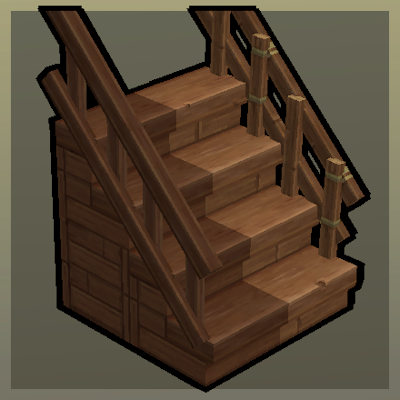 mod
mod CurseForge · Hytale
Step Up
Upgradable Stairs with Railings!
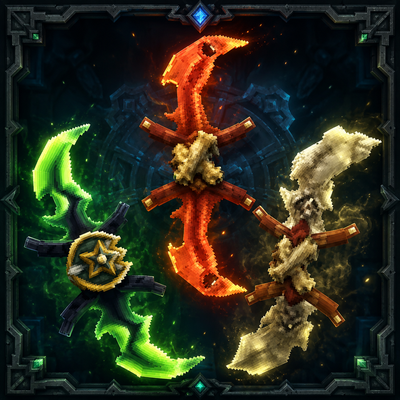 mod
mod CurseForge · Hytale
Twinfang Glaives
**Twinfang Glaives** adds a growing collection of dual-wielded glaives to Hytale.
 mod
mod CurseForge · Hytale
Vandoria - Job Board Economy
Vandoria Contract Board+ adds a complete profession-based contract system to Hytale.