Hytale version
Back to mods 
CurseForge · Hytale mod
ActualElevators
Build your own working elevator or door, made out of blocks
Choose a version Pick your version below, then grab the matching file.
Quick answer
Which ActualElevators release should I use?
Latest stable file ActualElevators-1.10.jar
Game version 0.5
Mod system Built-in Hytale mod system
ActualElevators-1.10.jar targets 0.5. Do not install it as a separate client mod. Enable it on the world host—the local server in singleplayer or the dedicated server in multiplayer. No required dependencies listed for this file.
Where it goes
Where should ActualElevators be installed in Hytale?
Do not install it as a separate client mod. Enable it on the world host—the local server in singleplayer or the dedicated server in multiplayer.
Separate client mod Not supported
World host / dedicated server Required
Mod system for this release Built-in Hytale mod system
Required install it here Optional supported, not mandatory Not supported do not install here Source doesn’t say do not assume
Put Hytale mods on the world host or dedicated server. Singleplayer runs a local server too; Hytale does not use separate client mods.
What else does ActualElevators-1.10.jar need?
ActualElevators-1.10.jar. Change the file and its required mods may change too.
This file does not list any required mods. Do not add a library just because a different file uses it.
This file does not list any required or optional project dependencies. Check the creator notes before changing an existing world.
Before you install it
Add ActualElevators without breaking your instance.
Built for ActualElevators-1.10.jar. Pick another file and the loader, install side or required mods may change.
- 01
Stick to this file
Use ActualElevators-1.10.jar. It targets 0.5; another release may target a different game build or dependency set.
- 02
Bring the mods it needs
This file does not list any required mods. Do not add a library just because a different file uses it.
- 03
Enable it on the world host
Do not install it as a separate client mod. Enable it on the world host—the local server in singleplayer or the dedicated server in multiplayer.
- 04
Pick the file you checked
Use the “Get this file” button beside ActualElevators-1.10.jar. It opens that exact file at the source.
About this project
What does ActualElevators add?
Actual Elevators
Build your own elevator out of blocks, then use it to get around your base.
It can also be used to power large custom-made doors!
Here's how it works.
To get started, go to your Workbench and craft the new tool: Engineer's Hammer.
Build an elevator platform out of any blocks you'd like, then switch to the Engineer's Hammer and right click each block to convert them into Elevator Blocks. This is a one-time-only step.
After doing this, you now have a working elevator. Simply stand on the elevator, look at any block, and hit 'F' to go up. Press 'F' again while in motion to stop. If you would instead like to go down, press 'Crouch+F'. The elevator will naturally stop if it hits a block, so you will ideally want to build a small platform far above it where it can bump into and come to a stop.
Also included is a new Workbench block under the Tinkering category: the Elevator Call Switch. Place this near (but not on) the elevator. Then if the elevator is above or below you, press the call switch to summon it.
New in v1.03:
In the Tinkering section of the Workbench there is a new "Elevator Terminal". Add this to your elevator and use the Engineer's Hammer on it (right click). Then, step on your elevator and press 'F' while looking at the terminal. It will display a GUI where you can select which floor to go to. "Floors" are based on Elevator Call Switches, so make sure to place those or the terminal will not show any floors.
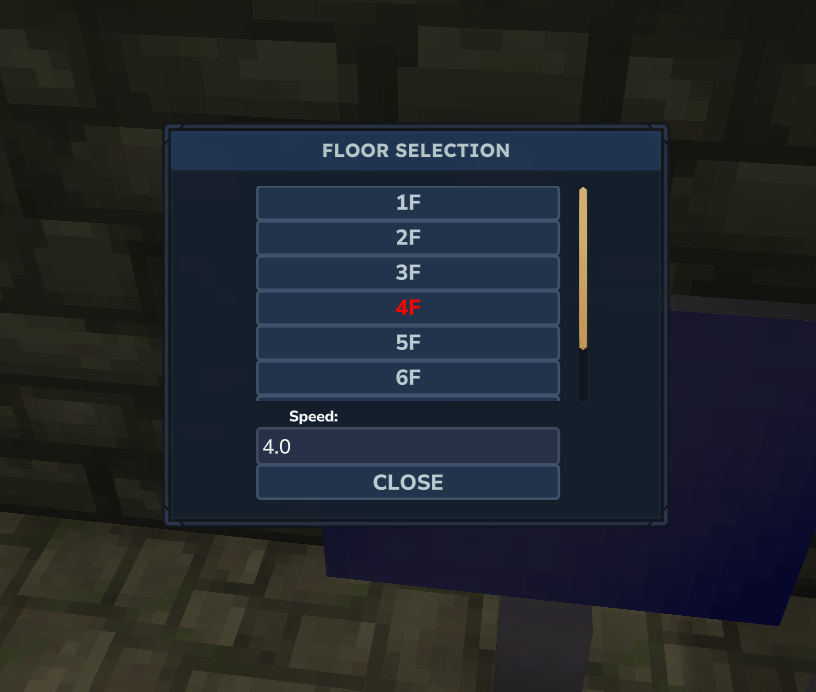
New in 1.04:
Summon config via "/actualelevators" or alias "/acte"
Important notes:
- Currently it's probably easy to cheat with this by using the Engineer's Hammer on random blocks - until I come out with a good idea/system, don't abuse it
- The elevator will go upwards forever until it either hits a block or you place an Elevator Call Switch somewhere. Ideally, you will want to build out the call switches before you test your elevator.
Accepting tips! https://ko-fi.com/dairymoose
Project description from CurseForge.
Pick your setup
ActualElevators releases for each Hytale build.
Choose the version and loader you play, then open the matching release.
Check the dependencies, then try the file in a copied instance before changing a world you care about.
Recent files
ActualElevators releases and Hytale builds
ActualElevators-1.10.jar
12 Jun 2026
Client Not supported Server Required Dependencies No extras listed Listed on Project page
Check the 0.5 setup 0.5 release
ActualElevators-1.09.jar
31 Mar 2026
Client Not supported Server Required Dependencies No extras listed Listed on Project page
Check the setup ActualElevators-1.08.jar
20 Feb 2026
Client Not supported Server Required Dependencies No extras listed Listed on Project page
Check the setup ActualElevators-1.07.jar
14 Feb 2026
Client Not supported Server Required Dependencies No extras listed Listed on Project page
Check the setup ActualElevators-1.06.jar
11 Feb 2026
Client Not supported Server Required Dependencies No extras listed Listed on Project page
Check the setup ActualElevators-1.05.jar
2 Feb 2026
Client Not supported Server Required Dependencies No extras listed Listed on Project page
Check the setup ActualElevators-1.04.jar
1 Feb 2026
Client Not supported Server Required Dependencies No extras listed Listed on Project page
Check the setup ActualElevators-1.03.jar
1 Feb 2026
Client Not supported Server Required Dependencies No extras listed Listed on Project page
Check the setup ActualElevators-1.02.jar
31 Jan 2026
Client Not supported Server Required Dependencies No extras listed Listed on Project page
Check the setup ActualElevators-1.01.jar
30 Jan 2026
Client Not supported Server Required Dependencies No extras listed Listed on Project page
Check the setup ActualElevators-1.00.jar
30 Jan 2026
Client Not supported Server Required Dependencies No extras listed Listed on Project page
Check the setup Looking for an older file? The official CurseForge project page is in Resources.
 mod
mod CurseForge · Hytale
Hexcode Evoke
Bring objects to life
 mod
mod CurseForge · Hytale
Vandoria Party HUD
Vandoria Party adds a complete party system with a custom menu, party chat, persistent parties, configurable XP sharing, and an adjustable player HUD.
 mod
mod CurseForge · Hytale
Collection Master
Turn gathered resources into permanent progression through configurable item collections, milestones, rewards, and prestige.