Hytale version
Back to mods 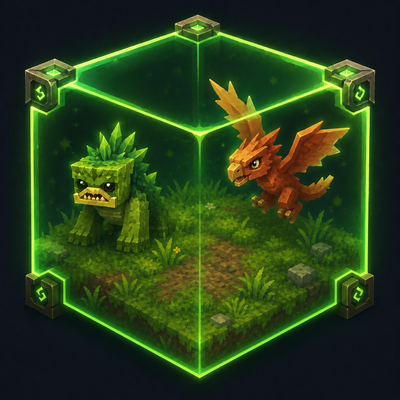
CurseForge · Hytale mod
RegionSpawnMobs
Take full control of how mobs spawn in your world. Define where they appear, how many, when, and under what conditions.
Choose a version Pick your version below, then grab the matching file.
Quick answer
Which RegionSpawnMobs release should I use?
Latest stable file RegionSpawnMobs-2.0.4.jar
Game version 0.5
Mod system Built-in Hytale mod system
RegionSpawnMobs-2.0.4.jar targets 0.5. Do not install it as a separate client mod. Enable it on the world host—the local server in singleplayer or the dedicated server in multiplayer. No required dependencies listed for this file.
Where it goes
Where should RegionSpawnMobs be installed in Hytale?
Do not install it as a separate client mod. Enable it on the world host—the local server in singleplayer or the dedicated server in multiplayer.
Separate client mod Not supported
World host / dedicated server Required
Mod system for this release Built-in Hytale mod system
Required install it here Optional supported, not mandatory Not supported do not install here Source doesn’t say do not assume
Put Hytale mods on the world host or dedicated server. Singleplayer runs a local server too; Hytale does not use separate client mods.
What else does RegionSpawnMobs-2.0.4.jar need?
RegionSpawnMobs-2.0.4.jar. Change the file and its required mods may change too.
This file does not list any required mods. Do not add a library just because a different file uses it.
This file does not list any required or optional project dependencies. Check the creator notes before changing an existing world.
Before you install it
Add RegionSpawnMobs without breaking your instance.
Built for RegionSpawnMobs-2.0.4.jar. Pick another file and the loader, install side or required mods may change.
- 01
Stick to this file
Use RegionSpawnMobs-2.0.4.jar. It targets 0.5; another release may target a different game build or dependency set.
- 02
Bring the mods it needs
This file does not list any required mods. Do not add a library just because a different file uses it.
- 03
Enable it on the world host
Do not install it as a separate client mod. Enable it on the world host—the local server in singleplayer or the dedicated server in multiplayer.
- 04
Pick the file you checked
Use the “Get this file” button beside RegionSpawnMobs-2.0.4.jar. It opens that exact file at the source.
About this project
What does RegionSpawnMobs add?
RegionSpawnMobs
RegionSpawnMobs is a Hytale server mod that gives admins full control over mob spawning through custom regions.
Instead of relying on global or player-centered spawning, this mod lets you define exact 3D areas where specific mobs can appear. Each region can have its own mob list, spawn weights, capacity, spawn mode, time conditions, weather conditions, terrain conditions and fixed SpawnPoints.
What it does
RegionSpawnMobs allows you to create controlled spawn areas for:
- dungeons
- arenas
- forests
- caves
- farms
- boss rooms
- event areas
- natural habitats
- RPG survival worlds
Players do not directly receive mobs around them. Instead, players activate nearby regions, and the region handles spawning internally based on its configuration.
Main Features
- Custom 3D spawn regions
- Player proximity activation
- Chunk-based mob capacity
- Per-region mob density
- Spawn weights per mob
- Spawn modes: Continuous, Wave and Threshold
- SpawnPoints for fixed spawn locations
- Spawn Markers for independent point-based spawns
- Zones and Cuts to include or exclude areas
- Parent region system for reusable configurations
- Time of day conditions
- Weather conditions
- Terrain type conditions
- Smart mob containment
- Region and chunk visualization tools
- In-game configuration menus
- JSON-based configuration
- Automatic backup system
Documentation
Full documentation is available on the GitHub Wiki:
- Getting Started / Overview
- How Region Spawning Works
- In-Game Configuration Menus
- Commands Reference
- Region Visualization Tools
- Mob Containment System
- Files, JSON and Data Storage
- Spawn Presets
- Time Conditions
- Weather Conditions
- Global Settings and Troubleshooting
- Terrain Type Conditions
Project Status
RegionSpawnMobs is actively maintained and has moved beyond its beta stage as of version 1.1.4.
The core systems are stable and usable, but the mod is still under active development. New features, improvements and compatibility adjustments may continue to be added over time.
Feedback, bug reports and suggestions are welcome.
Project description from CurseForge.
Pick your setup
RegionSpawnMobs releases for each Hytale build.
Choose the version and loader you play, then open the matching release.
Check the dependencies, then try the file in a copied instance before changing a world you care about.
Recent files
RegionSpawnMobs releases and Hytale builds
RegionSpawnMobs-2.0.4.jar
13 Aug 2026
Client Not supported Server Required Dependencies No extras listed Listed on Project page
Check the 0.5 setup 0.5 release
RegionSpawnMobs-2.0.3.jar
11 Aug 2026
Client Not supported Server Required Dependencies No extras listed Listed on Project page
Check the 0.5 setup 0.5 release
RegionSpawnMobs-2.0.2.jar
7 Aug 2026
Client Not supported Server Required Dependencies No extras listed Listed on Project page
Check the 0.5 setup 0.5 release
RegionSpawnMobs-2.0.1.jar
3 Aug 2026
Client Not supported Server Required Dependencies No extras listed Listed on Project page
Check the 0.5 setup 0.5 release
RegionSpawnMobs-2.0.0.jar
24 Jul 2026
Client Not supported Server Required Dependencies No extras listed Listed on Project page
Check the 0.5 setup 0.5 release
RegionSpawnMobs-1.1.9-Update5.jar
26 May 2026
Client Not supported Server Required Dependencies No extras listed Listed on Project page
Check the 0.5 setup 0.5 release
RegionSpawnMobs-1.1.8.jar
20 May 2026
Client Not supported Server Required Dependencies No extras listed Listed on Project page
Check the setup RegionSpawnMobs-1.1.7.jar
16 May 2026
Client Not supported Server Required Dependencies No extras listed Listed on Project page
Check the setup RegionSpawnMobs-1.1.6.jar
13 May 2026
Client Not supported Server Required Dependencies No extras listed Listed on Project page
Check the setup RegionSpawnMobs-1.1.5.jar
11 May 2026
Client Not supported Server Required Dependencies No extras listed Listed on Project page
Check the setup RegionSpawnMobs-1.1.4.jar
7 May 2026
Client Not supported Server Required Dependencies No extras listed Listed on Project page
Check the setup RegionSpawnMobs-1.1.3.jar
17 Apr 2026
Client Not supported Server Required Dependencies No extras listed Listed on Project page
Check the setup Looking for an older file? The official CurseForge project page is in Resources.