ImmersiveHud-1.2.8.jar
12 Oct 2026
Client Not supported Server Required Dependencies No extras listed Listed on Project page
Check the setup 
CurseForge · Hytale mod
A fully dynamic and customizable HUD experience that makes exploration, combat, and survival feel more immersive. Keeps your screen clean by showing HUD elements only when gameplay actually needs them.
Quick answer
ImmersiveHud-1.2.8.jar targets Hytale. Do not install it as a separate client mod. Enable it on the world host—the local server in singleplayer or the dedicated server in multiplayer. No required dependencies listed for this file.
Where it goes
Do not install it as a separate client mod. Enable it on the world host—the local server in singleplayer or the dedicated server in multiplayer.
Put Hytale mods on the world host or dedicated server. Singleplayer runs a local server too; Hytale does not use separate client mods.
ImmersiveHud-1.2.8.jar. Change the file and its required mods may change too.
This file does not list any required mods. Do not add a library just because a different file uses it.
This file does not list any required or optional project dependencies. Check the creator notes before changing an existing world.
Before you install it
Built for ImmersiveHud-1.2.8.jar. Pick another file and the loader, install side or required mods may change.
Use ImmersiveHud-1.2.8.jar. It targets Hytale; another release may target a different game build or dependency set.
This file does not list any required mods. Do not add a library just because a different file uses it.
Do not install it as a separate client mod. Enable it on the world host—the local server in singleplayer or the dedicated server in multiplayer.
Use the “Get this file” button beside ImmersiveHud-1.2.8.jar. It opens that exact file at the source.
About this project
ImmersiveHud (iHUD) shows only what matters, when it matters, delivering a cleaner and more immersive experience without losing critical information.
Dynamically hides and reveals HUD elements based on player actions and gameplay context.
Fully customizable and easy to use.
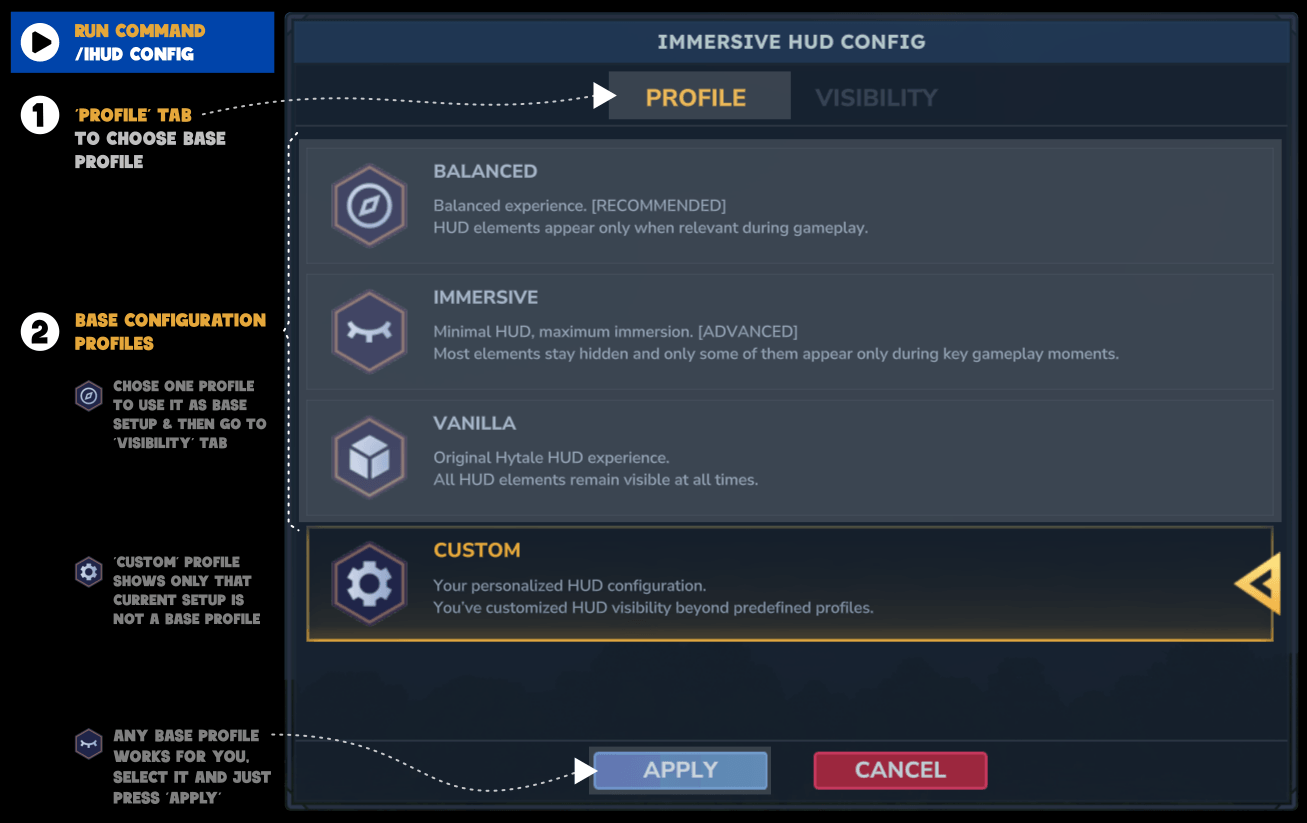
/ihud config : Open ImmersiveHud Config UI💡 Tip: Select one of the base profiles to quickly apply a base configuration
💡 Tip: Toggle components visibility and/or add or remove rules to customize your personal experience
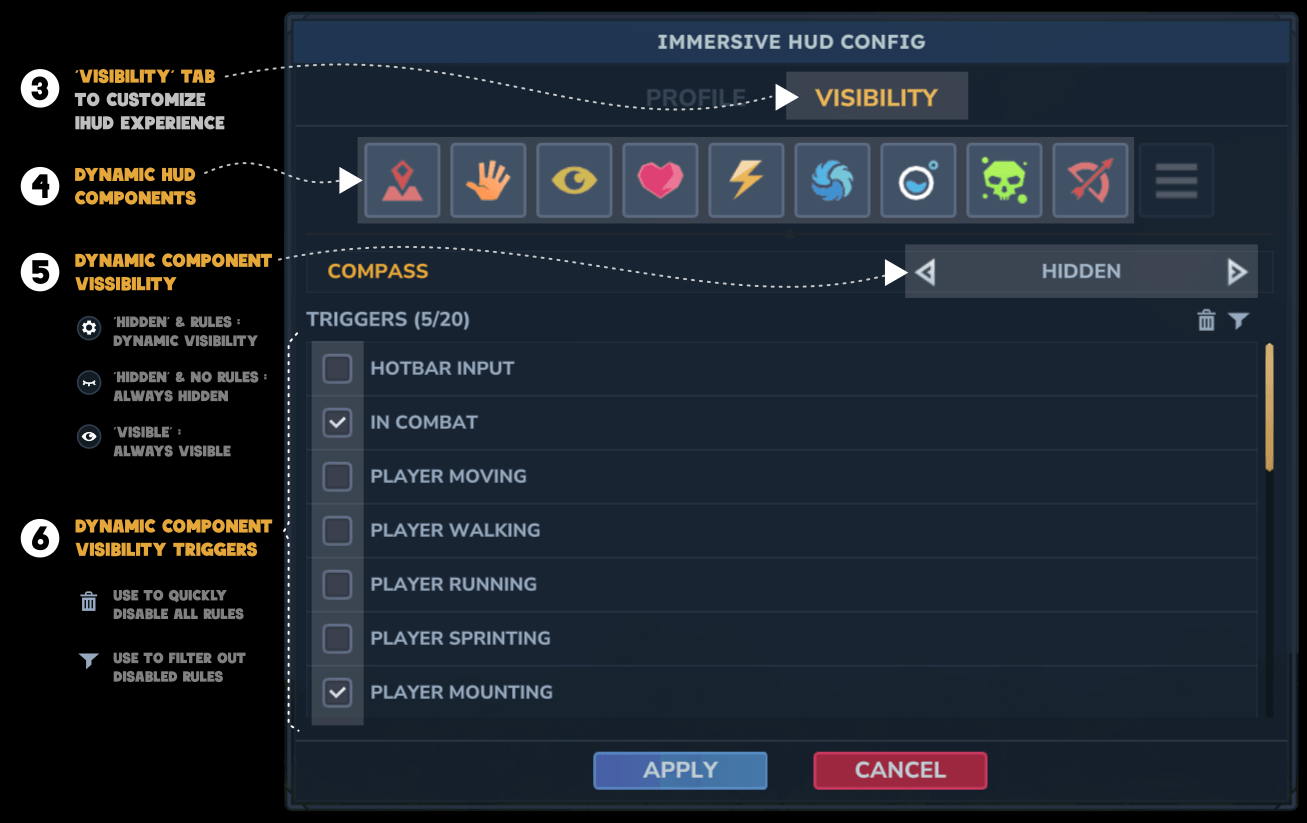
💡 Tip: Use trash icon to quickly unselect all rules and filter icon to view only the rules selected
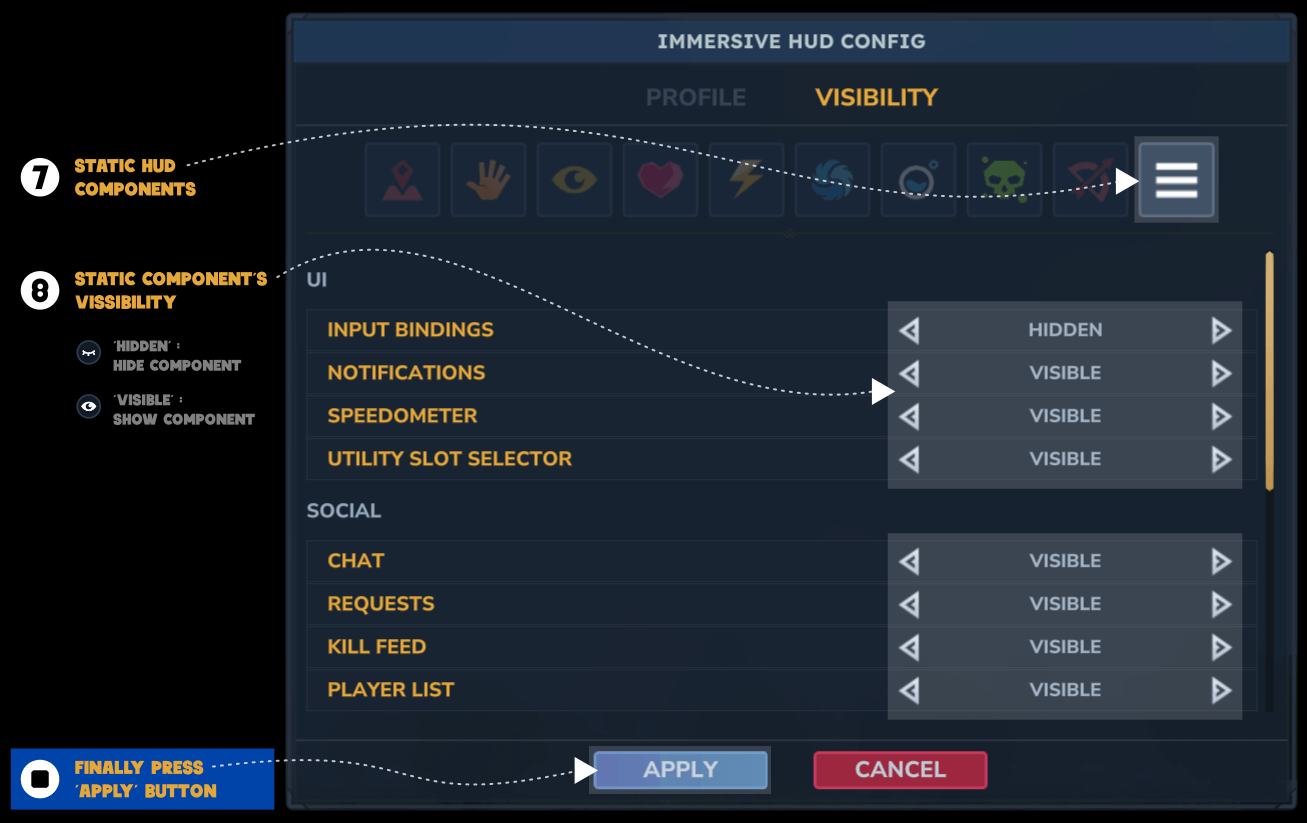
| Profile | Description |
|---|---|
balanced |
Balanced. Shows HUD components only when relevant |
immersive |
Minimal HUD, maximum immersion |
vanilla |
HUD always visible (vanilla-like) |
| HUD component | Group | Type |
|---|---|---|
| reticle | Core | DYNAMIC |
| hotbar | Core | DYNAMIC |
| compass | Core | DYNAMIC |
| health | Bars | DYNAMIC |
| stamina | Bars | DYNAMIC |
| mana | Bars | DYNAMIC |
| oxygen | Bars | DYNAMIC |
| statusicons * | UI | DYNAMIC |
| ammoindicator | UI | DYNAMIC |
| inputbindings | UI | STATIC |
| abilities (NEW) | UI | STATIC |
| notifications | UI | STATIC |
| speedometer | UI | STATIC |
| utilityslotselector | UI | STATIC |
| chat | Social | STATIC |
| requests | Social | STATIC |
| killfeed | Social | STATIC |
| playerlist | Social | STATIC |
| eventtitle | Panels | STATIC |
| objectivepanel | Panels | STATIC |
| portalpanel | Panels | STATIC |
| sleep | Panels | STATIC |
| buildertoolslegend | Builder | STATIC |
| buildermaterialsslotselector | Builder | STATIC |
| blockvariantselector | Builder | STATIC |
💡 Tip: When activating any rule bar _NOT_FULL, you can use Threshold to specify the bar % below which the component becomes visible. By default it's below 100%
| Rule | Trigger condition |
|---|---|
HOTBAR_INPUT |
Player changes hotbar selection |
CHARGING_WEAPON |
Player is aiming or charging a weapon |
CONSUMABLE_USE |
Player is consuming food or potion |
TARGET_ENTITY |
Player is targeting an entity |
INTERACTABLE_BLOCK |
Player is looking at an interactable blocks |
PLAYER_MOVING |
Player is moving |
PLAYER_WALKING |
Player is walking |
PLAYER_RUNNING |
Player is running |
PLAYER_SPRINTING |
Player is sprinting |
PLAYER_MOUNTING |
Player is mounting |
PLAYER_FLYING |
Player is fying |
PLAYER_GLIDING |
Player is gliding |
PLAYER_JUMPING |
Player is jumping |
PLAYER_CROUCHING |
Player is crouching |
PLAYER_CLIMBING |
Player is climbing |
PLAYER_IN_FLUID |
Player is in fluid |
PLAYER_ON_GROUND |
Player is on ground |
PLAYER_FALLING |
Player is falling |
PLAYER_SITTING |
Player is sitting |
PLAYER_ROLLING |
Player is rolling |
PLAYER_IDLE |
Player is idel |
PLAYER_SLEEPING |
Player is sleeping |
HOLDING_MELEE_WEAPON |
Player is holding a melee weapon |
HOLDING_RANGED_WEAPON |
Player is holding a ranged weapon |
BLOCKING_ATTACK |
Player is using a weapon to block an attack |
IN_COMBAT |
Player is in combat (Hostile mob attacking or spoted) |
HEALTH_NOT_FULL |
Health bar is not full |
STAMINA_NOT_FULL |
Stamina bar is not full |
MANA_NOT_FULL |
Mana bar is not full |
OXYGEN_NOT_FULL |
Oxygen bar is not full |
💡 Tip: multiple rules can be combined to alter component behaviour. For example: Hotbar rules=HOTBAR_INPUT, CHARGING_WEAPON -> when changes hotbar slot and when aiming.
ImmersiveHud combines two visibility models.
🅰️ Static visibility
Static HUD components are always hidden or visible.
Example: Input bindings, Notifications, Player list, Chat,…
🅱️ Dynamic visibility
Dynamic HUD components are normally hidden and become visible when specific gameplay triggers occur.
Examples:
Possible future improvements:
I created this mod from scratch, but obviously it's not the first of its kind and I couldn't have done it without those who came before me, so thanks to…
This is my first mod for Hytale, so please….
Please, use the github issues page
Project description from CurseForge.
Recent files
12 Oct 2026
27 Aug 2026
15 Jun 2026
14 Jun 2026
27 May 2026
26 May 2026
27 Apr 2026
13 Apr 2026
10 Apr 2026
30 Mar 2026
26 Mar 2026
20 Mar 2026
Looking for an older file? The official CurseForge project page is in Resources.
 mod
modIntroduces new extreme weather events. Blizzards, sandstorms, tornadoes, hurricanes and more! with immersive surround sound, and much more... (Regular updates)
 mod
mod✨ Re:Heartless is an MMORPG/Open World mod for Hytale inspired by Kingdom Hearts I & II, featuring Keyblades, Heartless, bosses, crafting, and more. 🌴 Explore Destiny Islands & Awakening! ➡️ https://discord.gg/3ZrXjMQVmm
 mod
modAutomatic zipped backups of your server world on a timer, with retention and a final backup on shutdown. /serverbackup now, list, status.