Hytale version
Back to mods 
CurseForge · Hytale mod
CommandSpy
Lightweight command spy plugin with toggle, logging, and configurable message format.
Choose a version Pick your version below, then grab the matching file.
Quick answer
Which CommandSpy release should I use?
Latest stable file CommandSpy-2.0.7.jar
Game version 0.5
Mod system Built-in Hytale mod system
CommandSpy-2.0.7.jar targets 0.5. Do not install it as a separate client mod. Enable it on the world host—the local server in singleplayer or the dedicated server in multiplayer. No required dependencies listed for this file.
Where it goes
Where should CommandSpy be installed in Hytale?
Do not install it as a separate client mod. Enable it on the world host—the local server in singleplayer or the dedicated server in multiplayer.
Separate client mod Not supported
World host / dedicated server Required
Mod system for this release Built-in Hytale mod system
Required install it here Optional supported, not mandatory Not supported do not install here Source doesn’t say do not assume
Put Hytale mods on the world host or dedicated server. Singleplayer runs a local server too; Hytale does not use separate client mods.
What else does CommandSpy-2.0.7.jar need?
CommandSpy-2.0.7.jar. Change the file and its required mods may change too.
This file does not list any required mods. Do not add a library just because a different file uses it.
This file does not list any required or optional project dependencies. Check the creator notes before changing an existing world.
Before you install it
Add CommandSpy without breaking your instance.
Built for CommandSpy-2.0.7.jar. Pick another file and the loader, install side or required mods may change.
- 01
Stick to this file
Use CommandSpy-2.0.7.jar. It targets 0.5; another release may target a different game build or dependency set.
- 02
Bring the mods it needs
This file does not list any required mods. Do not add a library just because a different file uses it.
- 03
Enable it on the world host
Do not install it as a separate client mod. Enable it on the world host—the local server in singleplayer or the dedicated server in multiplayer.
- 04
Pick the file you checked
Use the “Get this file” button beside CommandSpy-2.0.7.jar. It opens that exact file at the source.
About this project
What does CommandSpy add?
🕵️ CommandSpy
CommandSpy is a lightweight moderation and auditing tool for Hytale Server.
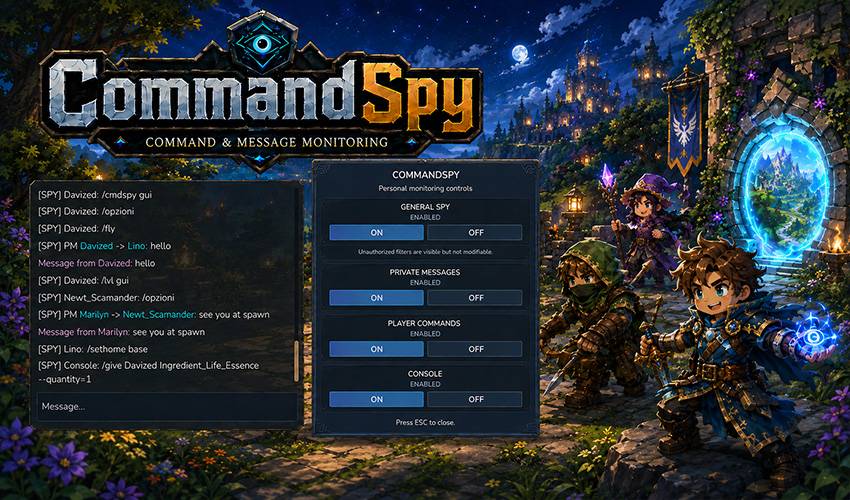
Authorized staff can monitor player commands, private messages, and console activity in real time. Every category has its own permission and personal filter, manageable through commands or a compact in-game interface.
Optional local audit logs can record each category in a separate timestamped file for every server startup.
✨ Features
✔ Player, private-message, and console monitoring
✔ Separate permissions and personal filters
✔ General ON/OFF control
✔ Compact in-game control panel
✔ Complete command-based controls
✔ Persistent settings stored by UUID
✔ Configurable local audit logs
✔ Separate log file for each startup
✔ Duplicate entries prevented
✔ Credential-bearing commands excluded
✔ Seven included languages
✔ Customizable messages and colors
✔ No dependencies or external data transmission
🖥️ Controls and Permissions
Open the interface with /cmdspy gui.
The panel contains independent controls for:
GENERAL SPY
PRIVATE MESSAGES
PLAYER COMMANDS
CONSOLE
Unavailable categories remain visible but cannot be modified. Turning off General Spy pauses all monitoring without changing the selected category filters.
Full access
command.spy
Commands:
/cmdspy or /commandspy — Toggle General Spy
/cmdspy gui — Open the control panel
/cmdspy reload — Reload configuration and saved states
/cmdspy messages — Toggle private-message monitoring - command.spy.messages
/cmdspy commands — Toggle player-command monitoring - command.spy.commands
/cmdspy console — Toggle console monitoring - command.spy.console
Permissions are additive. The full command.spy permission grants access to every category and administrative control.
🔎 Monitoring
Player Commands
Detects commands regardless of which mod registered them.
Private Messages
Recognizes common commands such as /msg, /m, /pm, /tell, /w, /whisper, /r, /reply, and /mail send.
Private messages are kept separate from ordinary commands.
Console Commands
Detects commands executed directly through the server console.
Commands associated with login, registration, passwords, PINs, one-time codes, and similar credentials are ignored before monitoring or logging.
📝 Audit Logs
CommandSpy creates a separate audit file for every server startup inside:
mods/CommandSpy/logs/
Example: 2026-08-05_17-59-12_commands.log
Logging is configured independently through:
log-player-commands
log-private-messages
log-console-commands
Any combination can be enabled, including no local logging.
The logging settings affect only audit files. They do not change staff permissions or live-monitoring filters.
Audit logs may contain command arguments and private conversations, so access to the CommandSpy folder should be restricted to trusted administrators.
⚙️ Files and Configuration
CommandSpy uses: mods/CommandSpy/
config.json / spy-state.json/ console-state.json/ server.lang/ logs/
Staff settings are saved automatically by UUID.
Missing configuration options are added automatically while existing values are preserved.
🌍 Languages and Customization
Included languages:
English / Italian / German / French / Spanish / Brazilian Portuguese / Russian
The correct language is selected automatically for each player.
Chat messages, spy formats, interface labels, errors, and instructions can be customized through server.lang.
Supported colors include &0–&f, &r, and hexadecimal codes such as 7FF55.
Available placeholders include:
{player}
{command}
Changes to included language resources require a server restart.
📦 Installation
Place the CommandSpy JAR inside the server mods folder.
Remove duplicate CommandSpy JAR files.
Restart the server.
Assign command.spy or the required category permissions.
Use /cmdspy or /cmdspy gui.
Keep the existing mods/CommandSpy folder when updating to preserve staff settings and logs.
✅ Compatibility
✔ Hytale Server 0.5.x
✔ Tested on Hytale Server 0.5.7
✔ Compatible with permission-management plugins
✔ No permanent HUD overlay
✔ Isolated UI assets to reduce conflicts
✔ Designed for multiplayer and production servers
💙 Inspiration
Inspired by command-spy and social-spy tools from the Minecraft server community.
After waiting for a similar utility for Hytale, I decided to create one myself as both a practical tool and a tribute to the original concept.
AI Disclosure
ChatGPT assisted with cover artwork, translations, documentation, code-cleanup suggestions, and general review.
All implementation, testing, configuration choices, edits, and release decisions were manually reviewed by me.
⭐ Latest Full Version
The CurseForge edition remains available as the original free version of CommandSpy.
A newer and expanded edition of CommandSpy is available on BuiltByBit.
View the full version on BuiltByBit: https://builtbybit.com/resources/commandspy.100988/
Project description from CurseForge.
Pick your setup
CommandSpy releases for each Hytale build.
Choose the version and loader you play, then open the matching release.
Check the dependencies, then try the file in a copied instance before changing a world you care about.
Recent files
CommandSpy releases and Hytale builds
CommandSpy-2.0.7.jar
5 Aug 2026
Client Not supported Server Required Dependencies No extras listed Listed on Project page
Check the 0.5 setup 0.5 release
CommandSpy-1.1.1.jar
27 May 2026
Client Not supported Server Required Dependencies No extras listed Listed on Project page
Check the setup CommandSpy-1.1.0.jar
31 Mar 2026
Client Not supported Server Required Dependencies No extras listed Listed on Project page
Check the setup CommandSpy-1.0.0.jar
30 Mar 2026
Client Not supported Server Required Dependencies No extras listed Listed on Project page
Check the setup Looking for an older file? The official CurseForge project page is in Resources.
 mod
mod CurseForge · Hytale
Menu Info Pages
Create beautiful in-game guides, tutorials and information pages with a native Hytale-style UI, JSON configuration, images, sections and interactive buttons.
 mod
mod CurseForge · Hytale
SupOutfit
Server-side outfit management system with commands and custom UI support.
 mod
mod CurseForge · Hytale
Endless Elite Mobs V3 (RPG Mobs)
Adds elite RPG mobs with 13 unique abilities all with custom interactions and cool visual effects, all very dangerous.