Hytale version
Back to mods 
CurseForge · Hytale mod
Blocking Items
Block certain items from being used to your liking, even per world/instance. Also block crafting recipes.
Choose a version Pick your version below, then grab the matching file.
Quick answer
Which Blocking Items release should I use?
Latest stable file Blocking Items 1.2.0.jar
Game version 0.5
Mod system Built-in Hytale mod system
Blocking Items 1.2.0.jar targets 0.5. Do not install it as a separate client mod. Enable it on the world host—the local server in singleplayer or the dedicated server in multiplayer. No required dependencies listed for this file.
Where it goes
Where should Blocking Items be installed in Hytale?
Do not install it as a separate client mod. Enable it on the world host—the local server in singleplayer or the dedicated server in multiplayer.
Separate client mod Not supported
World host / dedicated server Required
Mod system for this release Built-in Hytale mod system
Required install it here Optional supported, not mandatory Not supported do not install here Source doesn’t say do not assume
Put Hytale mods on the world host or dedicated server. Singleplayer runs a local server too; Hytale does not use separate client mods.
What else does Blocking Items 1.2.0.jar need?
Blocking Items 1.2.0.jar. Change the file and its required mods may change too.
This file does not list any required mods. Do not add a library just because a different file uses it.
This file does not list any required or optional project dependencies. Check the creator notes before changing an existing world.
Before you install it
Add Blocking Items without breaking your instance.
Built for Blocking Items 1.2.0.jar. Pick another file and the loader, install side or required mods may change.
- 01
Stick to this file
Use Blocking Items 1.2.0.jar. It targets 0.5; another release may target a different game build or dependency set.
- 02
Bring the mods it needs
This file does not list any required mods. Do not add a library just because a different file uses it.
- 03
Enable it on the world host
Do not install it as a separate client mod. Enable it on the world host—the local server in singleplayer or the dedicated server in multiplayer.
- 04
Pick the file you checked
Use the “Get this file” button beside Blocking Items 1.2.0.jar. It opens that exact file at the source.
About this project
What does Blocking Items add?
BLOCKING ITEMS
You can block items globally or per instance/world to your liking.
(Commands only for OP players)
(Config files only accessible for server owners)
This mod does not modidy any vanilla items/assets.
Can block/unblock custom items from other mods!
This can be useful for quests rewards or similar, where the item should
remain blocked for everyone but unblocked for the player/s that completed the quest.
Also good for in-game shops.
Includes translations for the warning messages players will receive if they have a blocked item
(English, Spanish, German & Portuguese) [Editable in JSON}.
Blocking an item will instantly block the chosen item live ingame,
no restart needed!
Is compatible with LuckPerms mod.
How does it block it?
It will automatically swap to another hotbar slot when
players try to swap into this blocked item.
It will also automatically move the blocked item out of the hotbar into the inventory,
the player will not be able to keep it in the hotbar if its blocked.
(Item will be dropped on ground if there is no room in the inventory)
(This also works with equipped armor and left hand slots)
Also, any started interactions of the blocked item, will stop/cut when this
system swaps to another hotbar slot and moves the blocked item.
And also, the crafting recipe of the blocked item will also get blocked.
Or you can just block the crafting recipe of an item.
You can also delete/remove items from all players.
In this case, all players will get this deleted item removed from their inventories,
and after a sync command, all containers & offline players will also be purged.,
The mod does nothing if you don't block any item.
You have the JSON config files in the "BlockingItems_Starky" folder in "mods",
but I highly recommend using all the commands and UI I made for it!!!
NOTE: There are commands for unblock, undelete or unblockcraft.
But it's much easier to do this in the UI Menu.
UI MENU
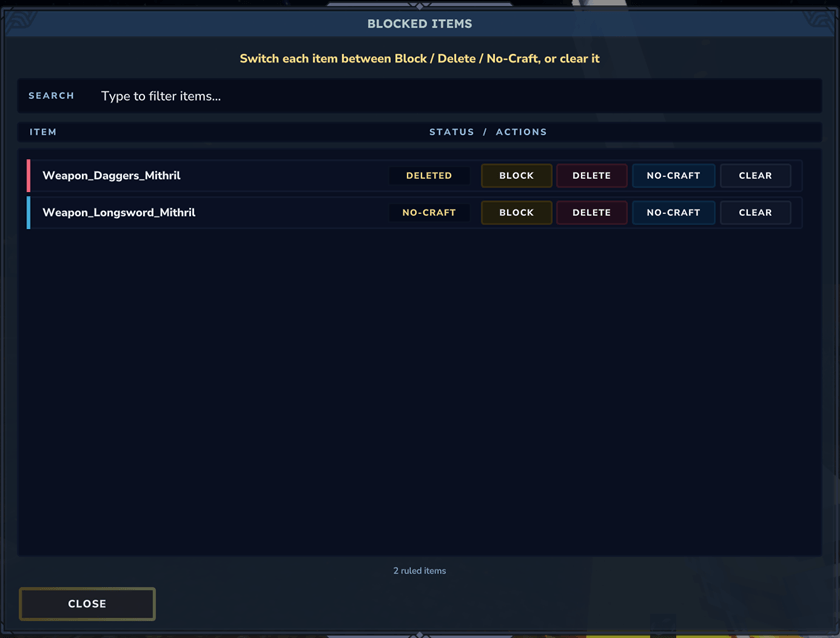
Manage all your blocked/deleted items in one place, much easier control.
OP BYPASS
By default, OP players bypass the block of any item.
But you can always edit "blockingitemsconfig.json" to toggle this OP bypass off.
Also I added the commands "/biop" or "/blockingitemsop" to toggle this OP bypass.
BLOCKING ITEMS GLOBALLY
"/blockitem <itemID>"
"/bi <itemID>"
This will block globally (all instances) the item you want.
"/unblockitem <itemID>"
"/ubi <itemID>"
This will unblock globally (all instances) the item you want (if its already blocked).
"/blockitem"
"/bi"
(with no extra arguments)
This will block globally (all instances) the item
IN YOUR MAIN HAND.
"/unblockitem"
"/ubi"
(with no extra arguments)
This will block globally (all instances) the item
IN YOUR MAIN HAND.
BLOCKING ITEMS PER INSTANCE/WORLD
This commands are prepared to work with
custom modded dungeons (normally are temporary dungeons).
Uses <instanceID> to identity that instance and all instances with that "prefix".
"/blockitem <itemID> <instanceID>"
"/bi <itemID> <instanceID>"
This will block the item you want in the instance you want.
"/unblockitem <itemID> <instanceID>"
"/ubi <itemID> <instanceID>"
This will unblock the item you want in the instance you want (if its already blocked).
"/blockitemhere"
"/blockiteminstance"
"/bii"
"/bih"
This will block the item
IN YOUR MAIN HAND IN THE INSTANCE YOU ALREADY ON!
"/unblockitemhere"
"/unblockiteminstance"
"/ubii"
"/ubih"
This will unblock the item
IN YOUR MAIN HAND IN THE INSTANCE YOU ALREADY ON!
BLOCKING ITEMS PER PLAYER
NOTE: If target player is offline, it will save its name and
re-apply the block/unblock when that player joins the server.
"/blockitemplayer <player> <itemID>"
"/bip <player> <itemID>"
Blocks the item only for this player in all instances/worlds.
"/unblockitemplayer <player> <itemID>"
"/ubip <player> <itemID>"
Unblocks the item only for this player in all instances/worlds.
Can be used without arguments:
"/blockitemplayer" OR "/bip"
"/unblockitemplayer" OR "/ubip"
It will choose the player executing the command and the item in main hand.
BLOCKING ITEMS PER PLAYER & PER INSTANCE/WORLD
"/blockiteminstanceplayer <player> <itemID> <instanceID>"
(same with "/blockitemhereplayer", "/biip" and "/bihp")
Blocks the item for this player in that instance/world (works with prefix).
"/unblockiteminstanceplayer <player> <itemID> <instanceID>"
(same with "/unblockitemhereplayer", "/ubiip" y "/ubihp")
Unlocks the item for this player in that instance/world (works with prefix).
Can be used without arguments too:
"/blockiteminstanceplayer" (or "/blockitemhereplayer", "/biip" y "/bihp")
"/unblockiteminstanceplayer" (or "/unblockitemhereplayer", "/ubiip" y "/ubihp")
It will choose the player executing the command, the item in main hand and
the instance you currently at (works with prefix).
DELETE/REMOVE ITEM GLOBALLY
NOTE: After deleting an item,
run "/syncremoveditems" to also purge offline players and all containers
(or "/syncdeleteditems").
"/deleteitem <itemID>"
"/di <itemID>"
"/removeitem <itemID>"
This will remove globally (all instances) the item you want from all players.
"/undeleteitem <itemID>"
"/udi <itemID>"
"/restoreitem <itemID>"
This will restore globally (all instances) the item you want (if its already deleted).
Will not give the previously deleted item back to the players that had it.
"/deleteitem"
"/di"
"/delitem"
"/removeitem"
(with no extra arguments)
This will remove globally (all instances, from all players) the item
IN YOUR MAIN HAND.
"/undeleteitem"
"/udi"
"/undelitem"
"/restoreitem"
(with no extra arguments)
This will restore globally (all instances) the item
IN YOUR MAIN HAND.
Will not give the previously deleted item back to the players that had it.
BLOCKING CRAFTING RECIPE GLOBALLY
"/blockitemcraft <itemID>"
"/bic <itemID>"
This will block globally (all instances) the crafting recipe of the item you want.
"/unblockitemcraft <itemID>"
"/ubic <itemID>"
This will unblock globally (all instances) the crafting recipe of the item you want (if its already blocked).
"/blockitemcraft"
"/bi"
(with no extra arguments)
This will block globally (all instances) the crafting recipe of the item
IN YOUR MAIN HAND.
"/unblockitemcraft"
"/ubic"
(with no extra arguments)
This will block globally (all instances) the crafting recipe of the item
IN YOUR MAIN HAND.
BLOCKING CRAFTING RECIPE PER INSTANCE/WORLD
This commands are prepared to work with
custom modded dungeons (normally are temporary dungeons).
Uses <instanceID> to identity that instance and all instances with that "prefix".
"/blockitemcraft <itemID> <instanceID>"
"/bic <itemID> <instanceID>"
This will block the crafting recipe of the item you want in the instance you want.
"/unblockitemcraft <itemID> <instanceID>"
"/ubic <itemID> <instanceID>"
This will unblock the crafting recipe of the crafting recipe of the item you want in the instance you want (if its already blocked).
"/blockitemcrafthere"
"/blockitemcraftinstance"
"/bici"
"/bich"
This will block the crafting recipe of the item
IN YOUR MAIN HAND IN THE INSTANCE YOU ALREADY ON!
"/unblockitemcrafthere"
"/unblockitemcraftinstance"
"/ubici"
"/ubich"
This will unblock the crafting recipe of the item
IN YOUR MAIN HAND IN THE INSTANCE YOU ALREADY ON!
BLOCKING CRAFTING RECIPE PER PLAYER
NOTE: If target player is offline, it will save its name and
re-apply the block/unblock when that player joins the server.
"/blockitemcraftplayer <player> <itemID>"
"/bicp <player> <itemID>"
Blocks the crafting recipe of the item only for this player in all instances/worlds.
"/unblockitemcraftplayer <player> <itemID>"
"/ubicp <player> <itemID>"
Unblocks the crafting recipe of the item only for this player in all instances/worlds.
Can be used without arguments:
"/blockitemcraftplayer" OR "/bicp"
"/unblockitemcraftplayer" OR "/ubicp"
It will choose the player executing the command and the crafting recipe of the item in main hand.
BLOCKING CRAFTING RECIPE PER PLAYER & PER INSTANCE/WORLD
"/blockitemcraftinstanceplayer <player> <itemID> <instanceID>"
(same with "/blockitemcrafthereplayer", "/bicip" and "/bichp")
Blocks the crafting recipe of the item for this player in that instance/world (works with prefix).
"/unblockitemcraftinstanceplayer <player> <itemID> <instanceID>"
(same with "/unblockitemcrafthereplayer", "/ubicip" y "/ubichp")
Unlocks the crafting recipe of the item for this player in that instance/world (works with prefix).
Can be used without arguments too:
"/blockitemcraftinstanceplayer" (or "/blockitemcrafthereplayer", "/bicip" y "/bichp")
"/unblockitemcraftinstanceplayer" (or "/unblockitemcrafthereplayer", "/ubicip" y "/ubichp")
It will choose the player executing the command, the crafting recipe of the item in main hand and
the instance you currently at (works with prefix).
Development was financed by azb (Froschteich server).
Also check out my other mods!
Discord
Our Discord Server (English and Spanish) for everyone interested at our
incoming new mods/mod updates for Hytale.
Project description from CurseForge.
Pick your setup
Blocking Items releases for each Hytale build.
Choose the version and loader you play, then open the matching release.
Check the dependencies, then try the file in a copied instance before changing a world you care about.
Recent files
Blocking Items releases and Hytale builds
Blocking Items 1.2.0.jar
30 Jun 2026
Client Not supported Server Required Dependencies No extras listed Listed on Project page
Check the 0.5 setup 0.5 release
Blocking Items 1.1.2.jar
27 Jun 2026
Client Not supported Server Required Dependencies No extras listed Listed on Project page
Check the 0.5 setup 0.5 release
Blocking Items 1.1.1.jar
26 May 2026
Client Not supported Server Required Dependencies No extras listed Listed on Project page
Check the setup Blocking Items 1.1.0.jar
7 May 2026
Client Not supported Server Required Dependencies No extras listed Listed on Project page
Check the setup Blocking Items 1.0.0.jar
5 May 2026
Client Not supported Server Required Dependencies No extras listed Listed on Project page
Check the setup Looking for an older file? The official CurseForge project page is in Resources.
 mod
mod CurseForge · Hytale
HyDragon
Raise dragons, master the elements, and rule the skies with legendary companions, elemental Miniwyverns, and aerial dragon combat.
 mod
mod CurseForge · Hytale
Below Every Heaven
Below Every Heaven is a horror mod for Hytale. Descend through seven dimensions, each ruled by a deadly creature and guarded by something that shouldn't exist.
 mod
mod CurseForge · Hytale
Machine Blocks
Make your Hytale Factory dream come true using technology through a tiered discovery system. Mostly Single block machines (this is not for the faint of heart, they are expensive). Tech, furnace, crusher, plant, fuel, alloy, miner, crop, farm, ore