Clementine Hytale Playermodel.zip
7 May 2026
Client Not supported Server Required Dependencies No extras listed Listed on Project page
Check the setup 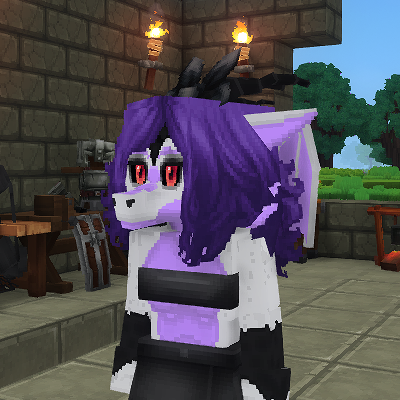
CurseForge · Hytale mod
A custom playermodel of my fursona. This can be accessed through the asset creator, by commands, or with the Wardrobe mod (Recommended).
Quick answer
Clementine Playermodel Clementine Hytale Playermodel.zip targets Hytale. Do not install it as a separate client mod. Enable it on the world host—the local server in singleplayer or the dedicated server in multiplayer. No required dependencies listed for this file.
Where it goes
Do not install it as a separate client mod. Enable it on the world host—the local server in singleplayer or the dedicated server in multiplayer.
Put Hytale mods on the world host or dedicated server. Singleplayer runs a local server too; Hytale does not use separate client mods.
Clementine Hytale Playermodel.zip. Change the file and its required mods may change too.
This file does not list any required mods. Do not add a library just because a different file uses it.
This file does not list any required or optional project dependencies. Check the creator notes before changing an existing world.
Before you install it
Built for Clementine Playermodel Clementine Hytale Playermodel.zip. Pick another file and the loader, install side or required mods may change.
Use Clementine Hytale Playermodel.zip. It targets Hytale; another release may target a different game build or dependency set.
This file does not list any required mods. Do not add a library just because a different file uses it.
Do not install it as a separate client mod. Enable it on the world host—the local server in singleplayer or the dedicated server in multiplayer.
Use the “Get this file” button beside Clementine Hytale Playermodel.zip. It opens that exact file at the source.
About this project
Usage by commands (You must have operator perms):
input: /op self
output: gives the player operator perms (only works if you are the world owner)
input: /model set Clementine_Playermodel <username>
output: player's model will be swapped out with the base custom model with no clothing.
input: /model set Clementine_Playermodel_Outfit(1-4) <username>
output: player's model will be swapped out with the custom model with a preset outfit depending on the Outfit number selected.
input: /model clear
output: resets the player's model to default
Usage by Asset Editor (Must also have operator perms):
>go to Creative Tools (B) and open the Asset Editor under the Assets tab
>change the asset pack selection (top right corner) to "Clem Playermodels:Clementine Dragon"
>navigate to the Model Asset folder under the Server tab and select a model
>click "Use Model" and your player model will be set to the selected model
>you can reset your player model back to default by clicking "Reset Model"
Usage by Wardrobe Mod (No operator perms required but must be installed on the server/world you are playing):
>type in /wardrobe to access the cosmetic wardrobe
>you can locate the base player model in General/Body Characteristics and select the clearly placeholder image icon
>to complete applying the model you will need the first top 3 attachments in the dedicated Dragon Assets tab (Which is using the same placeholder image)
>the rest of the tabs are optional cosmetics such as hair, clothing, and extra accessories
Dependencies:
-none
Recommendations:
-Wardrobe (More convenient and user friendly experience for using player model assets and removing the requirement of operator perms)
-PMA Persistent Model Assignment (logs /model set so user's player model is saved and reapplied when relaunching the world)
Disclaimers:
This mod as of right now is very crude and nowhere near completion. Dont expect for it to work 100% of the time a things may break and assets may become depreciated over time. I will try to be consistent on ensuring basic functionality of the mod is stable but periods between updates and patches may be sporadic and long in between.
Roadmap:
I plan on adding more features such as more customization options for clothing and accessories, a grayscale model that will have color variants, and also updating placeholder images with proper icons to make the mod more intuitive to the user experience.
Feedback is always appreciated and I will be checking the comments for critiques and advice on where to improve.
Project description from CurseForge.
Recent files
7 May 2026
Looking for an older file? The official CurseForge project page is in Resources.
 mod
modExplore the seas: shipwrecks and ruins on the ocean floor, loot chests, floating pirate ships, treasure maps, and diving gear for deep dives.
 mod
modA Custom Enchants plugin that adds cool enchants applyable to armor and weapons.
 mod
modFeaturing Shared Inventory, Marriage Buffs, Rings, Piggyback, Kissing, Homes