Hytale version
Back to mods 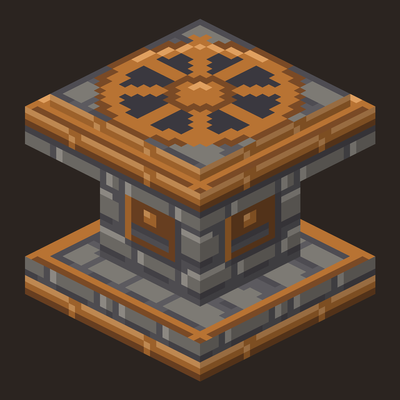
CurseForge · Hytale mod
HyPedestals
Harvester blocks that automatically harvest every ripe crop around them into their own storage. Four material tiers, plus watering and fertilizer upgrades.
Choose a version Pick your version below, then grab the matching file.
Quick answer
Which HyPedestals release should I use?
Latest stable file HyPedestals 0.2.3
Game version 0.7
Mod system Built-in Hytale mod system
HyPedestals 0.2.3 targets 0.7. Do not install it as a separate client mod. Enable it on the world host—the local server in singleplayer or the dedicated server in multiplayer. No required dependencies listed for this file.
Where it goes
Where should HyPedestals be installed in Hytale?
Do not install it as a separate client mod. Enable it on the world host—the local server in singleplayer or the dedicated server in multiplayer.
Separate client mod Not supported
World host / dedicated server Required
Mod system for this release Built-in Hytale mod system
Required install it here Optional supported, not mandatory Not supported do not install here Source doesn’t say do not assume
Put Hytale mods on the world host or dedicated server. Singleplayer runs a local server too; Hytale does not use separate client mods.
What else does HyPedestals 0.2.3 need?
HyPedestals 0.2.3. Change the file and its required mods may change too.
This file does not list any required mods. Do not add a library just because a different file uses it.
This file does not list any required or optional project dependencies. Check the creator notes before changing an existing world.
Before you install it
Add HyPedestals without breaking your instance.
Built for HyPedestals 0.2.3. Pick another file and the loader, install side or required mods may change.
- 01
Stick to this file
Use HyPedestals 0.2.3. It targets 0.7; another release may target a different game build or dependency set.
- 02
Bring the mods it needs
This file does not list any required mods. Do not add a library just because a different file uses it.
- 03
Enable it on the world host
Do not install it as a separate client mod. Enable it on the world host—the local server in singleplayer or the dedicated server in multiplayer.
- 04
Pick the file you checked
Use the “Get this file” button beside HyPedestals 0.2.3. It opens that exact file at the source.
About this project
What does HyPedestals add?
Tired of walking up and down your fields? Place a Harvester next to your crops and it harvests every ripe crop in range, storing the drops in its own inventory. Pair it with Eternal crops and your farm never needs replanting.
Keep animals on your farm and their manure becomes fertilizer. With the Fertilizer Upgrade, every Poop your livestock drops inside the field is collected by the Harvester and used to fertilize the crops — no crafting, no bags, a closed loop from pasture to plant.
Features
- Four tiers. Copper, Iron, Thorium and Cobalt. Higher tiers cover a larger area, work faster and hold more items.
- Its own storage. Press Use (F) on a Harvester to open it. Drops that roll away are picked up too.
- Upgrades. A Watering Upgrade keeps the farmland in range watered, and a Fertilizer Upgrade fertilizes it with animal manure (Poop) or Fertilizer bags from the Harvester's storage. Keep your livestock inside the fenced field and the Harvester collects their manure and turns it into fertilizer.
- Export. A chest (or any container) placed below or next to a Harvester receives its harvest automatically, so the farm keeps going.
- Configurable. Server operators can change radius, interval and more per tier, in game (
/hypedestals config) or inHyPedestals.json. - English and Brazilian Portuguese.
Tiers
| Tier | Area | Interval | Slots | Recipe (Workbench) |
|---|---|---|---|---|
| Copper Harvester | 5×5×3 | 12 s | 9 | 12× Copper Bar + 10× any wood trunk |
| Iron Harvester | 7×7×3 | 8 s | 18 | 1× Copper Harvester + 15× Iron Bar |
| Thorium Harvester | 9×9×3 | 5 s | 27 | 1× Iron Harvester + 15× Thorium Bar |
| Cobalt Harvester | 11×11×3 | 3 s | 36 | 1× Thorium Harvester + 15× Cobalt Bar |
The area is a square centered on the Harvester, from one block below to one block above it. Each tier is crafted from the previous one; empty the old Harvester first, its contents do not carry over.
Upgrades
| Upgrade | Recipe (Farming Bench) | What it does |
|---|---|---|
| Watering Upgrade | tier 2: 1× Watering Can + 4× Iron Bar + 3× Tree Sap + 25× Life Essence | Keeps the tilled soil in range watered. No water source needed, nothing consumed |
| Fertilizer Upgrade | tier 3: 1× Fertilizer + 4× Iron Bar + 25× Life Essence | Fertilizes the planted soil in range: 2 Poop per block (collected from livestock in the area, or from any slot of the storage), Fertilizer bags as a fallback. Manure above one stack is exported like any other item |
Hold an upgrade and right-click the Harvester to install it. Crouch + Use (F) takes the last installed upgrade back. Installed upgrades show as glowing orbs above the pedestal: blue for watering, green for fertilizer.
How to use
- Craft a Copper Harvester at a Workbench.
- Place it next to (or in the middle of) your crops.
- Every few seconds it harvests the ripe crops in its area and collects the drops.
- Press Use (F) to take your harvest, or put a chest next to it.
Good to know
- Works while its area is loaded, i.e. near a player. It does not load chunks.
- It picks up any dropped item in its area, not only crops (operators can turn this off for tools, weapons and armor).
- Every ripe crop in the area is harvested each cycle, as long as the drops fit in the storage; when it is full, the remaining crops wait on the plant (nothing is wasted on the ground). Use a chest next to it for large farms.
- Harvesters placed near each other do not steal each other's drops.
- Annual crops are removed when harvested, like by hand. Use Eternal crops or replant.
- Harvesters have no owner and do not check claims or protected areas.
- Remove your Harvesters before uninstalling the mod.
Compatibility
- ModernStorage: an Import Bus facing a Harvester pulls its harvest into your storage network.
- AutoStorage: place the Harvester right next to an AutoStorage chest and export moves the harvest into it.
Requirements
Hytale 0.7.2. Works in singleplayer and on dedicated servers. After installing, enable HyPedestals in your world's mod settings. Updating from an older version: remove the old HyPedestals-*.jar first.
About
I make these mods to make everyday life in Hytale a little easier. I build them with AI assistance: every change is reviewed and tested on a real server, and the full source code is on GitHub (GPL-3.0). The textures and icons are AI-generated. Found a bug or have an idea? Open an issue.
If you enjoy it, you can buy me a coffee on Ko-fi.
HyPedestals is a fan project and is not affiliated with or endorsed by Hypixel Studios.
Project description from CurseForge.
Pick your setup
HyPedestals releases for each Hytale build.
Choose the version and loader you play, then open the matching release.
Check the dependencies, then try the file in a copied instance before changing a world you care about.
Recent files
HyPedestals releases and Hytale builds
HyPedestals 0.2.3
21 Oct 2026
Client Not supported Server Required Dependencies No extras listed Listed on Project page
Check the 0.7 setup 0.7 release
HyPedestals 0.2.2
21 Oct 2026
Client Not supported Server Required Dependencies No extras listed Listed on Project page
Check the 0.7 setup 0.7 release
HyPedestals 0.2.1
17 Oct 2026
Client Not supported Server Required Dependencies No extras listed Listed on Project page
Check the 0.7 setup 0.7 release
Looking for an older file? The official CurseForge project page is in Resources.
 mod
mod CurseForge · Hytale
HyThief
Creator tools for container ownership and NPC theft participation, alongside stealth pickpocketing and witnessed container theft. HyThief 1.5.0 for Hytale 0.7.2.
 mod
mod CurseForge · Hytale
Insight
See what you’re looking at in Hytale: block and creature names, 3D icons and portraits, chest contents, workbench progress, and which mod it’s from. Clean, movable HUD with 9 sizes and a simple in-game settings menu.
 mod
mod CurseForge · Hytale
Monster Mash
Add Halloween party furniture From neon lights, spooky smoke an so much more than next Halloween night