Simple Backups Optional for Backup Manager 1.0.2 [Fabric]
optionalNo matching file

CurseForge · Minecraft mod
A mod to add basic gui support for multiple backup mods
Quick answer
Backup Manager 1.0.2 [Fabric] targets 1.21, 1.21.1, 1.21.2 with Fabric. The project page does not say whether this file belongs on the client, dedicated server, or both. All 3 required mods have matching files.
Where it goes
The project page does not say whether this file belongs on the client, dedicated server, or both.
The source does not explicitly classify this release as client-only or server-only.
1.0.2 [Fabric]. Change the file and its required mods may change too.
Install PolyLib, Architectury API, Fabric API first. We found matching files for this game-version and loader setup. 2 come through another mod in the chain.
2 extra mods were pulled in by other dependencies. Indented rows show who needs each one. We only count dependency files that match this setup. A file for another loader does not fill the gap.
Before you install it
Built for Backup Manager 1.0.2 [Fabric]. Pick another file and the loader, install side or required mods may change.
Use 1.0.2 [Fabric]. It targets 1.21, 1.21.1, 1.21.2 with Fabric; another release may have different loader, side or dependency requirements.
Install PolyLib, Architectury API, Fabric API first. We found matching files for this game-version and loader setup. 2 come through another mod in the chain.
The project page does not say whether this file belongs on the client, dedicated server, or both.
Use the “Get this file” button beside 1.0.2 [Fabric]. It opens that exact file at the source.
About this project

Backup manager
A small client-side-only mod that allows the player to restore backups from FTB Backups 2, Simple Backups, or even vanilla backups.
Once installed you will see a new option on the world select screen, This will give you access to the backup manager UI.
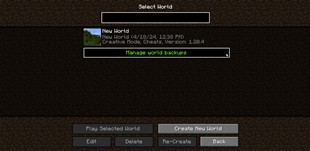
You can then select any backup you wish to restore and restore it with a single click and
stop the need for manually extracting and moving files around outside of Minecraft.
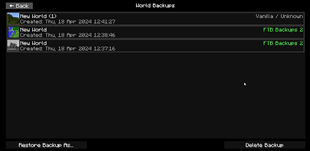

Project description from CurseForge.
Pick your setup
Choose the version and loader you play, then open the matching release.
Showing the newest 12 of 13 game versions. Older files are in the list below.
Check the dependencies, then try the file in a copied instance before changing a world you care about.
Recent files
BackupManager-fabric-1.21-1.0.2.jar
4 Jun 2026
BackupManager-neoforge-1.21-1.0.2.jar
4 Jun 2026
BackupManager-fabric-1.21.5-1.0.1.jar
30 Apr 2025
BackupManager-neoforge-1.21.5-1.0.1.jar
30 Apr 2025
BackupManager-neoforge-1.21.4-1.0.0.jar
9 Jan 2025
BackupManager-fabric-1.21.4-1.0.0.jar
9 Jan 2025
BackupManager-fabric-1.18.2-1.0.1.jar
5 Jan 2025
BackupManager-forge-1.18.2-1.0.1.jar
5 Jan 2025
BackupManager-neoforge-1.21.3-1.0.0.jar
3 Nov 2024
BackupManager-fabric-1.21.3-1.0.0.jar
3 Nov 2024
BackupManager-neoforge-1.21-1.0.0.jar
4 Oct 2024
BackupManager-neoforge-1.20.2-1.0.0.jar
4 Oct 2024
Looking for an older file? The official CurseForge project page is in Resources.
 mod
Customize Everything! Transform Minecraft into a zombie apocalypse. Zombies no longer burn in sunlight, spawn continuously near players, and get stronger over time. Features horde events, blood moon nights, biome modifiers, and 40+ config options.
 mod
The story campaign of Create: Echoes of the Great Derailment: 17 mentors, 360+ quests across twelve ages, a journal and a camp that grows into a town.
 mod
A vanilla-style overhaul that brings deeper, more immersive life to Minecraft's farm animals.