playerAnimator Needed by zspeed-1.20.1-1.0.1.jar
requiredMatching file found Matched file: player-animation-lib-forge-1.0.2-rc1+1.20.jar
CurseForge · Minecraft mod
A Speedster Type Mod Made by Yours Truly -Zacronium!
Quick answer
zspeed-1.20.1-1.0.1.jar targets 1.20.1 with Forge. The project page does not say whether this file belongs on the client, dedicated server, or both. All 2 required mods have matching files.
Where it goes
The project page does not say whether this file belongs on the client, dedicated server, or both.
The source does not explicitly classify this release as client-only or server-only.
zspeed-1.20.1-1.0.1.jar. Change the file and its required mods may change too.
Install playerAnimator, Tickrate API first. We found matching files for this game-version and loader setup. 1 comes through another mod in the chain.
1 extra mod was pulled in by another dependency. Indented rows show who needs each one. We only count dependency files that match this setup. A file for another loader does not fill the gap.
Before you install it
Built for zspeed-1.20.1-1.0.1.jar. Pick another file and the loader, install side or required mods may change.
Use zspeed-1.20.1-1.0.1.jar. It targets 1.20.1 with Forge; another release may have different loader, side or dependency requirements.
Install playerAnimator, Tickrate API first. We found matching files for this game-version and loader setup. 1 comes through another mod in the chain.
The project page does not say whether this file belongs on the client, dedicated server, or both.
Use the “Get this file” button beside zspeed-1.20.1-1.0.1.jar. It opens that exact file at the source.
About this project
What you need to know!
YOU NEED THESE MODS:
tickrate api
player animator
There are currently 3 suits:
^ Flash
^ Reverse Flash
^ Zoom
Key Bindings:
Y = Increase Speed
H = Decrease Speed
R = Enable/Disable Speed
There Is a small meter at the bottom of your screen.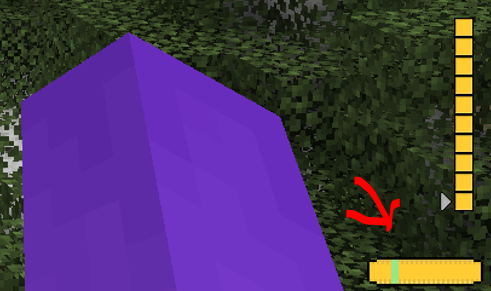
This is your level up meter! Your speed is at a minimum of 5 and a maximum of 10. (Not including suit speed boost)
Crafting:
Injector: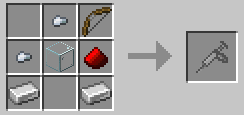
V9 Injector: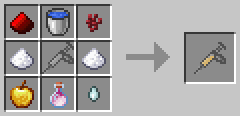
Fabric: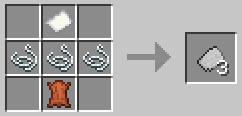
Colored Fabrics: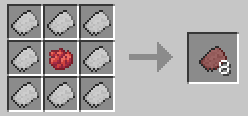
Reinforced Fabric: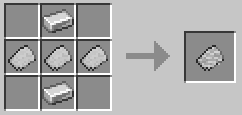
Flash Suit:
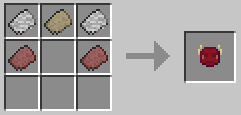
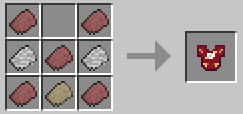
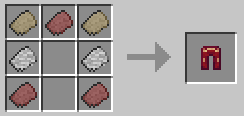
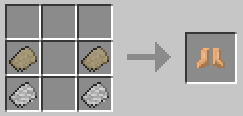
Reverse Flash:
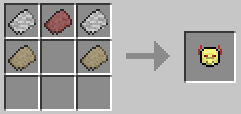
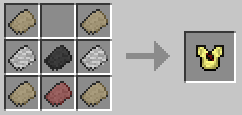
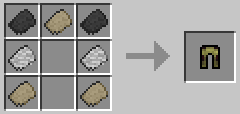
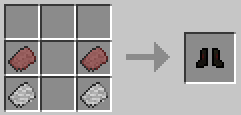
Zoom:
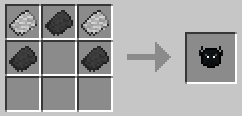
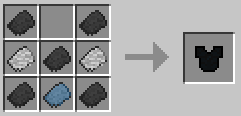
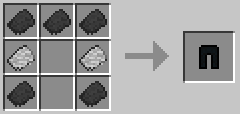
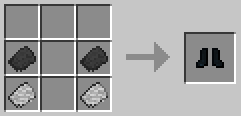
Suit Textures:
I had some preset suits I didn't make, I took them out but now only the flash suit has a texture, they still work. They just don't have textures. I will work on them!
Bugs:
There are a few Bugs that I am aware of and trying to fix!
^ Crash - Index (number prob 20-30) Invalid in length 0, This is a bug with the trail, its not you, and its rare. But It can happen, I will try to eliminate it in future versions.
^ Trail is off!!! - At a 45 degree and -135 degree angle the trail is not directly behind the player. I'm not entirely sure why this is. But I will continue to crack at it in the future.
^ Other Players can't see my trail! - This is because of how I render the trail. I render it directly to the client and not the game itself. I will work on multiplayer compatibility, But Its not here yet!
**MULTIPLAYER IS RESTRICTED:**The way I coded some of the features makes it single player only. This mod WILL work in multiplayer, It just wont look as cool :( , I am working on making it compatible, but for now, Only you can see your trail.
I will update this mod over time (especially if yall like it)
Project description from CurseForge.
Pick your setup
Choose the version and loader you play, then open the matching release.
Check the dependencies, then try the file in a copied instance before changing a world you care about.
Recent files
1 Jun 2024
Looking for an older file? The official CurseForge project page is in Resources.
 mod
modAn addon for the Friends&Foes mod, adding one moobloom variant for each flower.
 mod
modA Minecraft mod that adds auto sprint, no need to press or hold ctrl any more.
 mod
mod> Build on your Create train while it drives. A Functional Fob makes a carriage's blocks real: place and break them, open chests, run machines. Disassemble and your build stays in the world. Early build — back up first. ---