Back to mods
JEI Area Fixer project artwork

CurseForge · Minecraft mod

JEI Area Fixer

fix JEI GUI to not overlap with modded GUIs

Choose a version Pick your version below, then grab the matching file.

Quick answer

Which JEI Area Fixer release should I use?

Updated 3 months ago
Latest stable file 2.4.0: Refined Storage & vanilla Toast
Game version 1.12.2
Loader Forge

JEI Area Fixer 2.4.0: Refined Storage & vanilla Toast targets 1.12.2 with Forge. The project page does not say whether this file belongs on the client, dedicated server, or both. 1 required mod needs checking.

Where it goes

Is JEI Area Fixer required on the client, server, or both?

The project page does not say whether this file belongs on the client, dedicated server, or both.

Client Source doesn’t say
Dedicated server Source doesn’t say
Loader for this release Forge
Required install it here Optional supported, not mandatory Not supported do not install here Source doesn’t say do not assume

The source does not explicitly classify this release as client-only or server-only.

What else does JEI Area Fixer 2.4.0: Refined Storage & vanilla Toast need?

2.4.0: Refined Storage & vanilla Toast. Change the file and its required mods may change too.

1 required mod needs checking

Install project 419286 first. 1 required mod still needs checking for this exact setup. 8 come through another mod in the chain.

27 listed on this file 8 pulled in by those mods
Just Enough Items (JEI) Optional for JEI Area Fixer 2.4.0: Refined Storage & vanilla Toast
optional
Matching file found Matched file: 4.16.5.1029 for Forge 1.12.2
Project Red - Expansion Optional for JEI Area Fixer 2.4.0: Refined Storage & vanilla Toast
optional
No matching file
ComputerCraft Optional for JEI Area Fixer 2.4.0: Refined Storage & vanilla Toast
optional
No matching file
OpenModsLib Optional for JEI Area Fixer 2.4.0: Refined Storage & vanilla Toast
optional
No matching file
Tinker I/O Optional for JEI Area Fixer 2.4.0: Refined Storage & vanilla Toast
optional
No matching file
Thaumcraft Optional for JEI Area Fixer 2.4.0: Refined Storage & vanilla Toast
optional
No matching file
Forestry Optional for JEI Area Fixer 2.4.0: Refined Storage & vanilla Toast
optional
Matching file found Matched file: forestry_1.12.2-5.8.2.427.jar
RFTools Optional for JEI Area Fixer 2.4.0: Refined Storage & vanilla Toast
optional
No matching file
Cyclic Optional for JEI Area Fixer 2.4.0: Refined Storage & vanilla Toast
optional
Matching file found Matched file: Cyclic-1.12.2-1.20.14.jar
Trinkets and Baubles Optional for JEI Area Fixer 2.4.0: Refined Storage & vanilla Toast
optional
Matching file found Matched file: Trinkets and Baubles-Forge-1.12.2-0.33.4.jar
Deep Mob Evolution Optional for JEI Area Fixer 2.4.0: Refined Storage & vanilla Toast
optional
Matching file found Matched file: DeepMobEvolution-1.12.2-1.2.3.jar
Had Enough Items Optional for JEI Area Fixer 2.4.0: Refined Storage & vanilla Toast
optional
Matching file found Matched file: Had Enough Items 4.34.3
Gambling Style [Archived] Optional for JEI Area Fixer 2.4.0: Refined Storage & vanilla Toast
optional
Matching file found Matched file: GamblingStyle-v1.1.3-1.12.2.jar
Smeltery IO Optional for JEI Area Fixer 2.4.0: Refined Storage & vanilla Toast
optional
Matching file found Matched file: MCT-SmelteryIO-1.12.2-1.3.72-release.jar
MrTJPCore Optional for JEI Area Fixer 2.4.0: Refined Storage & vanilla Toast
optional
No matching file
Applied Energistics 2 Optional for JEI Area Fixer 2.4.0: Refined Storage & vanilla Toast
optional
No matching file
Curios API Needed by Cyclic
pulled in
No matching file
Baubles Needed by Cyclic
pulled in
No matching file
Guide-API Needed by Cyclic
pulled in
No matching file
CraftTweaker Needed by Cyclic
pulled in
Matching file found Matched file: CraftTweaker2-1.12-4.1.20.699.jar
Patchouli Needed by Cyclic
pulled in
Matching file found Matched file: Patchouli-1.0-23.6.jar
Tinkers Construct Needed by Smeltery IO
pulled in
Matching file found Matched file: TConstruct-1.12.2-2.13.0.183.jar
Tinkers' Antique Needed by Smeltery IO
pulled in
Matching file found Matched file: 2.13.0.209

8 extra mods were pulled in by other dependencies. Indented rows show who needs each one. We only count dependency files that match this setup. A file for another loader does not fill the gap.

Before you install it

Add JEI Area Fixer without breaking your instance.

Built for JEI Area Fixer 2.4.0: Refined Storage & vanilla Toast. Pick another file and the loader, install side or required mods may change.

  1. 01

    Stick to this file

    Use 2.4.0: Refined Storage & vanilla Toast. It targets 1.12.2 with Forge; another release may have different loader, side or dependency requirements.

  2. 02

    Bring the mods it needs

    Install project 419286 first. 1 required mod still needs checking for this exact setup. 8 come through another mod in the chain.

  3. 03

    Put it on the correct side

    The project page does not say whether this file belongs on the client, dedicated server, or both.

  4. 04

    Pick the file you checked

    Use the “Get this file” button beside 2.4.0: Refined Storage & vanilla Toast. It opens that exact file at the source.

About this project

What does JEI Area Fixer add?

JEI Area Fixer

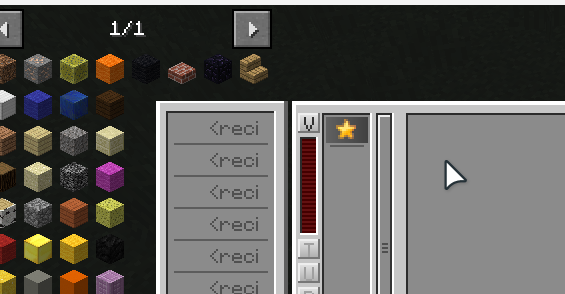
provides patches to fix GUI overlapping issues of JEI, with a config for enabling/disabling patches targeting specific mods.

This is a client-only mod, you don't need to install it on server.

Currently (version 2.4.0) supports:
  • XNet
  • RFTools
  • mods made by OpenMods, like OpenBlocks
  • GamblingStyle
  • (1.3.0+) Quark: Chest Buttons
  • (1.3.0+) Reskillable: side inventory tabs
  • (1.3.0+) SmelteryIO: Fuel Controller, Casting machine
  • (1.4.0+) Cyclic: extended player inventory
  • (1.4.0+) Forestry
  • (1.4.0+) McJtyLib
  • (1.5.0+) AE2
  • (1.5.0+) ComputerCraft
  • (1.6.0+) Tinker I/O
  • (1.6.0+) BlueSkies
  • (1.6.0+) Crafting Tweaks
  • (1.6.0+) Trinkets And Baubles
  • (1.6.0+) AE2WTLib and its dependents: Wireless Crafting/Pattern/Fluid/Interface Terminal
  • (2.0.0+) Deep Mob Evolution
  • (2.1.0+) Thaumcraft
  • (2.2.0+) ProjectRed
  • (2.3.0+) Deep Mob Learning
  • (2.4.0+) Refined Storage
  • (2.4.0+) Toast, from vanilla Minecraft

after-rftools-stroagescanner.png

Q & A

My game crashes before anything shows up

  • Check if MixinBooter is installed
  • If MixinBooter is already installed, you might need to replace the Java that your launcher is using. If you're using CurseForge App, please open "settings" -> "Minecraft" -> scroll down to "java versions" section -> choose another Java for "java 8"

JEI overlaps (or behaves strangely) with GUI from mod XXX

  • report to Github, and attach a screenshot with "draw" from "debug opotion" enabled to make investigation easier

Project description from CurseForge.

Pick your setup

JEI Area Fixer by Minecraft version and loader

Choose the version and loader you play, then open the matching release.

1 available setups

Check the dependencies, then try the file in a copied instance before changing a world you care about.

Recent files

JEI Area Fixer versions and loaders

12 of 12 releases match

Looking for an older file? The official CurseForge project page is in Resources.