Minecraft version
Back to mods 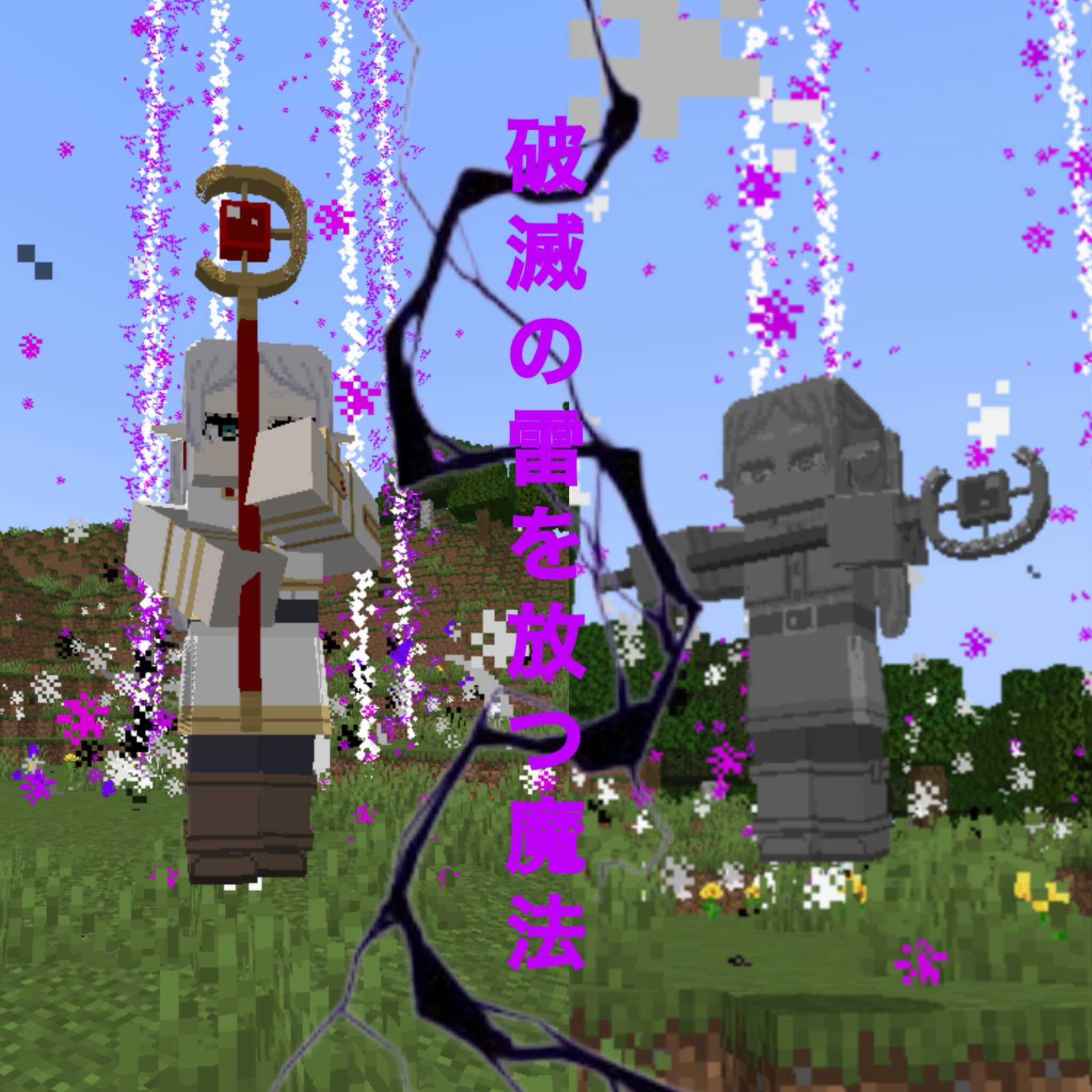
CurseForge · Minecraft mod
FrierenCraft
This mod adds characters and magic from Frieren: Beyond Journey's End by Abe Tsukasa.
Choose a version Pick your version below, then grab the matching file.
Quick answer
Which FrierenCraft release should I use?
Latest stable file FrierenCraft-ver.1.1-forge.1.20.1.jar
Game version 1.20.1
Loader Forge
FrierenCraft-ver.1.1-forge.1.20.1.jar targets 1.20.1 with Forge. The project page does not say whether this file belongs on the client, dedicated server, or both. No extra mods listed for this file.
Where it goes
Is FrierenCraft required on the client, server, or both?
The project page does not say whether this file belongs on the client, dedicated server, or both.
Client Source doesn’t say
Dedicated server Source doesn’t say
Loader for this release Forge
Required install it here Optional supported, not mandatory Not supported do not install here Source doesn’t say do not assume
The source does not explicitly classify this release as client-only or server-only.
What else does FrierenCraft-ver.1.1-forge.1.20.1.jar need?
FrierenCraft-ver.1.1-forge.1.20.1.jar. Change the file and its required mods may change too.
This file does not list any required mods. Do not add a library just because a different file uses it.
This file does not list any required or optional mods.
Before you install it
Add FrierenCraft without breaking your instance.
Built for FrierenCraft-ver.1.1-forge.1.20.1.jar. Pick another file and the loader, install side or required mods may change.
- 01
Stick to this file
Use FrierenCraft-ver.1.1-forge.1.20.1.jar. It targets 1.20.1 with Forge; another release may have different loader, side or dependency requirements.
- 02
Bring the mods it needs
This file does not list any required mods. Do not add a library just because a different file uses it.
- 03
Put it on the correct side
The project page does not say whether this file belongs on the client, dedicated server, or both.
- 04
Pick the file you checked
Use the “Get this file” button beside FrierenCraft-ver.1.1-forge.1.20.1.jar. It opens that exact file at the source.
About this project
What does FrierenCraft add?
Welcome to Frierencraft!
This mod adds characters and magic from Frieren: Beyond Journey's End by Abe Tsukasa.
*This mod is in the prototype stage, and some characters and magic have not been added yet. Please report any bugs you find.
First, use the character selection book (currently limited to creative mode)
to choose either Frieren or Fern.
(Other characters are incomplete.)
Then press the R key to switch the skill you want to use,
and press the Z key to use the skill. Press the G key to switch magic detection on and off, and while it is ON, you can block attacks with defensive magic. (When you use magic, there is a two-second gap and defensive magic will not work.)
When magic detection is ON, press the N key to check the location of mobs within 60 blocks.
Prerequisite mods: GeckoLib and playerAnimator.
https://www.curseforge.com/minecraft/mc-mods/geckolib
https://www.curseforge.com/minecraft/mc-mods/playeranimator
G key (You need to achieve progress in defensive magic.)
N key (You need to complete the Magic Detect progress.)
YouTube↓
https://youtube.com/@howasiro_0141?si=U5fveH8j2PYOxeD1
Project description from CurseForge.
Pick your setup
FrierenCraft by Minecraft version and loader
Choose the version and loader you play, then open the matching release.
Check the dependencies, then try the file in a copied instance before changing a world you care about.
Recent files
FrierenCraft versions and loaders
FrierenCraft-ver.1.1-forge.1.20.1.jar
22 Oct 2024
Client Source doesn’t say Server Source doesn’t say Dependencies No extras listed Listed on Release listing
Check the 1.20.1 · Forge setup 1.20.1Forge release
FrierenCraft-ver.1-forge.1.20.1.jar
22 Oct 2024
Client Source doesn’t say Server Source doesn’t say Dependencies No extras listed Listed on Release listing
Check the 1.20.1 · Forge setup 1.20.1Forge release
test-FrierenCraft-ver.2-forge.1.20.1.jar
19 Oct 2024
Client Source doesn’t say Server Source doesn’t say Dependencies No extras listed Listed on Release listing
Check the 1.20.1 · Forge setup 1.20.1Forge beta
test-FrierenCraft-ver.1-forge.1.20.1.jar
18 Oct 2024
Client Source doesn’t say Server Source doesn’t say Dependencies No extras listed Listed on Release listing
Check the 1.20.1 · Forge setup 1.20.1Forge beta
Looking for an older file? The official CurseForge project page is in Resources.
 mod
CurseForge + Modrinth · Minecraft
Antarchy
Adding 45+ mobs, 8+ bosses, 3 fleshed out dimensions, and more
 mod
CurseForge · Minecraft
Strength In Numbers
Mobs stick with their own kind. Herds stampede when one is hurt, zombies swarm once you’re spotted, skeletons form firing lines.
 mod
CurseForge · Minecraft
The System - Solo Leveling
You have become a Player. Levels, stats, Jinwoo's skills, the Daily Quest, Gates from E to S, the Shadow Army, ten Monarch thrones, and bosses that break the world.