Minecraft version
Back to mods 
CurseForge · Minecraft mod
Artillery Support
Artillery support allows you to conduct military tactics. Designate targets with smoke bombs and call for attacks by Mortar or Howitzer.
Choose a version Pick your version below, then grab the matching file.
Quick answer
Which Artillery Support release should I use?
Latest stable file artillerysupport-1.3.4-forge-mc1.20.1.jar
Game version 1.20.1
Loader Forge
Artillery Support artillerysupport-1.3.4-forge-mc1.20.1.jar targets 1.20.1 with Forge. The project page does not say whether this file belongs on the client, dedicated server, or both. No extra mods listed for this file.
Where it goes
Is Artillery Support required on the client, server, or both?
The project page does not say whether this file belongs on the client, dedicated server, or both.
Client Source doesn’t say
Dedicated server Source doesn’t say
Loader for this release Forge
Required install it here Optional supported, not mandatory Not supported do not install here Source doesn’t say do not assume
The source does not explicitly classify this release as client-only or server-only.
What else does Artillery Support artillerysupport-1.3.4-forge-mc1.20.1.jar need?
artillerysupport-1.3.4-forge-mc1.20.1.jar. Change the file and its required mods may change too.
This file does not list any required mods. Do not add a library just because a different file uses it.
This file does not list any required or optional mods.
Before you install it
Add Artillery Support without breaking your instance.
Built for Artillery Support artillerysupport-1.3.4-forge-mc1.20.1.jar. Pick another file and the loader, install side or required mods may change.
- 01
Stick to this file
Use artillerysupport-1.3.4-forge-mc1.20.1.jar. It targets 1.20.1 with Forge; another release may have different loader, side or dependency requirements.
- 02
Bring the mods it needs
This file does not list any required mods. Do not add a library just because a different file uses it.
- 03
Put it on the correct side
The project page does not say whether this file belongs on the client, dedicated server, or both.
- 04
Pick the file you checked
Use the “Get this file” button beside artillerysupport-1.3.4-forge-mc1.20.1.jar. It opens that exact file at the source.
About this project
What does Artillery Support add?
Artillery Support is a mod that enables military tactics with mortars and howitzers. Artillery strikes are executed from behind the player, and the sound of firing and explosions echoes over a wide area, making it highly immersive.
You have an excellent artillery unit deployed behind you!
Designate targets by using smoke bombs and request a massive and destructive bombardment!
English and Japanese are available.
💥Attack Type
Two types of explosions can be requested: Mortar, which produces an explosion that does not destroy blocks, and Howitzer, which produces an explosion that destroys blocks.
Mortar

Howitzer

There are different tactical types of artillery support, with Normal Fire, Volley Fire, Continuous Fire, Concentrated Fire, and Simple Fire to choose from.
Normal Fire
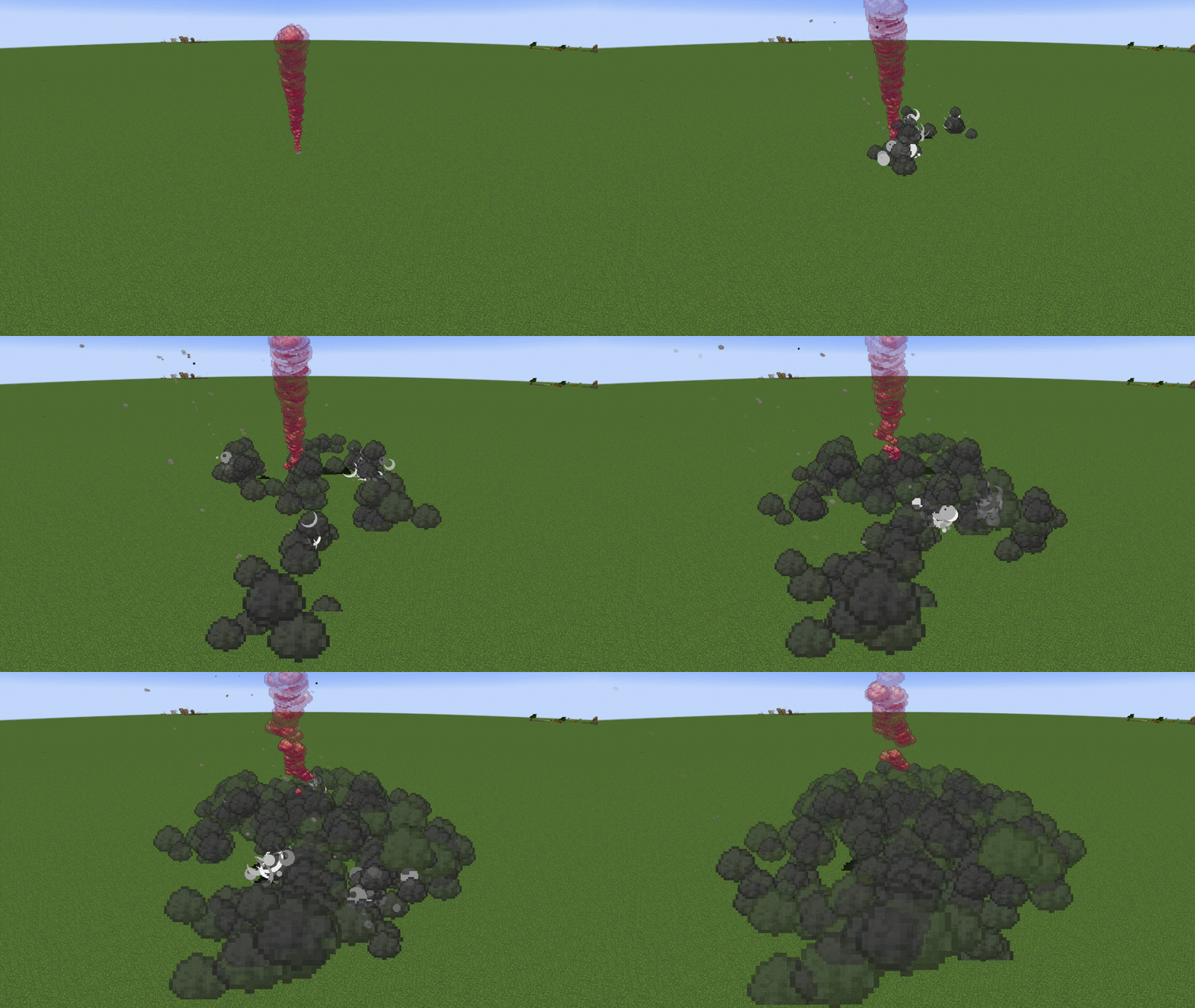
Concentrated Fire
The intervals between attacks are short and the attack radius is narrow.
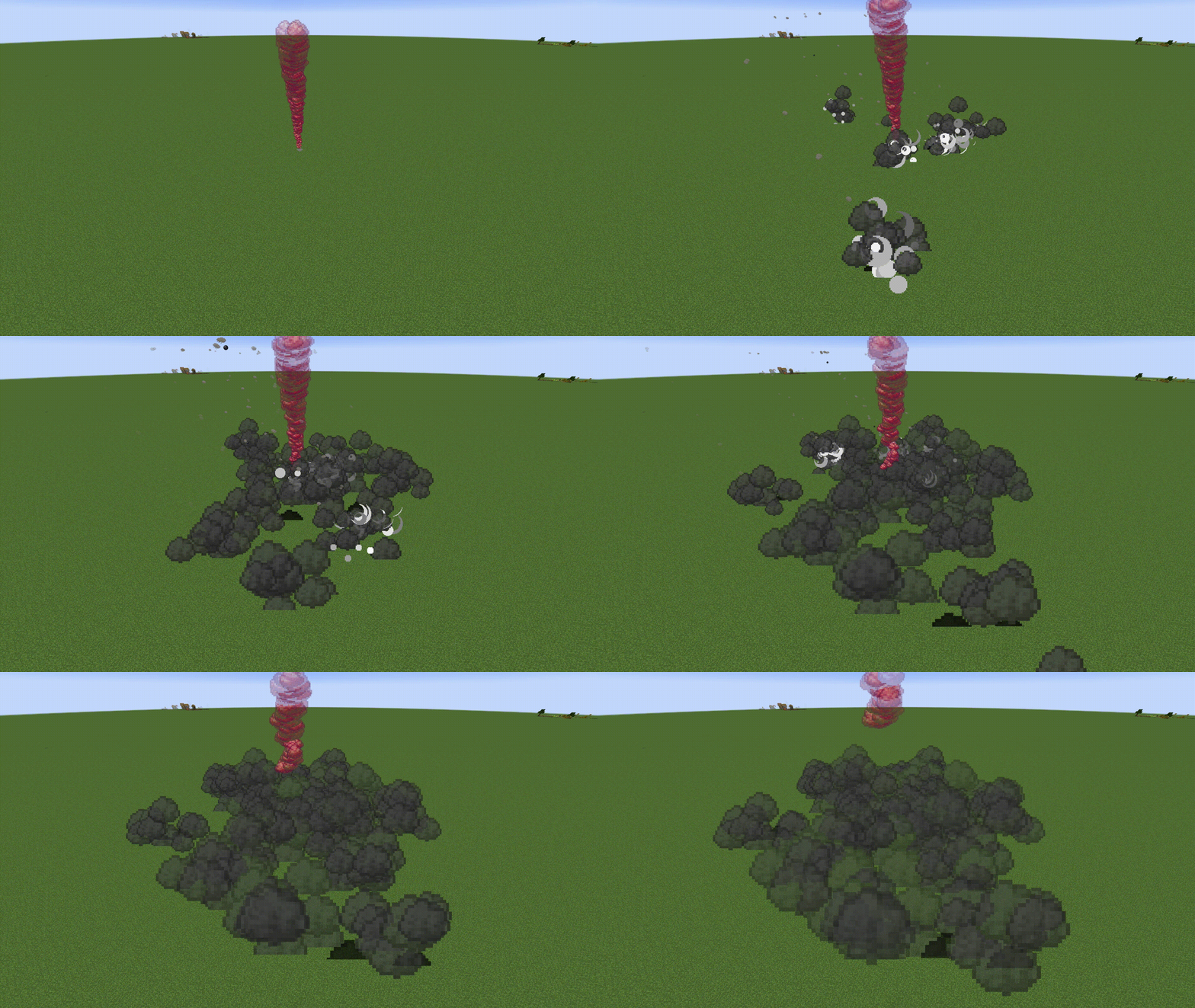
Continuous Fire
The attack interval is long, but the number of shots is high.

Volley Fire
Fires many bullets at the same time.
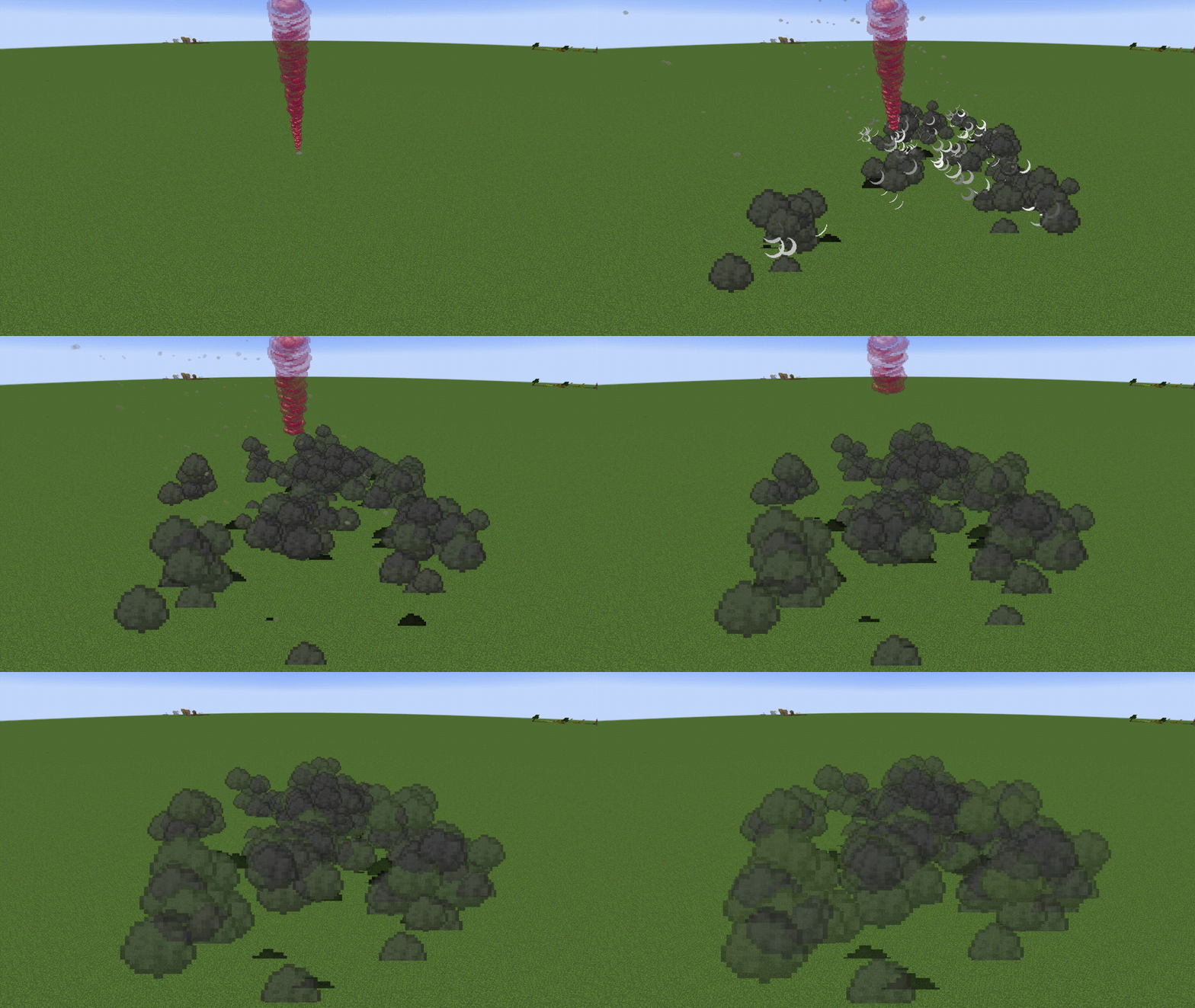
Simple Fire
GIF image in preparation
The number of shots fired is low, but the shots land quickly and accurately.
Other types have a stack limit of 1, but Single Fire has a stack limit of 8.
Mortar and Howitzer have ranks, and higher ranks increase their power and number of shots.
New attack types and ranks will be implemented in the future.
🌱How to start
Although the material cost is high, some Smoke Bombs can be crafted.
Smoke bombs may be created after reaching the nether because they require Glowstone Dust in addition to general materials such as Iron and Gunpowder.
Other smoke bombs can be obtained by purchasing them from Wandering Trader.
You can check the performance of Smoke Bomb with the tool tip.
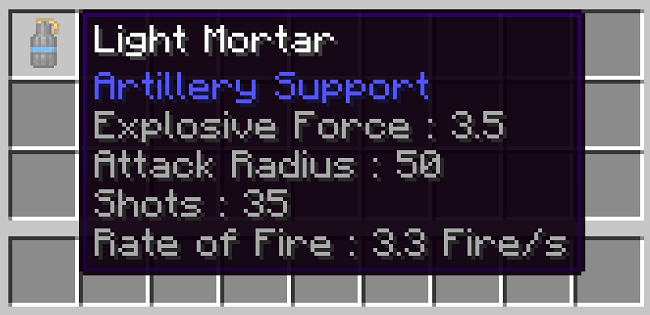
Explosive Force
Indicates the size and damage of the explosion. For reference, the Explosive Force of TNT is 4 and the Explosive Force of Charged Creeper is 6.
Attack Radius
The radius of the area over which the shell will fall.
Shots
Total number of shells fire in one request.
Rate of Fire
The number of shells fired per second.
Smoke bomb can increase the throwing distance by holding down the right mouse button for up to 5 seconds.
By increasing the Entity Distance value, shells can be seen from a long distance, allowing you to enjoy a more dynamic performance.

🚫Precautions for use
It can be requested artillery support outside of Over World, but Nether will not benefit from it because the attack will hit the Bedrock.
Because the projectile is forced to read chunks of the projectile's initial and current positions, even small values of Simulation Distance work correctly, but chunk reading becomes unstable when a large amount of bombardment support is requested in rapid succession.
Setting the Simulation Distance value to 18 or higher will stabilize the generation of the Projectile.
However, this setting is not required, as the generation of projectiles is not unstable within the expected range of use of Survival.
Improvements to chunk loading will continue in future updates.
Finally
Thank you for reading this far. If you have any problems or requests, please feel free to contact us.
Now, enjoy Artillery Support!
Project description from CurseForge.
Pick your setup
Artillery Support by Minecraft version and loader
Choose the version and loader you play, then open the matching release.
Check the dependencies, then try the file in a copied instance before changing a world you care about.
Recent files
Artillery Support versions and loaders
artillerysupport-1.3.4-forge-mc1.20.1.jar
1 Aug 2025
Client Source doesn’t say Server Source doesn’t say Dependencies No extras listed Listed on Release listing
Check the 1.20.1 · Forge setup 1.20.1Forge release
artillerysupport-1.3.3-forge-mc1.20.1.jar
16 Jan 2025
Client Source doesn’t say Server Source doesn’t say Dependencies No extras listed Listed on Release listing
Check the 1.20.1 · Forge setup 1.20.1Forge release
artillerysupport-1.3.2-forge-mc1.20.1.jar
5 Jan 2025
Client Source doesn’t say Server Source doesn’t say Dependencies No extras listed Listed on Release listing
Check the 1.20.1 · Forge setup 1.20.1Forge release
artillerysupport-1.3.1-forge-mc1.20.1.jar
3 Jan 2025
Client Source doesn’t say Server Source doesn’t say Dependencies No extras listed Listed on Release listing
Check the 1.20.1 · Forge setup 1.20.1Forge release
artillerysupport-1.3.0-forge-mc1.20.1.jar
1 Jan 2025
Client Source doesn’t say Server Source doesn’t say Dependencies No extras listed Listed on Release listing
Check the 1.20.1 · Forge setup 1.20.1Forge release
artillerysupport-1.2.2-forge-mc1.20.1.jar
27 Dec 2024
Client Source doesn’t say Server Source doesn’t say Dependencies No extras listed Listed on Release listing
Check the 1.20.1 · Forge setup 1.20.1Forge release
artillerysupport-1.2.1-forge-mc1.20.1.jar
26 Dec 2024
Client Source doesn’t say Server Source doesn’t say Dependencies No extras listed Listed on Release listing
Check the 1.20.1 · Forge setup 1.20.1Forge release
artillerysupport-1.2.0-forge-mc1.20.1.jar
26 Dec 2024
Client Source doesn’t say Server Source doesn’t say Dependencies No extras listed Listed on Release listing
Check the 1.20.1 · Forge setup 1.20.1Forge release
artillerysupport-1.1.1-forge-mc1.20.1.jar
24 Dec 2024
Client Source doesn’t say Server Source doesn’t say Dependencies No extras listed Listed on Release listing
Check the 1.20.1 · Forge setup 1.20.1Forge release
artillerysupport-1.1.0-forge-mc1.20.1.jar
24 Dec 2024
Client Source doesn’t say Server Source doesn’t say Dependencies No extras listed Listed on Release listing
Check the 1.20.1 · Forge setup 1.20.1Forge release
artillerysupport-1.0.3-forge-mc1.20.1.jar
23 Dec 2024
Client Source doesn’t say Server Source doesn’t say Dependencies No extras listed Listed on Release listing
Check the 1.20.1 · Forge setup 1.20.1Forge release
artillerysupport-1.0.2-forge-mc1.20.1.jar
23 Dec 2024
Client Source doesn’t say Server Source doesn’t say Dependencies No extras listed Listed on Release listing
Check the 1.20.1 · Forge setup 1.20.1Forge release
Looking for an older file? The official CurseForge project page is in Resources.
 mod
mod CurseForge + Modrinth · Minecraft
CBC: Terminal Ballistics (Offiical)
A create big cannon addon that overhaul the terminal ballistcis. Adding impact holes/ricochet marks, spalling mechanics, ductility and more
 mod
mod CurseForge · Minecraft
Vitalwane
A hardcore survival mod adding stamina, temperature, thirst, fatigue,sanity, and wound & infection systems.
 mod
mod Modrinth · Minecraft
Vein Miner
Viper Vein Miner is a lightweight, Server-Side vein-mining mod. Break one ore or log and mine its connected vein in a single action