Minecraft version
Back to mods 
CurseForge · Minecraft mod
Clean View [NeoForge]
Removes the vignette effect from your screen.
Choose a version Pick your version below, then grab the matching file.
Quick answer
Which Clean View [NeoForge] release should I use?
Latest stable file MC 26.3 | Mod version 2
Game version 26.3
Loader NeoForge
Clean View [NeoForge] MC 26.3 | Mod version 2 targets 26.3 with NeoForge. The project page does not say whether this file belongs on the client, dedicated server, or both. No extra mods listed for this file.
Where it goes
Is Clean View [NeoForge] required on the client, server, or both?
The project page does not say whether this file belongs on the client, dedicated server, or both.
Client Source doesn’t say
Dedicated server Source doesn’t say
Loader for this release NeoForge
Required install it here Optional supported, not mandatory Not supported do not install here Source doesn’t say do not assume
The source does not explicitly classify this release as client-only or server-only.
What else does Clean View [NeoForge] MC 26.3 | Mod version 2 need?
MC 26.3 | Mod version 2. Change the file and its required mods may change too.
This file does not list any required mods. Do not add a library just because a different file uses it.
This file does not list any required or optional mods.
Before you install it
Add Clean View [NeoForge] without breaking your instance.
Built for Clean View [NeoForge] MC 26.3 | Mod version 2. Pick another file and the loader, install side or required mods may change.
- 01
Stick to this file
Use MC 26.3 | Mod version 2. It targets 26.3 with NeoForge; another release may have different loader, side or dependency requirements.
- 02
Bring the mods it needs
This file does not list any required mods. Do not add a library just because a different file uses it.
- 03
Put it on the correct side
The project page does not say whether this file belongs on the client, dedicated server, or both.
- 04
Pick the file you checked
Use the “Get this file” button beside MC 26.3 | Mod version 2. It opens that exact file at the source.
About this project
What does Clean View [NeoForge] add?
CleanView
This mod removes the vignette effect around the edges of the screen. The vignette is the dark overlay that appears around the edges of your display.
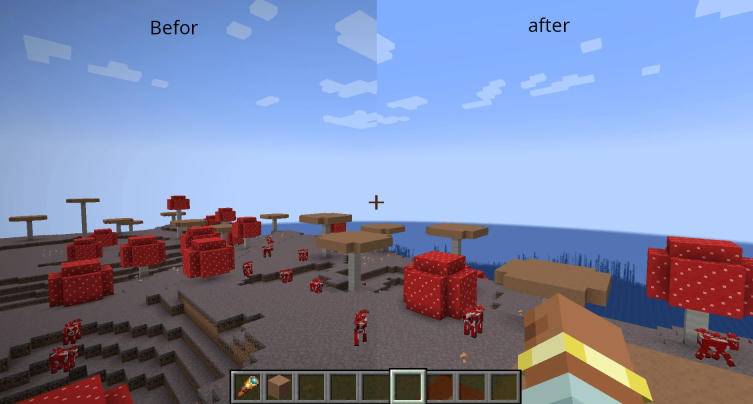
Additional Features
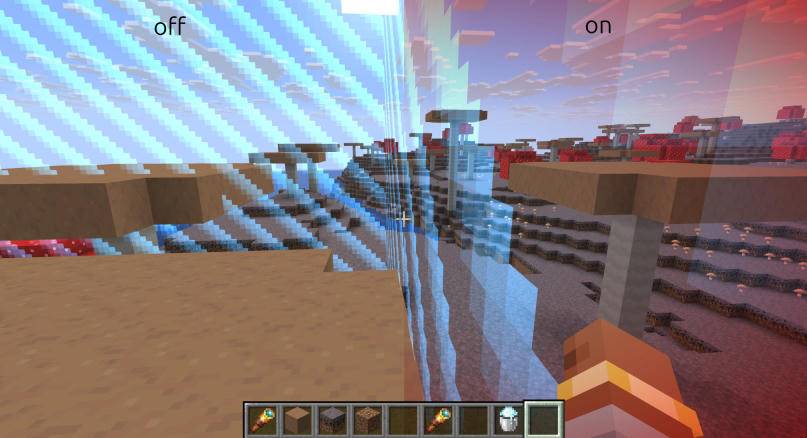
BoderVignette
This option allows you to keep the red vignette effect that appears when you get close to the world border.
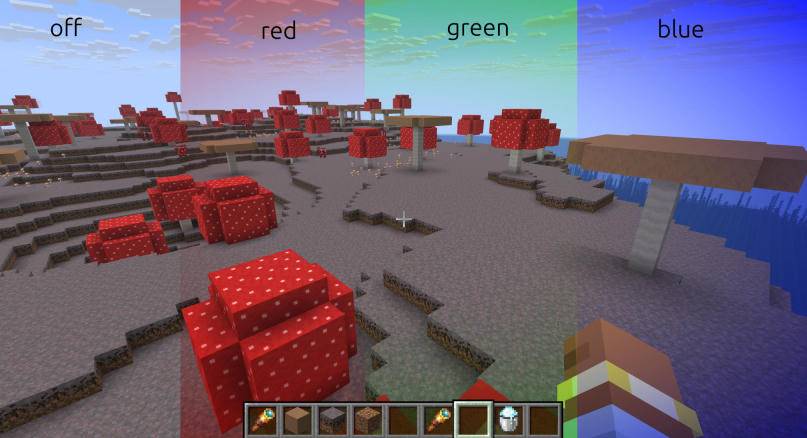
CustomVignetteColor
This option allows you to customize the vignette color using RGB values.
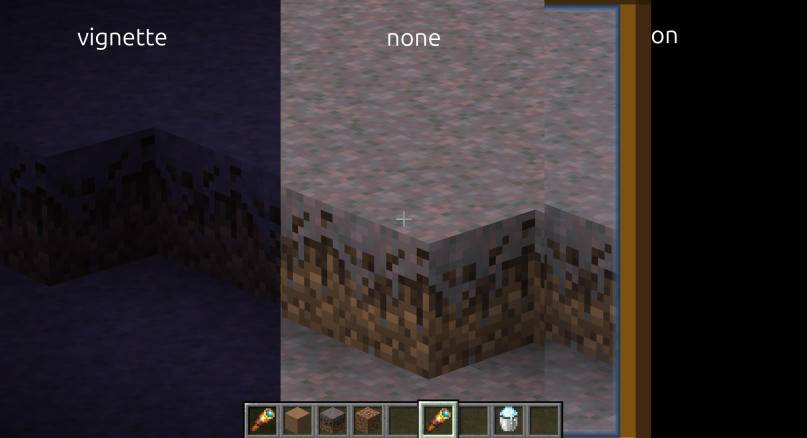
SpyglassEffekt
This option lets you choose whether the vignette effect should be displayed when looking through a spyglass. You can choose between the normal spyglass overlay, the vignette effect, or no overlay at all.
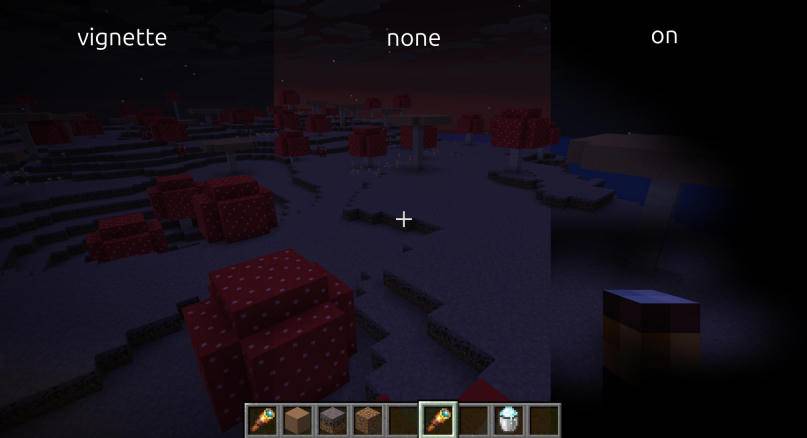
EquipmentEffekt
This option lets you choose how the screen should look when wearing equipment that applies a screen overlay, such as a carved pumpkin. You can choose between the normal overlay, a vignette effect, or no overlay at all.
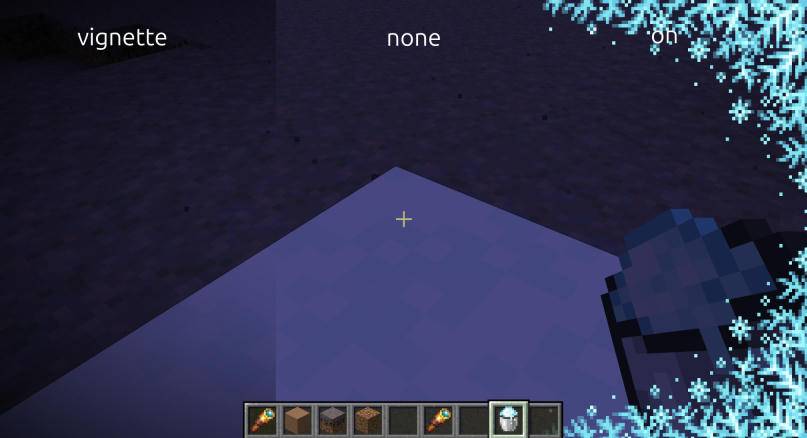
FreezingEffekt
This option lets you choose how the screen should look when you are freezing in powder snow. You can choose between the normal freezing overlay, a vignette effect, or no overlay at all.
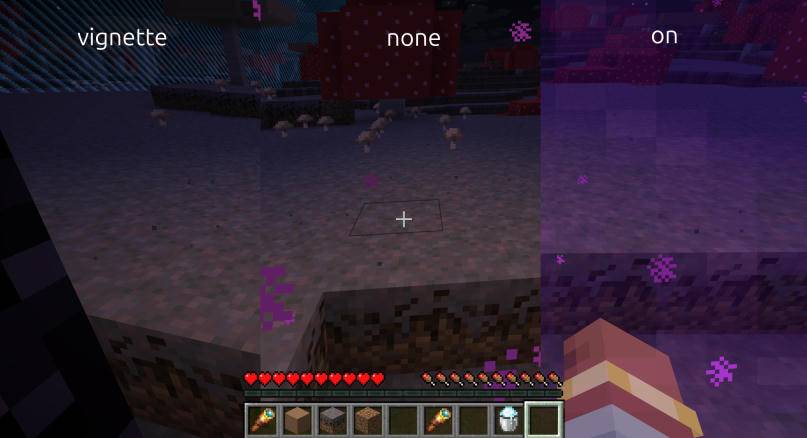
PortalEffekt
This option lets you choose how the screen should look when you are standing inside a portal. You can choose between the normal portal overlay, a vignette effect, or no overlay at all.
Project description from CurseForge.
Pick your setup
Clean View [NeoForge] by Minecraft version and loader
Choose the version and loader you play, then open the matching release.
Minecraft version
26.2
1 loader buildMinecraft version
26.1.2
1 loader buildMinecraft version
26.1.1
1 loader buildMinecraft version
26.1
1 loader buildMinecraft version
1.21.11
1 loader buildMinecraft version
1.21.10
1 loader buildMinecraft version
1.21.9
1 loader buildMinecraft version
1.21.8
1 loader buildMinecraft version
1.21.7
1 loader buildMinecraft version
1.21.6
1 loader buildMinecraft version
1.21.5
1 loader buildShowing the newest 12 of 22 game versions. Older files are in the list below.
Check the dependencies, then try the file in a copied instance before changing a world you care about.
Recent files
Clean View [NeoForge] versions and loaders
MC 26.3 | Mod version 2
cleanview 26.3 V2.jar
28 Oct 2026
Client Source doesn’t say Server Source doesn’t say Dependencies No extras listed Listed on Release listing
Check the 26.3 · NeoForge setup NeoForge26.3 release
MC 26.2 | Mod version 2
cleanview 26.2 V2.jar
28 Oct 2026
Client Source doesn’t say Server Source doesn’t say Dependencies No extras listed Listed on Release listing
Check the 26.2 · NeoForge setup NeoForge26.2 release
MC 26.1 - 26.1.2 | Mod version 2
cleanview 26.1 - 26.1.2 V2.jar
28 Oct 2026
Client Source doesn’t say Server Source doesn’t say Dependencies No extras listed Listed on Release listing
Check the 26.1.2 · NeoForge setup NeoForge26.126.1.126.1.2 release
MC 1.21 | Mod version 2
cleanview 1.21 V2.jar
28 Oct 2026
Client Source doesn’t say Server Source doesn’t say Dependencies No extras listed Listed on Release listing
Check the 1.21 · NeoForge setup 1.21NeoForge release
MC 1.21.11 | Mod version 2
cleanview 1.21.11 V2.jar
28 Oct 2026
Client Source doesn’t say Server Source doesn’t say Dependencies No extras listed Listed on Release listing
Check the 1.21.11 · NeoForge setup NeoForge1.21.11 release
MC 1.21.6 - 1.21.10 | Mod version 2
cleanview 1.21.6 - 1.21.10 V2.jar
28 Oct 2026
Client Source doesn’t say Server Source doesn’t say Dependencies No extras listed Listed on Release listing
Check the 1.21.10 · NeoForge setup 1.21.81.21.61.21.7NeoForge release
MC 1.21.5 | Mod version 2
cleanview 1.21.5 V2.jar
28 Oct 2026
Client Source doesn’t say Server Source doesn’t say Dependencies No extras listed Listed on Release listing
Check the 1.21.5 · NeoForge setup 1.21.5NeoForge release
MC 1.21.2 - 1.21.4 | Mod version 2
cleanview 1.21.2 - 1.21.4 V2.jar
28 Oct 2026
Client Source doesn’t say Server Source doesn’t say Dependencies No extras listed Listed on Release listing
Check the 1.21.4 · NeoForge setup 1.21.41.21.3NeoForge1.21.2 release
MC 1.21.1 | Mod version 2
cleanview 1.21.1 V2.jar
28 Oct 2026
Client Source doesn’t say Server Source doesn’t say Dependencies No extras listed Listed on Release listing
Check the 1.21.1 · NeoForge setup 1.21.1NeoForge release
MC 1.20.5 - 1.20.6 | Mod version 2
cleanview 1.20.5 - 1.20.6 V2.jar
28 Oct 2026
Client Source doesn’t say Server Source doesn’t say Dependencies No extras listed Listed on Release listing
Check the 1.20.6 · NeoForge setup 1.20.51.20.6NeoForge release
MC 26.2 - 3 | Mod version 1
cleanview 26.2 - 26.3 V1.jar
19 Sept 2026
Client Source doesn’t say Server Source doesn’t say Dependencies No extras listed Listed on Release listing
Check the 26.3 · NeoForge setup NeoForge26.226.3 release
MC 26.2 | Mod version 1
cleanview 26.2 V1.jar
2 Jul 2026
Client Source doesn’t say Server Source doesn’t say Dependencies No extras listed Listed on Release listing
Check the 26.2 · NeoForge setup NeoForge26.2 release
Looking for an older file? The official CurseForge project page is in Resources.
 mod
CurseForge · Minecraft
Instantly Destroy Tree :Clear Path for Horse Riding
fastor than Treecapitator or Lumberjack , efficient terraforming. Like VeinMiner, our Demolish Axe instantly removes trees. It offers fast logging with zero wait. Leaving zero items,Clear Obstacles,Instant Break,Fast Logging
 mod
CurseForge · Minecraft
AppliedSwatches - AE2 Addon
Pick a colour or theme and pull matching blocks straight out of your Applied Energistics 2 network.
 mod
CurseForge · Minecraft
FFItemWeight
Adds weight and encumbrance built dynamically from crafting recipes and data. Insanely configurable.