GroovyScript Optional for SelectionGUI Crafting - Continued selectionguicrafting-2.0.2.jar
optionalMatching file found Matched file: GroovyScript − 1.4.3
CurseForge · Minecraft mod
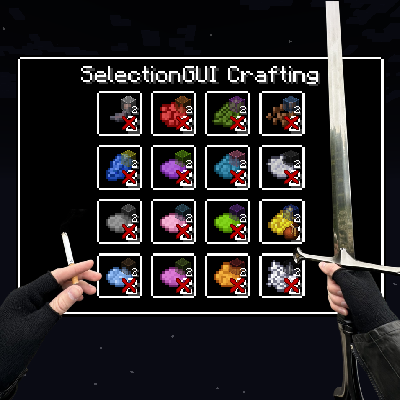
Modpack tool that allows crafting with the items you hold in your hands. All possible recipes are shown in a neat GUI, where multiple crafts can be queued at once. Comes with GroovyScript and CraftTweaker support.
Quick answer
SelectionGUI Crafting - Continued selectionguicrafting-2.0.2.jar targets 1.12.2 with Forge. The project page does not say whether this file belongs on the client, dedicated server, or both. No extra mods listed for this file.
Where it goes
The project page does not say whether this file belongs on the client, dedicated server, or both.
The source does not explicitly classify this release as client-only or server-only.
selectionguicrafting-2.0.2.jar. Change the file and its required mods may change too.
This file does not list any required mods. Do not add a library just because a different file uses it.
22 extra mods were pulled in by other dependencies. Indented rows show who needs each one. We only count dependency files that match this setup. A file for another loader does not fill the gap.
Before you install it
Built for SelectionGUI Crafting - Continued selectionguicrafting-2.0.2.jar. Pick another file and the loader, install side or required mods may change.
Use selectionguicrafting-2.0.2.jar. It targets 1.12.2 with Forge; another release may have different loader, side or dependency requirements.
This file does not list any required mods. Do not add a library just because a different file uses it.
The project page does not say whether this file belongs on the client, dedicated server, or both.
Use the “Get this file” button beside selectionguicrafting-2.0.2.jar. It opens that exact file at the source.
About this project
This is a fork of Selection GUI Crafting by Gliese_832_c.
What started as a fork of the original mod, quickly turned into a rewrite. The original crafting system felt way to clunky and not user-friendly. The new system is much more intuitive and user-friendly. It also allows much more customization and is more flexible to benefit the needs of modpack developers. An added bonus is the support for GroovyScript. The old CraftTweaker support was rewritten as well to reflect the new system.
Yep another rewrite. Now I finally took the time to transform the mod into something much more modular. So now GUIs can be opened either by items or blocks, each 'trigger' can tweaks the overall stats of the recipes. Additionally there are now ways to restrict recipes, for example you can now lock recipes behind Game Stages, Reskillable skill levels and even advancements. Furthermore I added the possibility to execute a set of commands if the general recipe builder wasn't powerful enough. This update also comes with an overhauled JEI integration and various other quality of life improvements!
SelectionGUI Crafting gives modpack authors the ability to add crafting recipes into a selection GUI that is triggered by right-clicking while holding the right items. This could, for example, be used for clay recipes. Instead of manually arranging clay balls in a different way in a crafting table, it would be possible to make it so that you right-click with a spatula in one hand, clay in the other, and just select the clay item you want to make. Another use example would be forging. Right-click with a hammer in one hand, an ingot in the other, and select your desired toolhead.
I tried to make them as similar as possible. I'll publish additional documentation to the GroovyScript wiki as well as the CraftTweaker wiki. Below are a few examples, while I'll setup proper documentation.
val test = mods.selectionguicrafting.category.categoryBuilder();
test.id("test");
test.trigger(<minecraft:apple>);
test.trigger(<minecraft:diamond_pickaxe>, 10.0, 0.1, 10.0);
test.trigger(<minecraft:grass>.asBlock(), 2.0, 2.0, 2.0);
test.register();

val myRecipe = mods.selectionguicrafting.recipe.recipeBuilder();
myRecipe.category("test");
myRecipe.output(<minecraft:sand> * 2);
myRecipe.input(<minecraft:snow> * 3);
myRecipe.input(<ore:blockGlass>);
myRecipe.input(<minecraft:diamond_pickaxe>, 10);
myRecipe.register();

mods.selectionguicrafting.recipe.recipeBuilder().category("test").output(<minecraft:dirt> * 5).input(<minecraft:stone> * 2).input(<minecraft:cobblestone> * 2).gamestage(["my_first_stage"]).skill("reskillable.farming", 4).register();

mods.selectionguicrafting.recipe.recipeBuilder().category("test").output(<minecraft:diamond> * 2).input(<minecraft:gold_ingot> * 2).mainHand(<minecraft:diamond_pickaxe>, 5).gamestage(["my_second_stage"]).advancement(["minecraft:adventure/adventuring_time"]).register();
Crafting Category:
All recipes in the mod are divided into categories. Each category has its own set of recipes. Each category can have its own texture for the background, border, frame, decoration, and progress bar. The category can also have its own sounds, particles, can specify how the sounds are played, if recipes in the category can be added to the crafting queue, and how the output items are handed to the player.

mods.selectionguicrafting.category.removeByName('dummy_category_1')
// mods.selectionguicrafting.category.removeAll()

mods.selectionguicrafting.category.categoryBuilder()
    .id('dummy_category')
    .trigger(item('minecraft:diamond'))
    .background('selectionguicrafting:textures/gui/background/wood.png')
    .register()

mods.selectionguicrafting.category.categoryBuilder()
    .id('blub')
    .trigger(item('minecraft:stone_shovel'))
    .background('selectionguicrafting:textures/gui/background/lake.png')
    .backgroundType('SINGLE_CUT')
    .register()

mods.selectionguicrafting.category.categoryBuilder()
    .id('dead')
    .trigger(block('minecraft:snow'))
    .background('selectionguicrafting:textures/gui/background/deadlands.png')
    .decoration('selectionguicrafting:textures/gui/decor/gold.png')
    .border('selectionguicrafting:textures/gui/background/wood.png')
    .backgroundType('SINGLE_CUT')
    .register()


Crafting Recipe:
Creates a recipe that is shown in the specified category. Each recipe requires at least an input and output. There can also be an optional input for either hand. The recipe can have its own frame, sounds, particles, progress bar, can specify how the sounds are played, if the recipe can be added to the crafting queue, how the output items are handed to the player, how much durability is consumed if the tool is a damageable item, the crafting time, and how much XP is rewarded. Most of these have a fallback to the category settings.

// mods.selectionguicrafting.recipe.removeByCategory('dummy_category')
mods.selectionguicrafting.recipe.removeByInput(item('minecraft:cobblestone'))
mods.selectionguicrafting.recipe.removeByOutput(item('minecraft:stone'))
// mods.selectionguicrafting.recipe.removeAll()

mods.selectionguicrafting.recipe.recipeBuilder()
    .category('dummy_category')
    .input(item('minecraft:stone') * 3)
    .output(item('minecraft:cobblestone') * 2, 0.5f)
    .time(200)
    .xp(1)
    .sound('minecraft:block.anvil.land', 1.0f, 1.0f)
    .register()

mods.selectionguicrafting.recipe.recipeBuilder()
    .category('blub')
    .input(item('minecraft:diamond'))
    .output(item('minecraft:wheat_seeds') * 5, 0.5f)
    .register()

mods.selectionguicrafting.recipe.recipeBuilder()
    .category('dummy_category')
    .input(item('minecraft:stone') * 32)
    .output(item('minecraft:diamond') * 50, 0.5f)
    .output(item('minecraft:clay') * 2, 0.1f)
    .time(200)
    .xp(1)
    .sound('minecraft:block.anvil.land', 1.0f, 1.0f)
    .register()

mods.selectionguicrafting.recipe.recipeBuilder()
    .category('dead')
    .input(item('minecraft:wheat_seeds') * 3)
    .output(item('minecraft:sand') * 2)
    .time(40)
    .queueable(false)
    .outputType('DROP')
    .xp(1)
    .register()

mods.selectionguicrafting.recipe.recipeBuilder()
    .category('dead')
    .input(item('minecraft:stick') * 3)
    .output(item('minecraft:sand') * 2)
    .frame('selectionguicrafting:textures/gui/frame/iron.png')
    .time(40)
    .queueable(false)
    .command('kill @p')
    .register()
Project description from CurseForge.
Pick your setup
Choose the version and loader you play, then open the matching release.
Check the dependencies, then try the file in a copied instance before changing a world you care about.
Recent files
2 Jun 2025
27 Jan 2025
24 Jan 2025
23 Jan 2025
Looking for an older file? The official CurseForge project page is in Resources.
 mod
modEnhances pickaxes with custom 3x3/5x5 area mining, vein mining, and instant ore smelting enchantments integrated into natural villager trading.
 mod
modThis mod adds over 80+ powers into your world including heroes from the Incredibles, The Boys and The Dc Universes!
 mod
modAnimation studio and content creation tool