Quick answer
Which RandomComplement release should I use?
Latest stable file random_complement-1.9.6.jar
Game version 1.12.2
Loader Forge
RandomComplement random_complement-1.9.6.jar targets 1.12.2 with Forge. The project page does not say whether this file belongs on the client, dedicated server, or both. All 1 required mods have matching files.
Where it goes
Is RandomComplement required on the client, server, or both?
The project page does not say whether this file belongs on the client, dedicated server, or both.
Client Source doesn’t say
Dedicated server Source doesn’t say
Loader for this release Forge
Required install it here Optional supported, not mandatory Not supported do not install here Source doesn’t say do not assume
The source does not explicitly classify this release as client-only or server-only.
What else does RandomComplement random_complement-1.9.6.jar need?
random_complement-1.9.6.jar. Change the file and its required mods may change too.
Install MixinBooter first. We found matching files for this game-version and loader setup. 10 come through another mod in the chain.
14 listed on this file 10 pulled in by those mods
Matching file found Matched file: Fluid Craft for AE2-2.6.6-r.jar
Matching file found Matched file: thaumic-energistics-extended-life-1.12.2-2.5.2.jar
Matching file found Matched file: 1.12.2-1.0.3.33
Matching file found Matched file: 1.12.2-1.0.3.25
PackagedAstral Optional for RandomComplement random_complement-1.9.6.jar optionalMatching file found Matched file: 1.12.2-1.0.5.24
Lazy AE2 Optional for RandomComplement random_complement-1.9.6.jar optionalNo matching file
Matching file found Matched file: 1.12.2-1.0.4.24
MixinBooter Needed by RandomComplement random_complement-1.9.6.jar requiredMatching file found Matched file: MixinBooter 11.15
Matching file found Matched file: Draconic-Evolution-1.12.2-2.3.28.354-universal.jar
Matching file found Matched file: AE2 Extended Crafting Table − v1.0.8
Botania Optional for RandomComplement random_complement-1.9.6.jar optionalMatching file found Matched file: Botania r1.10-364.4.jar
Matching file found Matched file: AE2 Unofficial Extended Life − v0.56.6
Matching file found Matched file: 2.3.2-Archive
Matching file found Matched file: NotEnoughEnergistics-1.12.2-2.0.9.jar
Matching file found Matched file: Neeve's AE2: Extended Life Additions: 1.6.4
Matching file found Matched file: Mekanism CE 9.12.14 Core
Matching file found Matched file: GregTech: 2.8.10-beta
Matching file found Matched file: Mekanism-CE-Unofficial-All-10.0.2.540.jar
Matching file found Matched file: MekanismEnergistics-0.1.5.jar
Thaumcraft Needed by Thaumic Energistics Extended Life pulled inNo matching file
Matching file found Matched file: 1.12.2-1.0.24.73
No matching file
No matching file
No matching file
10
extra mods were pulled in by other dependencies.
Indented rows show who needs each one. We only count dependency files that match this setup. A file for another loader does not fill the gap.
Before you install it
Add RandomComplement without breaking your instance.
Built for RandomComplement random_complement-1.9.6.jar. Pick another file and the loader, install side or required mods may change.
- 01
Stick to this file
Use random_complement-1.9.6.jar. It targets 1.12.2 with Forge; another release may have different loader, side or dependency requirements.
- 02
Bring the mods it needs
Install MixinBooter first. We found matching files for this game-version and loader setup. 10 come through another mod in the chain.
- 03
Put it on the correct side
The project page does not say whether this file belongs on the client, dedicated server, or both.
- 04
Pick the file you checked
Use the “Get this file” button beside random_complement-1.9.6.jar. It opens that exact file at the source.
About this project
What does RandomComplement add?
RandomComplement (1.12)
Some fixes and content expansion
Requires MixinBooter version 8.0 or higher
What has this mod done so far?
- For AE2UEL:
- Allows players to use the vanilla PickBlock Key to retrieve items from their Wireless Terminal's network and place them directly into their hand. Just like in Creative Mode!(Of course, items will be deducted from your network)
- Ported the new version of AE2's additional rendering effects for craftable items,Also supports AE2FCR's Fluid Pattern Terminal.
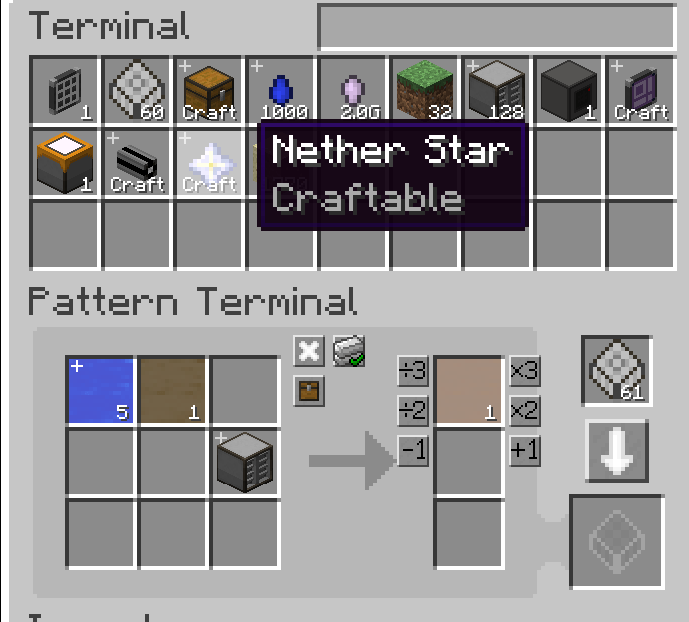
- Automatically fill blank patterns into the Pattern Terminal.
- Now displays the currently crafting item at the front of the interface and renders an additional texture for it, Added configuration option to switch between different texture displays.
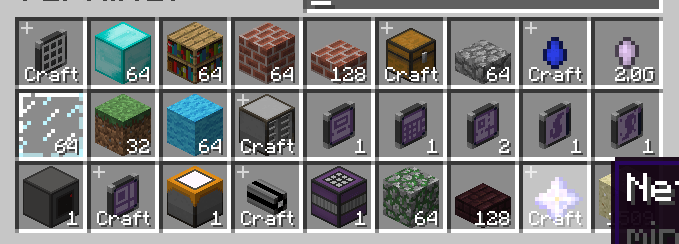
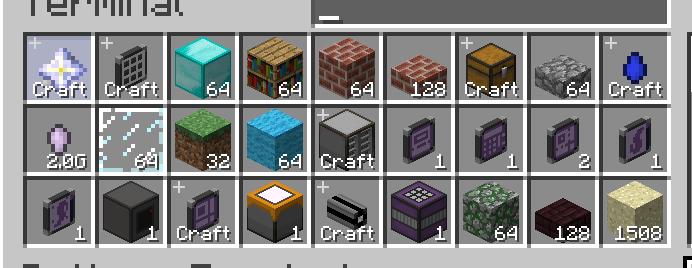
- Ported nearly all features from the 1.19+ Inscriber;
- Changed the time display in Crafting Status to show elapsed time instead;
- Creative ME Storage Cell now maintains a capacity of 2^52-1.
- The feature allows using JEI bookmarks to request crafting from AE networks or retrieve items from AE networks, which can be configured via keybindings in the controls menu. When not in an AE GUI interface, requests will be directed to carried Wireless Terminals. If a single network cannot provide sufficient items, the system will automatically search other connected Wireless Terminals..
- Don't require power to connect QNBs
- You can install it using the ME Storage Component right-click Crafting Unit, and detach it when performing shift right-click
- Intelligent Blocking Mode
- For MMCE:
- ME Machinery Pattern Provider joins AE2 interface terminal! While custom naming is not supported, the ME Machinery Pattern Provider within the Interface Terminal will dynamically render its designated name from the Modular Machinery.
- Conducted bug fixes for the compatibility between MMCE Structure Preview and the Pattern Terminal support.
- For Botania:
- Allow flor geradora to directly link to the mana pool
- Allow the use of sparks on Runic Alta
- Allow the use of sparks on Botanical Brewery
- By default, they are turned off and you need to go to config to open them yourself
- Fix bug in AE2FluidCraft-Rework (#175,PR Already created,After the version update, it will be removed)
- Related projects with NotEnoughEnergistics:
- The compatibility with Extended Crafting Terminals for Applied Energistics 2 has been added. Now you can use Ctrl+click on [+] to request the items.
- Fixed an issue where the AE2UEL Wireless Crafting Terminal placed in the bauble slot could not request items when opened with the hotkey and using Ctrl+click [+], (this might have broken compatibility with the Wireless Crafting Terminal from WCT, not yet tested).
- Set the Package Crafter in the extension of PackagedAuto (such as PackagedExCrafting) to the corresponding Recipe Catalyst of JEIRecipe.
- Set the Terminal in the Extended Crafting Terminals for Applied Energistics 2 to the corresponding Recipe Catalyst of JEIRecipe.(1.0.1)
- Added a configuration option to disable the build permission for AE2's ME Security Terminal, as this feature provides no practical benefit and can be inconvenient. :)
- ……..More may be done in the future
You can freely add it to your modpack,as long as you indicate the source
Project description from CurseForge.
Pick your setup
RandomComplement by Minecraft version and loader
Choose the version and loader you play, then open the matching release.
Minecraft version
1.12.2
1
loader build Check the dependencies, then try the file in a copied instance before changing a world you care about.
Recent files
RandomComplement versions and loaders
27 Jul 2026
Client Source doesn’t say Server Source doesn’t say Dependencies 1 required · 1 unchecked Listed on Release listing
Check the 1.12.2 · Forge setup → 15 Jul 2026
Client Source doesn’t say Server Source doesn’t say Dependencies 1 required · 1 unchecked Listed on Release listing
Check the 1.12.2 · Forge setup → random_complement-1.9.3.jar
2 May 2026
Client Source doesn’t say Server Source doesn’t say Dependencies 1 required · 1 unchecked Listed on Release listing
Check the 1.12.2 · Forge setup → 26 Apr 2026
Client Source doesn’t say Server Source doesn’t say Dependencies 1 required · 1 unchecked Listed on Release listing
Check the 1.12.2 · Forge setup → 11 Apr 2026
Client Source doesn’t say Server Source doesn’t say Dependencies 1 required · 1 unchecked Listed on Release listing
Check the 1.12.2 · Forge setup → random_complement-1.9.0.jar
12 Mar 2026
Client Source doesn’t say Server Source doesn’t say Dependencies 1 required · 1 unchecked Listed on Release listing
Check the 1.12.2 · Forge setup → 22 Dec 2025
Client Source doesn’t say Server Source doesn’t say Dependencies 1 required · 1 unchecked Listed on Release listing
Check the 1.12.2 · Forge setup → 21 Dec 2025
Client Source doesn’t say Server Source doesn’t say Dependencies 1 required · 1 unchecked Listed on Release listing
Check the 1.12.2 · Forge setup → 16 Dec 2025
Client Source doesn’t say Server Source doesn’t say Dependencies 1 required · 1 unchecked Listed on Release listing
Check the 1.12.2 · Forge setup → 
 mod
mod mod
mod mod
mod