Minecraft version
Back to mods 
CurseForge · Minecraft mod
UnralCore
Use custom GUI, HUD, and Model on the plugin server.
Choose a version Pick your version below, then grab the matching file.
Quick answer
Which UnralCore release should I use?
beta file UnrealCore-Plugin-2.0-beta82.jar
Game version 1.20.2
Loader Forge
UnralCore UnrealCore-Plugin-2.0-beta82.jar targets 1.20.2 with Forge. The project page does not say whether this file belongs on the client, dedicated server, or both. No extra mods listed for this file.
Where it goes
Is UnralCore required on the client, server, or both?
The project page does not say whether this file belongs on the client, dedicated server, or both.
Client Source doesn’t say
Dedicated server Source doesn’t say
Loader for this release Forge
Required install it here Optional supported, not mandatory Not supported do not install here Source doesn’t say do not assume
The source does not explicitly classify this release as client-only or server-only.
What else does UnralCore UnrealCore-Plugin-2.0-beta82.jar need?
UnrealCore-Plugin-2.0-beta82.jar. Change the file and its required mods may change too.
This file does not list any required mods. Do not add a library just because a different file uses it.
This file does not list any required or optional mods.
Before you install it
Add UnralCore without breaking your instance.
Built for UnralCore UnrealCore-Plugin-2.0-beta82.jar. Pick another file and the loader, install side or required mods may change.
- 01
Stick to this file
Use UnrealCore-Plugin-2.0-beta82.jar. It targets 1.20.2 with Forge; another release may have different loader, side or dependency requirements.
- 02
Bring the mods it needs
This file does not list any required mods. Do not add a library just because a different file uses it.
- 03
Put it on the correct side
The project page does not say whether this file belongs on the client, dedicated server, or both.
- 04
Pick the file you checked
Use the “Get this file” button beside UnrealCore-Plugin-2.0-beta82.jar. It opens that exact file at the source.
About this project
What does UnralCore add?
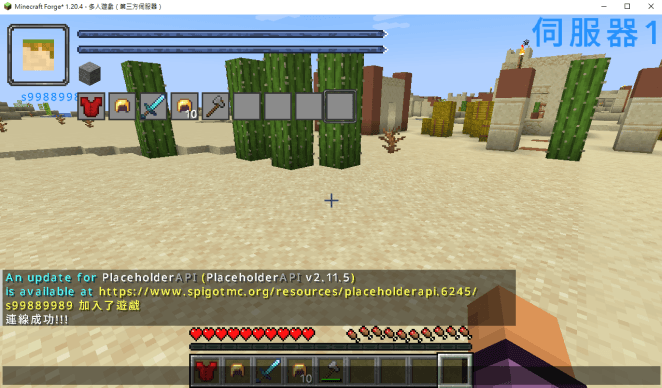
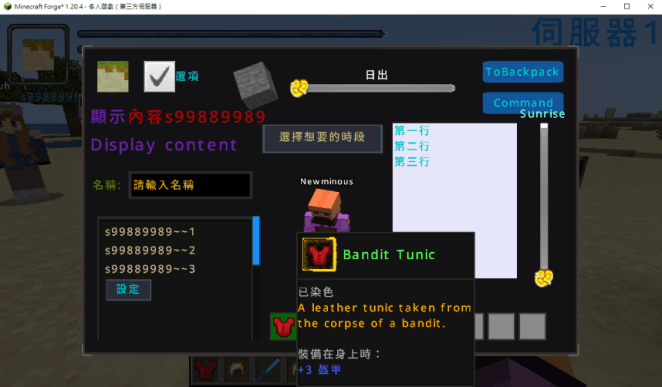
UnrealCore is a client-side Minecraft mod designed to work with server-side plugins, providing features such as custom GUI, HUD displays, and entity model modifications. This mod itself does not directly alter the game but serves as a framework that allows compatible server plugins to function.
Features
- Custom GUI & HUD – Servers can dynamically display custom interfaces, including buttons, icons, health bars, and more.
- Entity Model Modification – Allows servers to modify player and entity models, supporting unique appearances and animations.
- Optimized Client-Side Rendering – Reduces server load by handling rendering on the client side, improving game performance.
- Video Playback Support – Works with the WATERMeDIA mod to enable video playback (e.g., fullscreen animations or in-game screen displays).
How It Works?
Installing UnrealCore alone does not change the game in any way. To enable its features, server administrators must install UnrealCore-Plugin and its dependent plugins. These plugins provide functionalities such as GUI rendering, HUD effects, and model modifications.
Impact on Player Experience
Players do not need to perform any manual actions. By simply installing the UnrealCore mod, they can experience enhanced gameplay on supported servers, including custom UI, dynamic HUD elements, and immersive entity models.
UnrealCore 是一款 Minecraft 客戶端模組,專為 伺服器端插件 設計,提供 自訂 GUI、HUD 介面 以及 實體模型變更 的功能。此模組本身不會直接改變遊戲內容,而是作為 基礎框架,讓支援 UnrealCore 的伺服器插件發揮作用。
模組功能
- 自訂 GUI & HUD:伺服器可動態顯示自訂介面,如按鈕、圖示、血量條等。
- 實體模型變更:允許伺服器修改玩家與實體的模型,支援獨特外觀與動畫。
- 高效能客戶端渲染:透過客戶端渲染技術減少伺服器負擔,提高遊戲流暢度。
- 影片播放支援:搭配 WATERMeDIA 模組 可播放影片(如全螢幕動畫或遊戲內螢幕顯示)。
如何運作?
安裝 UnrealCore 後,遊戲本身不會有任何變化。伺服器管理員需安裝 UnrealCore-Plugin 及附屬插件,才能啟用各種自訂功能,例如 GUI 顯示、HUD 效果與模型變更等。
對玩家的影響
玩家不需要手動操作,只需安裝 UnrealCore 模組,便可在支援此系統的伺服器內享受更豐富的遊戲體驗,如專屬 UI、動態 HUD 顯示以及更具沉浸感的自訂角色模型。
Project description from CurseForge.
Pick your setup
UnralCore by Minecraft version and loader
Choose the version and loader you play, then open the matching release.
Check the dependencies, then try the file in a copied instance before changing a world you care about.
Recent files
UnralCore versions and loaders
UnrealCore-Plugin-2.0-beta82.jar
19 Feb 2025
Client Source doesn’t say Server Source doesn’t say Dependencies No extras listed Listed on Release listing
Check the 1.20.2 · Forge setup 1.20.2Forge beta
Looking for an older file? The official CurseForge project page is in Resources.
 mod
CurseForge + Modrinth · Minecraft
Runeborn | Soulslike RPG progression
A soulslike RPG overhaul: earn runes, level eight attributes at Ember Shrines, wield 74 scaling armaments and hunt seven Sovereigns.
 mod
CurseForge + Modrinth · Minecraft
Re:Animal
Intelligent new animals that make the world livelier
 mod
CurseForge · Minecraft
Extra Vanilla Mobs (Java)
Adds 22 New Mobs Into Minecraft Using The Classic Vanilla Style (Originally a Bedrock Addon)