Fabric API Needed by Notch, Please! 1.0.1 for Fabric 26.1.x
requiredMatching file found Matched file: [26.1.2] Fabric API 0.155.2+26.1.2

CurseForge · Minecraft mod
A simple Fabric mod for Minecraft 1.21.4 – 1.21.11 that aims to make vanilla UI elements fit better on Apple's notched MacBooks.
Quick answer
Notch, Please! 1.0.1 for Fabric 26.1.x targets 26.1, 26.1.1, 26.1.2 with Fabric. The project page does not say whether this file belongs on the client, dedicated server, or both. All 1 required mods have matching files.
Where it goes
The project page does not say whether this file belongs on the client, dedicated server, or both.
The source does not explicitly classify this release as client-only or server-only.
Notch, Please! 1.0.1 for Fabric 26.1.x. Change the file and its required mods may change too.
Install Fabric API first. We found matching files for this game-version and loader setup.
We only count dependency files that match this setup. A file for another loader does not fill the gap.
Before you install it
Built for Notch, Please! 1.0.1 for Fabric 26.1.x. Pick another file and the loader, install side or required mods may change.
Use Notch, Please! 1.0.1 for Fabric 26.1.x. It targets 26.1, 26.1.1, 26.1.2 with Fabric; another release may have different loader, side or dependency requirements.
Install Fabric API first. We found matching files for this game-version and loader setup.
The project page does not say whether this file belongs on the client, dedicated server, or both.
Use the “Get this file” button beside Notch, Please! 1.0.1 for Fabric 26.1.x. It opens that exact file at the source.
About this project
A simple Fabric mod for Minecraft 1.21.4 – 1.21.11 that aims to make vanilla UI elements fit better on Apple's notched MacBooks when in fullscreen mode.
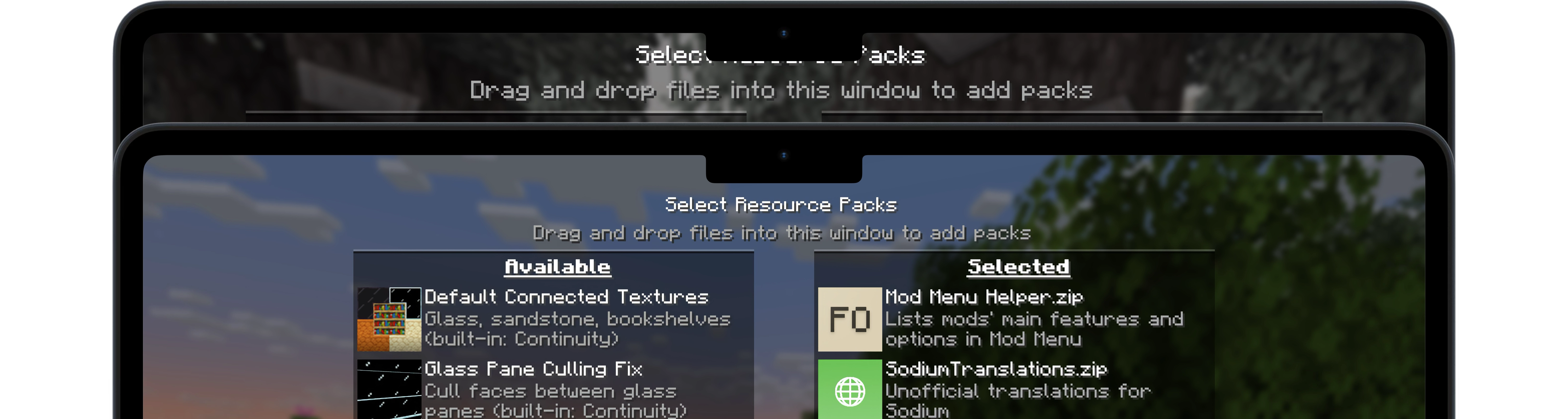
Notch, Please! requires the Fabric mod loader & the Fabric API.
Notch, Please! is designed specifically for MacBooks with display notches (M1 Pro, M2 and later) running macOS.
Since macOS's default fullscreen mode doesn't allow the game to extend into the notched area, you'll first need to enable Fullscreen under Options → Video Settings.
Then, make sure your screen resolution is set to something like 2560x1664 (not the notch-less 2560x1600) to take full advantage of the available space.
Once that's set up, I recommend using RenderScale to reduce your resolution to Retina levels (typically by half). This can significantly improve performance with little to no visible loss in quality on a MacBook display.
Except where otherwise stated, the content of this repository is provided under the GPL v3 license by namekeptanonymous.
Project description from CurseForge.
Pick your setup
Choose the version and loader you play, then open the matching release.
Check the dependencies, then try the file in a copied instance before changing a world you care about.
Recent files
notchplease-1.0.1-26.1-26.1.2.jar
10 Aug 2026
notchplease-0.2.1-1.21.11.jar
9 Aug 2026
notchplease-0.2.1-1.21.9-10.jar
5 Nov 2025
notchplease-0.2.1-1.21.6-8.jar
11 Aug 2025
notchplease-0.2.1-1.21.4-5.jar
11 Aug 2025
notchplease-0.2-1.21.6-8.jar
11 Aug 2025
notchplease-0.2-1.21.4-5.jar
11 Aug 2025
notchplease-0.1-1.21.6-7.jar
11 Aug 2025
notchplease-0.1-1.21.4-5.jar
11 Aug 2025
Looking for an older file? The official CurseForge project page is in Resources.
 mod
modReduce MSPT spikes and server freezes caused by chunk generation and speed it up.
 mod
modthis is a mod to fix Spiffy hud with moded elements!
 mod
modSpeed up Hoppers and add classification function to it!