Marium's Soulslike Weaponry Optional for Miner's Compas miners-compass-2.0.0+1.20.1.jar
optionalMatching file found Matched file: [1.20.1] SW-1.4.10 fabric
CurseForge · Minecraft mod
The Miner's Compass is an innovative tool designed for the savvy Minecraft miner. With its unique functionality, this compass is not just a direction finder but a game-changer in your mining adventures.
Quick answer
Miner's Compas miners-compass-2.0.0+1.20.1.jar targets 1.20.2, 1.20.5, 1.20.2-Snapshot with Fabric. The project page does not say whether this file belongs on the client, dedicated server, or both. No extra mods listed for this file.
Where it goes
The project page does not say whether this file belongs on the client, dedicated server, or both.
The source does not explicitly classify this release as client-only or server-only.
miners-compass-2.0.0+1.20.1.jar. Change the file and its required mods may change too.
This file does not list any required mods. Do not add a library just because a different file uses it.
9 extra mods were pulled in by other dependencies. Indented rows show who needs each one. We only count dependency files that match this setup. A file for another loader does not fill the gap.
Before you install it
Built for Miner's Compas miners-compass-2.0.0+1.20.1.jar. Pick another file and the loader, install side or required mods may change.
Use miners-compass-2.0.0+1.20.1.jar. It targets 1.20.2, 1.20.5, 1.20.2-Snapshot with Fabric; another release may have different loader, side or dependency requirements.
This file does not list any required mods. Do not add a library just because a different file uses it.
The project page does not say whether this file belongs on the client, dedicated server, or both.
Use the “Get this file” button beside miners-compass-2.0.0+1.20.1.jar. It opens that exact file at the source.
About this project
The Miner's Compass is a revolutionary tool that transforms how you mine in Minecraft. Whether you're playing vanilla or with 100+ mods, this compass intelligently detects and guides you to the ores you need most.
Perfect for modded servers, large modpacks, and vanilla players alike!
No more manual configuration! The compass automatically detects ores from ANY mod:
Smart grouping system that combines ore variants:
iron_ore and deepslate_iron_oreComplete control over ore detection:
"coal", "zinc")"minecraft:coal_ore")Works with ANY modpack out of the box:
.minecraft/config/miners-compass.json5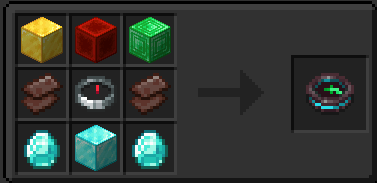
{
  // How many chunks around player to search (0-100)
  // Higher values = larger area but more performance impact
  "chunkRadius": 2,

  // Maximum ore types selectable at once (0-20)
  // Balance between flexibility and performance
  "maxBlocks": 3,

  // Enable automatic detection of modded ores
  // Set false to only use custom definitions
  "enableAutoDiscovery": true,

  // Group ore variants together (coal_ore + deepslate_coal_ore = "Coal Ore")
  // Set false to treat each block separately
  "groupSimilarOres": true,

  // Minimum block hardness for ore detection (0.0-50.0)
  // Higher values filter out soft decorative blocks
  "minimumHardness": 1.0,

  // Additional keywords to help detect missed ores
  // Add terms commonly used in mod ore names
  "additionalOreKeywords": [
    "gem",
    "crystal",
    "ingot",
    "core",
    "debris"
  ],

  // Exclude entire mods from ore detection
  // Add mod IDs that cause false positives
  "excludedMods": [
    "decorative_blocks",
    "chisel"
  ],

  // Add custom ore types not detected automatically
  // Format: "oreName:COLOR:blockId1,blockId2"
  "customOreTypes": [
    "exquisite:BLACK:arphex:exquisite_ore"
  ],

  // Force include specific blocks as ores
  // For blocks that should be detected but aren't
  "forceIncludeBlocks": [],

  // Exclude entire ore types (removes all variants)
  // Hide ore categories you don't want
  "excludedOreTypes": [],

  // Exclude specific ore blocks while keeping the type
  // Fine-grained control over individual blocks
  "excludedBlocks": []
}
chunkRadius - Search area around player (larger = more lag)maxBlocks - How many ore types you can select simultaneouslyenableAutoDiscovery - Automatically find modded ores vs manual onlygroupSimilarOres - Combine variants vs separate entriesminimumHardness - Filter out soft decorative blocksadditionalOreKeywords - Help detect ores with unusual namescustomOreTypes - Add ores that aren't detected automaticallyforceIncludeBlocks - Force specific blocks to be treated as oresexcludedMods - Ignore entire mods that cause problemsexcludedOreTypes - Hide entire ore categories (all coal, all zinc, etc.)excludedBlocks - Hide specific blocks while keeping the ore type{
"chunkRadius": 2,
"maxBlocks": 3,
"minimumHardness": 2.0,
"excludedOreTypes": ["coal", "iron", "copper"]
}
{
  "excludedOreTypes": ["coal", "iron", "copper", "zinc", "tin", "lead", "aluminum"]
}
{
  "excludedMods": ["create", "mythicmetals", "immersiveengineering", "soulsweapons"]
}
{
  "excludedBlocks": [
    "minecraft:deepslate_coal_ore",
    "minecraft:deepslate_iron_ore",
    "minecraft:deepslate_gold_ore",
    "create:deepslate_zinc_ore"
  ]
}
WHITE, YELLOW, GOLD, RED, DARK_RED, GREEN, DARK_GREEN, AQUA, DARK_AQUA, BLUE, DARK_BLUE, LIGHT_PURPLE, DARK_PURPLE, GRAY, DARK_GRAY, BLACK
v1.x users: Your old config will work, but consider upgrading:
{
  "chunkRadius": 2,
  "maxBlocks": 3
}
{
  // Basic settings (compatible)
  "chunkRadius": 2,
  "maxBlocks": 3,

  // New features
  "enableAutoDiscovery": true,
  "excludedOreTypes": ["coal", "iron"],
  "customOreTypes": ["mythril:AQUA:modname:mythril_ore"]
}
Migration is automatic - your old config continues working while new features become available!
For forge support, Sinytra Connector, Connector Extras, Forgified Fabric API combination tested and works as expected.
For those interested in knowing the Y-axis direction, I highly recommend using Compass3D, developed by AdamRaichu. My gratitude goes out to him for integrating support for this feature into the mod.
Project description from CurseForge.
Pick your setup
Choose the version and loader you play, then open the matching release.
Check the dependencies, then try the file in a copied instance before changing a world you care about.
Recent files
17 Aug 2025
17 Aug 2025
Looking for an older file? The official CurseForge project page is in Resources.
 mod
This mod is a remake of Old Mod TofuCraft made by tsuteto. add soybean As a new all-purpose food!
 mod
A mod that adds some new tools for Tinkers' Construct.
 mod
The shared foundation library for the Neroland sci-fi mod ecosystem — required by Nerospace and every other Nero mod.