Fabric API Needed by Oxidizable Copper Gear 1.3.0 for NeoForge 26.1.2
requiredNo matching file
CurseForge · Minecraft mod
Adds oxidation and waxing mechanics to copper tools and armor
Quick answer
Oxidizable Copper Gear 1.3.0 for NeoForge 26.1.2 targets 26.1, 26.1.1, 26.1.2 with NeoForge. The project page does not say whether this file belongs on the client, dedicated server, or both. 1 required mod needs a matching file.
Where it goes
The project page does not say whether this file belongs on the client, dedicated server, or both.
The source does not explicitly classify this release as client-only or server-only.
1.3.0 for NeoForge 26.1.2. Change the file and its required mods may change too.
Install Fabric API first, but 1 required mod has no matching file for this setup. Do not mix loader builds to force a match.
We only count dependency files that match this setup. A file for another loader does not fill the gap.
Before you install it
Built for Oxidizable Copper Gear 1.3.0 for NeoForge 26.1.2. Pick another file and the loader, install side or required mods may change.
Use 1.3.0 for NeoForge 26.1.2. It targets 26.1, 26.1.1, 26.1.2 with NeoForge; another release may have different loader, side or dependency requirements.
Install Fabric API first, but 1 required mod has no matching file for this setup. Do not mix loader builds to force a match.
The project page does not say whether this file belongs on the client, dedicated server, or both.
Use the “Get this file” button beside 1.3.0 for NeoForge 26.1.2. It opens that exact file at the source.
About this project
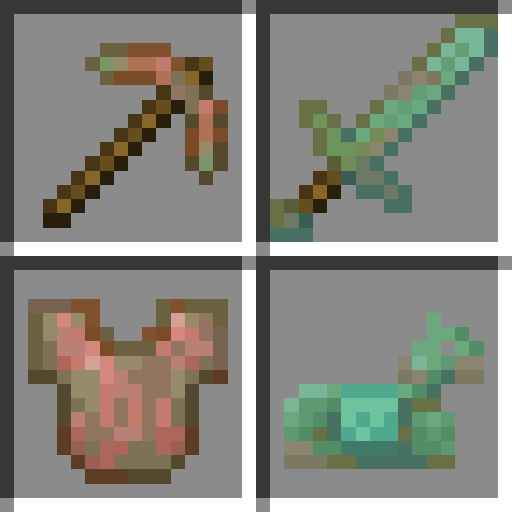
This mod makes copper tools and armor oxidize over time, much like copper blocks. Can also be used as a framework to make any item oxidizable.
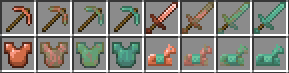
Items will oxidize while they're in your inventory, equipped, or dropped on the ground. They won't oxidize if they're stored in a chest for example.
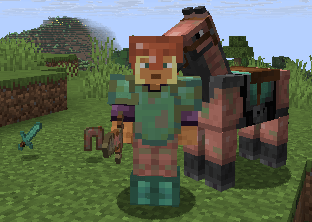
Oxidization speed is similar to the speed copper blocks oxidize at. It's also increased depending on how much the item durability differs from the current oxidation state.
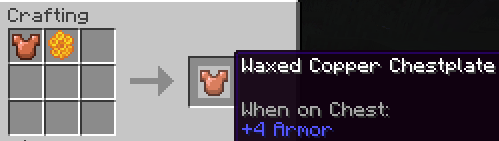
Crafting recipes:
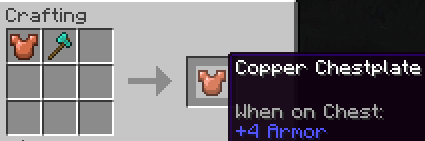
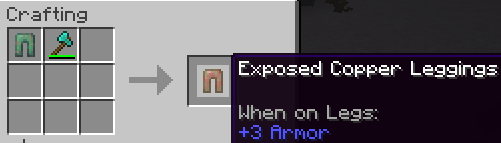
This mod can also be used as a framework to make any item oxidizable by creating a data pack and resource pack. The default data pack which makes copper tools and armor oxidizable can be disabled like any other data pack if desired.
oxidizable item tag from this mod (example). This tells the mod to:items folder has to be under the namespace of the mod which adds the item you're adding assets for, or the minecraft namespace in case of vanilla items, as you're overriding the original files.oxidizable_copper_gear).Project description from CurseForge.
Pick your setup
Choose the version and loader you play, then open the matching release.
Showing the newest 12 of 14 game versions. Older files are in the list below.
Check the dependencies, then try the file in a copied instance before changing a world you care about.
Recent files
oxidizable_copper_gear-neoforge-1.3.0+26.1.2.jar
20 Oct 2026
oxidizable_copper_gear-neoforge-1.3.0+1.21.11.jar
20 Oct 2026
oxidizable_copper_gear-fabric-1.3.0+26.1.2.jar
20 Oct 2026
oxidizable_copper_gear-fabric-1.3.0+1.21.11.jar
20 Oct 2026
oxidizable_copper_gear-1.2.0+1.21.11-fabric.jar
19 Dec 2025
oxidizable_copper_gear-1.2.0+1.21.11-neoforge.jar
19 Dec 2025
oxidizable_copper_gear-1.1.1+1.21.10.jar
7 Oct 2025
oxidizable_copper_gear-1.1.1+1.21.10.jar
7 Oct 2025
oxidizable_copper_gear-1.1.1+1.21.9.jar
1 Oct 2025
oxidizable_copper_gear-1.1.1+1.21.9.jar
30 Sept 2025
oxidizable_copper_gear-1.1.0+1.21.9.jar
30 Sept 2025
oxidizable_copper_gear-1.0.1+1.21.9-pre1.jar
19 Sept 2025
Looking for an older file? The official CurseForge project page is in Resources.
 mod
modRS-Economy is a lightweight, configurable, and server-focused economy mod for NeoForge, providing everything needed to manage a reliable in-game currency system.
 mod
modLitemacro is a visual Minecraft macro builder for Fabric. It lets you build macros with drag-and-drop components, true/false logic, failed paths, item pickers, keybinds, import/export, and Discord notifications.
 mod
modA DNF-style gear enhancement mod for Minecraft — push your equipment from +1 to +15 through rising success risks, failure penalties and protection charms, all the way to a redstone-powered auto-enhancement factory.