Puzzles Lib Needed by Azalea Growth Control v26.3.0-mc26.3.x+fabric
requiredMatching file found Matched file: v26.3.18-mc26.3.x+fabric

CurseForge · Minecraft mod
Limits azalea generation to appropriate biomes. Because even trees need boundaries.
Quick answer
Azalea Growth Control v26.3.0-mc26.3.x+fabric targets 26.3 with Fabric. The project page does not say whether this file belongs on the client, dedicated server, or both. All 3 required mods have matching files.
Where it goes
The project page does not say whether this file belongs on the client, dedicated server, or both.
The source does not explicitly classify this release as client-only or server-only.
v26.3.0-mc26.3.x+fabric. Change the file and its required mods may change too.
Install Puzzles Lib, Forge Config API Port, Fabric API first. We found matching files for this game-version and loader setup. 4 come through another mod in the chain.
4 extra mods were pulled in by other dependencies. Indented rows show who needs each one. We only count dependency files that match this setup. A file for another loader does not fill the gap.
Before you install it
Built for Azalea Growth Control v26.3.0-mc26.3.x+fabric. Pick another file and the loader, install side or required mods may change.
Use v26.3.0-mc26.3.x+fabric. It targets 26.3 with Fabric; another release may have different loader, side or dependency requirements.
Install Puzzles Lib, Forge Config API Port, Fabric API first. We found matching files for this game-version and loader setup. 4 come through another mod in the chain.
The project page does not say whether this file belongs on the client, dedicated server, or both.
Use the “Get this file” button beside v26.3.0-mc26.3.x+fabric. It opens that exact file at the source.
About this project







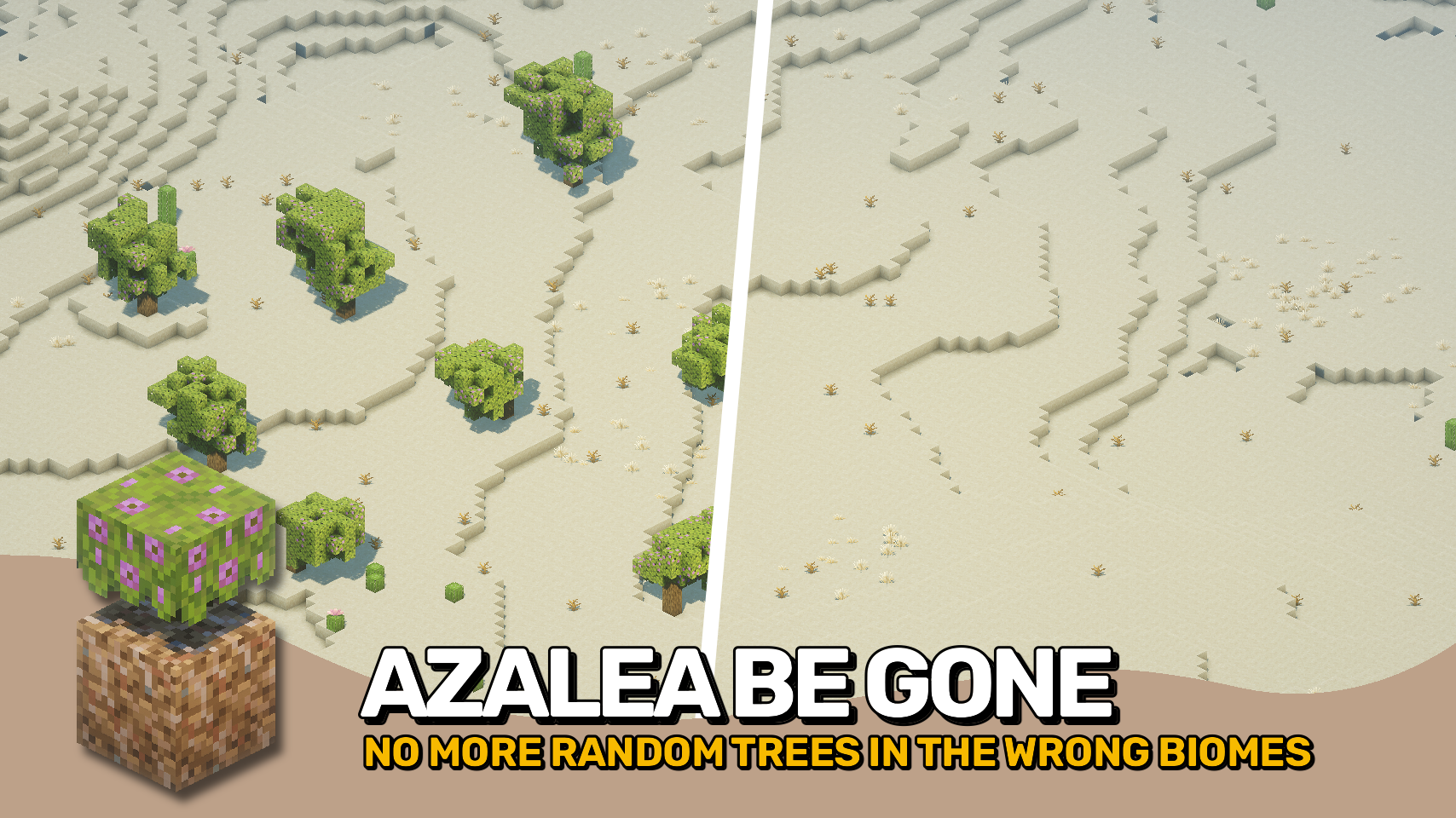
Vanilla Minecraft grows azalea trees in any surface biome, even deserts and snowy tundras. 🌱 This behavior was officially marked as Works As Intended in MC-238499.
Azalea Growth Control restores some sanity to world generation by limiting azalea trees to biomes that actually suit them. 🌍 Using the azaleagrowthcontrol:grows_azalea_trees biome tag, you can define exactly where these trees are allowed to grow. ⚙️
It works seamlessly with both vanilla and modded biomes, giving your worlds a more natural and consistent look. 🍃 No more random green blobs in frozen wastelands!


⏩ INSTALLATION REQUIRED ON SERVER
⏩ REQUIRES PUZZLES LIB TO BE INSTALLED (FABRIC & NEOFORGE)
⏩ REQUIRES FABRIC API TO BE INSTALLED (FABRIC)
⏩ REQUIRES FORGE CONFIG API PORT TO BE INSTALLED (FABRIC)

If available for a mod, configuration is possible directly from in-game using the mod menu (requires Mod Menu by Prospector to be installed on Fabric).
For manual configuration using an external text editor all files are found at .minecraft/config, named as MOD_ID-client.toml, MOD_ID-common.toml, or MOD_ID-server.toml, depending on the type of config. Not all types might exist for a mod, if any at all.
 |
 |
|
|---|---|---|
 |
 |
|
 |
 |
|
 |
 |
|
 |
 |
|

© 2026 @heyitsfuzs. All rights reserved. This page was last edited on 11 September 2026, at 06:44 (UTC).
Project description from CurseForge.
Pick your setup
Choose the version and loader you play, then open the matching release.
Check the dependencies, then try the file in a copied instance before changing a world you care about.
Recent files
azaleagrowthcontrol-v26.3.0-mc26.3.x+fabric.jar
28 Sept 2026
azaleagrowthcontrol-v26.3.0-mc26.3.x+neoforge.jar
28 Sept 2026
AzaleaGrowthControl-v26.2.0-mc26.2.x-Fabric.jar
18 Jun 2026
AzaleaGrowthControl-v26.2.0-mc26.2.x-NeoForge.jar
18 Jun 2026
AzaleaGrowthControl-v21.1.0-mc1.21.1-NeoForge.jar
22 May 2026
AzaleaGrowthControl-v21.1.0-mc1.21.1-Fabric.jar
22 May 2026
AzaleaGrowthControl-v26.1.0-mc26.1.x-Fabric.jar
3 May 2026
AzaleaGrowthControl-v26.1.0-mc26.1.x-NeoForge.jar
3 May 2026
AzaleaGrowthControl-v21.11.0-mc1.21.11-NeoForge.jar
15 Dec 2025
AzaleaGrowthControl-v21.11.0-mc1.21.11-Fabric.jar
15 Dec 2025
AzaleaGrowthControl-v21.8.0-1.21.8-NeoForge.jar
18 Oct 2025
AzaleaGrowthControl-v21.8.0-1.21.8-Fabric.jar
18 Oct 2025
Looking for an older file? The official CurseForge project page is in Resources.
 mod
A planetary survival, industrial automation, and atmospheric terraforming tech mod set in a hostile desert world populated by colossal sandworms.
 mod
Clay Soldiers Remake is a data driven remake of the classic Clay Soldiers mod.
 mod
Backup mod that keeps your worlds safe with automatic and manual backups, with an easy in-game UI to create, manage, and restore them.