GeckoLib Needed by Reinforced Black Holes ReinforcedBlackHoles-1.0.6-1.20.1-forge.jar
requiredMatching file found Matched file: geckolib-forge-1.20.1-4.8.4.jar
CurseForge · Minecraft mod
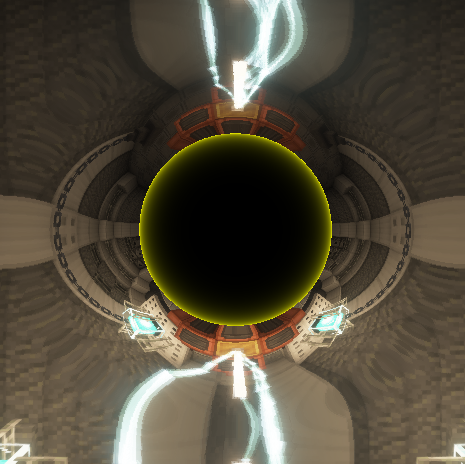
Have you ever wanted to create black holes with their iconic light bending effects? Well guess what! Now you can!
Quick answer
Reinforced Black Holes ReinforcedBlackHoles-1.0.6-1.20.1-forge.jar targets 1.20.1 with Forge. The project page does not say whether this file belongs on the client, dedicated server, or both. All 1 required mods have matching files.
Where it goes
The project page does not say whether this file belongs on the client, dedicated server, or both.
The source does not explicitly classify this release as client-only or server-only.
ReinforcedBlackHoles-1.0.6-1.20.1-forge.jar. Change the file and its required mods may change too.
Install GeckoLib first. We found matching files for this game-version and loader setup.
We only count dependency files that match this setup. A file for another loader does not fill the gap.
Before you install it
Built for Reinforced Black Holes ReinforcedBlackHoles-1.0.6-1.20.1-forge.jar. Pick another file and the loader, install side or required mods may change.
Use ReinforcedBlackHoles-1.0.6-1.20.1-forge.jar. It targets 1.20.1 with Forge; another release may have different loader, side or dependency requirements.
Install GeckoLib first. We found matching files for this game-version and loader setup.
The project page does not say whether this file belongs on the client, dedicated server, or both.
Use the “Get this file” button beside ReinforcedBlackHoles-1.0.6-1.20.1-forge.jar. It opens that exact file at the source.
About this project
Reinforced Black Holes adds visually impressive black holes to Minecraft, complete with their iconic screen-warping and light-bending appearance.
The mod currently focuses on the black hole effect itself. It includes a Black Hole Tester block that can be used to display and experiment with the effect in-game.
Starting with version 1.1.0, the Singularity Rifle is no longer included in this mod.
The rifle, its ammunition, batteries, crafting recipes, and shooting mechanics have been moved into a separate addon called Singularity Rifle.
Versions below 1.1.0 are still being maintained.
GeckoLib is not required for Reinforced Black Holes.
At the moment, Reinforced Black Holes includes:
The black hole visual effect
Screen-space distortion around black holes
A Black Hole Tester block for displaying and testing the effect
An API that other mod developers can use to add the effect to their own projects
For now, the black holes are primarily cosmetic. They do not automatically pull in nearby blocks, entities, or items.
The simple answer is that this behavior has not been implemented yet, and it may not become part of the core mod.
These are not intended to be completely realistic black holes. Within the wider story behind the mod, they are errors created by an artificial intelligence capable of manipulating the game world.
Instead of bending real light, they distort the pixels rendered on your screen. This also prevents the effect from being used to look through walls or around corners.
Different versions of these anomalies may eventually have different properties. Some may remain harmless and visual, while others could become considerably more destructive.
Reinforced Black Holes is also designed to function as a library.
Other mods can use it to implement the same black hole distortion effect without having to recreate the rendering system from scratch.
This mod originated as part of a larger, currently unreleased project. The effect worked well enough on its own that I decided to release it as a standalone mod and development library.
The effect generally looks even better when used with Iris, Oculus, or compatible shader packs.
Shaders are optional and are not required for the mod to work.
The mod is still in development. Some visuals, sounds, configuration options, or other features may change in future versions.
More functionality and improvements are planned over time.
Thanks for checking out Reinforced Black Holes!
Project description from CurseForge.
Pick your setup
Choose the version and loader you play, then open the matching release.
Check the dependencies, then try the file in a copied instance before changing a world you care about.
Recent files
3 Sept 2026
ReinforcedBlackHoles-1.1.6-1.20.1-forge.jar
3 Sept 2026
rbh-1.1.6.jar
3 Sept 2026
rbh-1.1.5.jar
3 Aug 2026
rbh-1.1.4.jar
9 Jun 2026
rbh-1.1.3.jar
4 Jun 2026
rbh-1.1.2.jar
2 May 2026
8 Dec 2025
ReinforcedBlackHoles-1.1.2-1.20.1-forge.jar
8 Dec 2025
6 Dec 2025
ReinforcedBlackHoles-1.1.1-1.20.1-forge.jar
6 Dec 2025
ReinforcedBlackHoles-1.1.0-1.20.1-forge.jar
30 Oct 2025
Looking for an older file? The official CurseForge project page is in Resources.
 mod
modAdds Revival, Block painting system, Carry, Mail box, and New Flowers crops for dye.
 mod
modFull economy system, auction house, markets, Land claims. Player shops, banks.
 mod
modAdds entity visualization to FTB Quests!