Minecraft version
Back to mods 
CurseForge · Minecraft mod
Creative Sandbox Dimension
A flat creative dimension for survival without transferring items
Choose a version Pick your version below, then grab the matching file.
Quick answer
Which Creative Sandbox Dimension release should I use?
Latest stable file Creative_Sandbox-1.0.17.jar
Game version 1.21.1
Loader NeoForge
Creative Sandbox Dimension Creative_Sandbox-1.0.17.jar targets 1.21.1 with NeoForge. The project page does not say whether this file belongs on the client, dedicated server, or both. No extra mods listed for this file.
Where it goes
Is Creative Sandbox Dimension required on the client, server, or both?
The project page does not say whether this file belongs on the client, dedicated server, or both.
Client Source doesn’t say
Dedicated server Source doesn’t say
Loader for this release NeoForge
Required install it here Optional supported, not mandatory Not supported do not install here Source doesn’t say do not assume
The source does not explicitly classify this release as client-only or server-only.
What else does Creative Sandbox Dimension Creative_Sandbox-1.0.17.jar need?
Creative_Sandbox-1.0.17.jar. Change the file and its required mods may change too.
This file does not list any required mods. Do not add a library just because a different file uses it.
This file does not list any required or optional mods.
Before you install it
Add Creative Sandbox Dimension without breaking your instance.
Built for Creative Sandbox Dimension Creative_Sandbox-1.0.17.jar. Pick another file and the loader, install side or required mods may change.
- 01
Stick to this file
Use Creative_Sandbox-1.0.17.jar. It targets 1.21.1 with NeoForge; another release may have different loader, side or dependency requirements.
- 02
Bring the mods it needs
This file does not list any required mods. Do not add a library just because a different file uses it.
- 03
Put it on the correct side
The project page does not say whether this file belongs on the client, dedicated server, or both.
- 04
Pick the file you checked
Use the “Get this file” button beside Creative_Sandbox-1.0.17.jar. It opens that exact file at the source.
About this project
What does Creative Sandbox Dimension add?
Creative Sandbox Dimension
Overview
A dedicated superflat creative dimension for survival players. Build, test redstone, or prototype structures without touching your progression. Your survival inventory, XP, effects, and Ender Chest are fully isolated and restored on exit.
Installation
- Server: Required.
- Client: Optional. Without the mod, players lose access to teleport keybinds. All other features work server-side.
Security & Anti-Exploit
Built to protect survival integrity:
- Full State Isolation – Inventory, Ender Chest, XP, health, hunger, and effects are snapshotted on entry and restored on exit.
- Restricted Actions – Sleeping, portal creation, and Ender Chest item transfer are blocked.
- No Food Consumption – Eating is disabled by default to prevent stat bypasses.
- Advancement Lock – Advancements are disabled inside the dimension.
- FTB Quests Lock – Quest progression and reward claims are blocked inside the sandbox.
- Item Blacklist – Server-configurable list of items that cannot be held or used.
Teleportation Methods
All methods are enabled by default and individually toggleable in config:
| Method | Details |
|---|---|
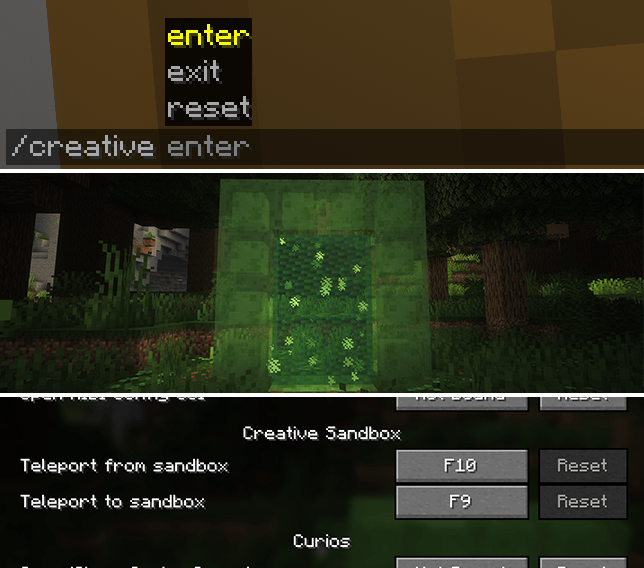
| Commands | /creative enter & /creative exit |
| Slime Portal | Build a frame from slime blocks and ignite it with flint and steel |
| Hotkeys | F9 to enter, F10 to exit (requires client mod) |
World Editing
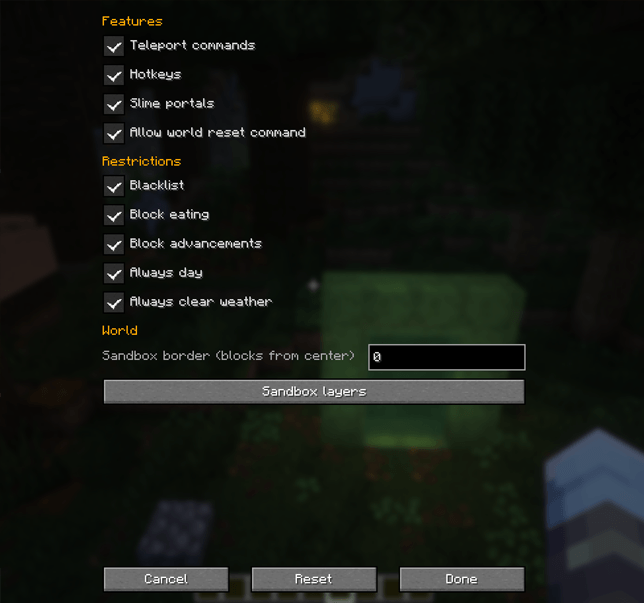
- Layer Editor – Modify superflat layer composition in-game or via config.
- Admin Reset –
/creative resetwipes and regenerates the creative world (admin-only).
Configuration
- Always day & clear weather (on by default)
- Configurable world border
- Toggleable security rules, teleport methods, and environment locks
- Config location:
config/creative_dim/
Compatibility
- Works seamlessly with Curios API, Backpacked, FTB Quests, and other major inventory/mod frameworks.
- Designed for modpack and multiplayer server integration.
- Verify no unintended progression bypasses in your specific pack.
Project description from CurseForge.
Pick your setup
Creative Sandbox Dimension by Minecraft version and loader
Choose the version and loader you play, then open the matching release.
Check the dependencies, then try the file in a copied instance before changing a world you care about.
Recent files
Creative Sandbox Dimension versions and loaders
Creative_Sandbox-1.0.17.jar
creativesandbox-1.0.17.jar
12 Aug 2026
Client Source doesn’t say Server Source doesn’t say Dependencies No extras listed Listed on Release listing
Check the 1.21.1 · NeoForge setup 1.21.1NeoForge release
Creative_Sandbox-1.0.16.jar
creativesandbox-1.0.16.jar
12 Aug 2026
Client Source doesn’t say Server Source doesn’t say Dependencies No extras listed Listed on Release listing
Check the 1.21.1 · NeoForge setup 1.21.1NeoForge release
Creative_Sandbox-1.0.15
creativesandbox-1.0.15.jar
11 Aug 2026
Client Source doesn’t say Server Source doesn’t say Dependencies No extras listed Listed on Release listing
Check the 1.21.1 · NeoForge setup 1.21.1NeoForge release
Creative sandbox-1.0.5.jar
creativesandbox-1.0.5.jar
5 Aug 2026
Client Source doesn’t say Server Source doesn’t say Dependencies No extras listed Listed on Release listing
Check the 1.21.1 · NeoForge setup 1.21.1NeoForge release
CreativeSandbox-1.0.4.jar
creativesandbox-1.0.4.jar
5 Jun 2026
Client Source doesn’t say Server Source doesn’t say Dependencies No extras listed Listed on Release listing
Check the 1.21.1 · NeoForge setup 1.21.1NeoForge release
CreativeSandbox-1.0.3.jar
creativesandbox-1.0.3.jar
15 May 2026
Client Source doesn’t say Server Source doesn’t say Dependencies No extras listed Listed on Release listing
Check the 1.21.1 · NeoForge setup 1.21.1NeoForge release
CreativeSandbox-1.0.1.jar
creativesandbox-1.0.1.jar
15 May 2026
Client Source doesn’t say Server Source doesn’t say Dependencies No extras listed Listed on Release listing
Check the 1.21.1 · NeoForge setup 1.21.1NeoForge release
CreativeSandbox-1.0.0.jar
creativesandbox-1.0.0.jar
15 May 2026
Client Source doesn’t say Server Source doesn’t say Dependencies No extras listed Listed on Release listing
Check the 1.21.1 · NeoForge setup 1.21.1NeoForge release
Looking for an older file? The official CurseForge project page is in Resources.
 mod
mod CurseForge + Modrinth · Minecraft
Roxy
Roxy is a translation layer that allows the Fabric-only LOD rendering mod Voxy to function on Neoforge 1.21.1.
 mod
mod CurseForge · Minecraft
From The Caves
Adds a stalking entity.
 mod
mod CurseForge · Minecraft
Bird Watching
Wait... where did all these birds come from?