Fabric API Needed by Text Styles 1.3.5 Neoforge 1.21.1
requiredNo matching file
CurseForge · Minecraft mod
An advanced, modular, and highly personalizable text effect system for Minecraft.
Quick answer
Text Styles 1.3.5 Neoforge 1.21.1 targets 1.21.1 with NeoForge. The project page does not say whether this file belongs on the client, dedicated server, or both. 1 required mod needs a matching file.
Where it goes
The project page does not say whether this file belongs on the client, dedicated server, or both.
The source does not explicitly classify this release as client-only or server-only.
Text Styles 1.3.5 Neoforge 1.21.1. Change the file and its required mods may change too.
Install Fabric API first, but 1 required mod has no matching file for this setup. Do not mix loader builds to force a match.
We only count dependency files that match this setup. A file for another loader does not fill the gap.
Before you install it
Built for Text Styles 1.3.5 Neoforge 1.21.1. Pick another file and the loader, install side or required mods may change.
Use Text Styles 1.3.5 Neoforge 1.21.1. It targets 1.21.1 with NeoForge; another release may have different loader, side or dependency requirements.
Install Fabric API first, but 1 required mod has no matching file for this setup. Do not mix loader builds to force a match.
The project page does not say whether this file belongs on the client, dedicated server, or both.
Use the “Get this file” button beside Text Styles 1.3.5 Neoforge 1.21.1. It opens that exact file at the source.
About this project
"Bring your text to life with dynamic animations and effects!"
An advanced, modular, and highly personalizable text effect system for Minecraft.
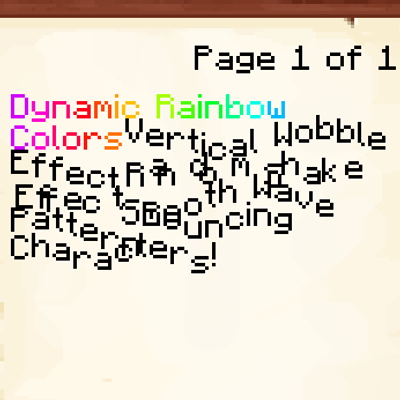
Text Styles is a powerful refactor and expansion of the original text effects concept. It introduces a robust, registry-based system that allows for deeply personalizable text animations using simple tags. Whether you're writing in a book, on a sign, or just chatting, you can now add movement, color cycles, and unique reveal animations to your text.
Unlike other simple effect mods, Text Styles is designed for compatibility and extensibility, allowing other mods to register their own styles and parameters easily.
<wb d=5> instead of <wobble distance=5>), perfect for space-constrained areas like books and signs..jar file into the mods folder of your Minecraft instance.Simply wrap your text in tags like <style_name params>your text</style_name>. You can use full names or short aliases.
| Style | Alias | Parameters (Full / Short) | Description |
|---|---|---|---|
| Wobble | wb |
distance/d, speed/s |
Vertical bobbing motion. |
| Shake | sh |
x, y, frequency/f |
Random jittery movement. |
| Wave | wv |
amplitude/a, frequency/f, speed/s, vertical/v |
Fluid wave-like motion. |
| Rainbow | rb |
speed/s, frequency/f, saturation/sat, brightness/bri |
Cycles through HSB colors. |
| Bounce | bn |
amplitude/a, speed/s, delay/dl |
Jumping/bouncing effect. |
| Pulse | pl |
intensity/i, speed/s, delay/dl, color/c |
Pulses in scale and color. |
| Fade | fd |
min_alpha/m, max_alpha/x, speed/s, delay/dl |
Fades in and out. |
| Swing | sw |
amplitude/a, speed/s, delay/dl |
Pendulum-like rotation. |
| Glitch | gl |
intensity/i, frequency/f |
Random offsets and color flashes. |
| Turbulence | tb |
intensity/i, speed/s |
Erratic but smooth movement. |
| Gradient | gr |
color1/c1, color2/c2, speed/s, frequency/f |
Smooth transition between two colors. |
| Typewriter | tw |
delay/dl, land/l, snap/sn |
Reveals characters one by one. |
| Marquee | mq |
min/m, max/x, vertical/v |
Scrolling marquee effect. |
| Shadow | sd |
color/c, x, y |
Custom offset shadow. |
| Show After | sa |
delay/dl |
Hides text for a set duration. |
You can see all these effects in action in-game by running: /textstyles showcase
Contributions, ideas, and bug reports are always welcome!
This mod is licensed under the MIT License.
Text Styles was created by [RazorPlay01] to bring more expressiveness to Minecraft's text. Thank you for using the mod! If you enjoy it, please consider leaving a star on the repository!
Project description from CurseForge.
Pick your setup
Choose the version and loader you play, then open the matching release.
Check the dependencies, then try the file in a copied instance before changing a world you care about.
Recent files
text_styles-1.3.5-neoforge+1.21.1.jar
20 Aug 2026
text_styles-1.3.5-neoforge+26.2.jar
20 Aug 2026
text_styles-1.3.5-fabric+26.2.jar
20 Aug 2026
text_styles-1.3.5-fabric+1.21.1.jar
20 Aug 2026
text_styles-1.3.5-fabric+26.1.2.jar
20 Aug 2026
text_styles-1.3.5-neoforge+26.1.2.jar
20 Aug 2026
text_styles-1.3.4-neoforge+26.2.jar
20 Aug 2026
text_styles-1.3.4-fabric+26.2.jar
20 Aug 2026
text_styles-1.3.4-fabric+1.21.1.jar
20 Aug 2026
text_styles-1.3.4-neoforge+1.21.1.jar
20 Aug 2026
text_styles-1.3.4-fabric+26.1.2.jar
20 Aug 2026
text_styles-1.3.4-neoforge+26.1.2.jar
20 Aug 2026
Looking for an older file? The official CurseForge project page is in Resources.
 mod
modWhen death awaits you, adrenaline kicks in
 mod
modAdds naturally generating tin, silver, and lead ores with standard raw drops, ingots, blocks, recipes, and universal compatibility tags for NeoForge.
 mod
modMakes your resident recipe viewer a little more vanilla flavored.