skyveilcloudlands-1.0.0.jar
29 May 2026
Client Source doesn’t say Server Source doesn’t say Dependencies No extras listed Listed on Release listing
Check the setup 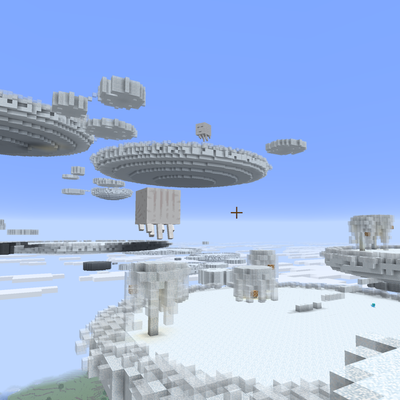
CurseForge · Minecraft mod
Adds a new biome above cloud level that naturally spawns Allays, Happy Ghasts and new Red Sprite mobs + storm blocks
Quick answer
Skyveil Biome skyveilcloudlands-1.0.0.jar targets Minecraft. The project page does not say whether this file belongs on the client, dedicated server, or both. No extra mods listed for this file.
Where it goes
The project page does not say whether this file belongs on the client, dedicated server, or both.
The source does not explicitly classify this release as client-only or server-only.
skyveilcloudlands-1.0.0.jar. Change the file and its required mods may change too.
This file does not list any required mods. Do not add a library just because a different file uses it.
This file does not list any required or optional mods.
Before you install it
Built for Skyveil Biome skyveilcloudlands-1.0.0.jar. Pick another file and the loader, install side or required mods may change.
Use skyveilcloudlands-1.0.0.jar. It targets Minecraft; another release may have different loader, side or dependency requirements.
This file does not list any required mods. Do not add a library just because a different file uses it.
The project page does not say whether this file belongs on the client, dedicated server, or both.
Use the “Get this file” button beside skyveilcloudlands-1.0.0.jar. It opens that exact file at the source.
About this project
Skyveil Biome is an experimental NeoForge skylands mod that expands the world above cloud level with new cloud islands, cloud blocks, weather hazards, sky creatures, and altitude-based movement behavior.
Inspired by classic sky-biome fantasy and games like Terraria, Skyveil adds a new reason to explore the upper atmosphere instead of treating the sky as empty space. High above the Overworld, players can discover floating cloud formations, dangerous storm clouds, glowing puff-cloud shelters, falling stars, and hostile Red Sprites.
This mod is still experimental and will receive lots of TLC through updates and community feedback.
Skyveil generates above cloud level, creating high-altitude sky-biome areas with new cloud blocks, hazards, and atmospheric gameplay. While exploring at this altitude, players can also jump higher, giving the biome a lighter, low-gravity skylands feel.
Red Sprites are storm-spawned sky mobs that appear during bad weather. They are hostile toward Allays, while Happy Ghasts defend the Allays.
Happy Ghasts can spit snowballs at Red Sprites, and snowballs are their only major weakness. Defeating a Red Sprite has a chance to drop a redstone block, making stormy sky exploration risky but rewarding.
Inspired by Terraria, Falling Stars crash down from the sky, leaving a glowing crater where they land. These impacts create a visible point of interest and add a magical sky-event feeling to the world.
Storm cloud islands become dangerous during storms. Getting too close to them while the weather is active can damage players, making stormy sky travel more hazardous.
Puff clouds are hollow cloud spheres with glowstone chunks inside. They can be used as natural glowing shelters in the sky, giving players a safe and useful structure to discover or build around.
Cloud blocks can be placed within 10 blocks above a water source to evaporate the water and convert the cloud block into a Rain Cloud Block.
Rain Cloud Blocks act like dripstone-style water sources without needing a hanging pointed dripstone spike.
Electrified Rain Cloud Blocks can remotely activate nearby redstone, but they are dangerous if not isolated properly. Players standing too close can take damage, making these blocks useful for advanced builds, traps, and sky-powered redstone experiments.
Skyveil Biome is currently experimental. World generation, block behavior, mob balance, drops, and sky hazards may change between versions.
Please back up important worlds before testing new versions, and feel free to leave feedback to help shape future updates.
Future updates may expand cloud island generation, sky mobs, cloud block interactions, storm events, falling star rewards, structures, ambience, and more biome-specific content.
Project description from CurseForge.
Recent files
29 May 2026
Looking for an older file? The official CurseForge project page is in Resources.
 mod
mod114 nukes from briefcase to Tsar Bomba, ICBMs, a launcher with live cameras, tanks, a bomber, real tsunamis and fallout. Everything's bigger in Texas, and these craters prove it.
 mod
modImprovements for the Nether (plants, biomes, structures, worldgen)
 mod
modCircle of Craft is a massive Lion King–inspired total conversion. Explore three new dimensions — the Pride Lands, Outlands, and Upendi — befriend and battle savanna wildlife, and follow a story-driven questline with Rafiki, Simba, Scar, and more.