Minecraft version
Back to mods 
CurseForge · Minecraft mod
Survival Needs
A survival needs mod that adds thirst, hygiene, energy, bladder, fun, and social motives to Minecraft.
Choose a version Pick your version below, then grab the matching file.
Quick answer
Which Survival Needs release should I use?
Latest stable file minecraftneeds-1.0.1.jar
Game version 1.20.1
Loader Forge
Survival Needs minecraftneeds-1.0.1.jar targets 1.20.1 with Forge. The project page does not say whether this file belongs on the client, dedicated server, or both. No extra mods listed for this file.
Where it goes
Is Survival Needs required on the client, server, or both?
The project page does not say whether this file belongs on the client, dedicated server, or both.
Client Source doesn’t say
Dedicated server Source doesn’t say
Loader for this release Forge
Required install it here Optional supported, not mandatory Not supported do not install here Source doesn’t say do not assume
The source does not explicitly classify this release as client-only or server-only.
What else does Survival Needs minecraftneeds-1.0.1.jar need?
minecraftneeds-1.0.1.jar. Change the file and its required mods may change too.
This file does not list any required mods. Do not add a library just because a different file uses it.
This file does not list any required or optional mods.
Before you install it
Add Survival Needs without breaking your instance.
Built for Survival Needs minecraftneeds-1.0.1.jar. Pick another file and the loader, install side or required mods may change.
- 01
Stick to this file
Use minecraftneeds-1.0.1.jar. It targets 1.20.1 with Forge; another release may have different loader, side or dependency requirements.
- 02
Bring the mods it needs
This file does not list any required mods. Do not add a library just because a different file uses it.
- 03
Put it on the correct side
The project page does not say whether this file belongs on the client, dedicated server, or both.
- 04
Pick the file you checked
Use the “Get this file” button beside minecraftneeds-1.0.1.jar. It opens that exact file at the source.
About this project
What does Survival Needs add?
Survival Needs


You can follow development, devlogs, and future updates for free here 📝
And if you'd like to support the project you can grab me a Ko-fi ☕

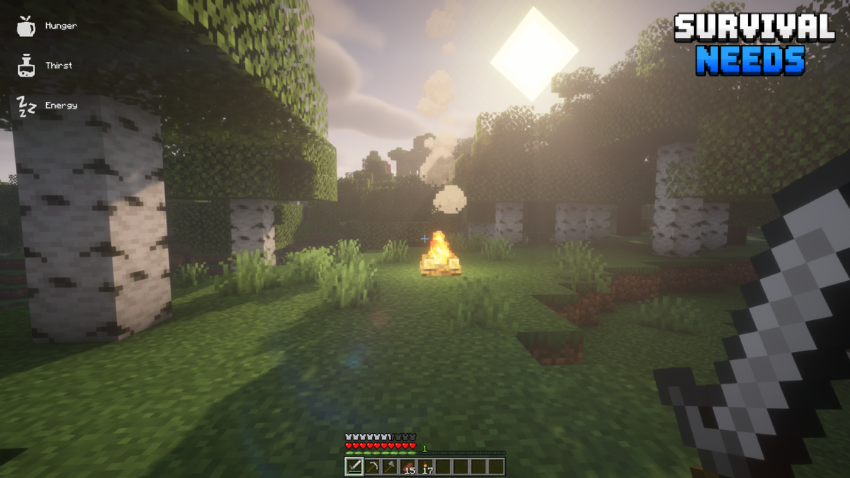
Survival Needs is a life sim inspired survival mod that adds thirst, hygiene, energy, bladder, fun, and social motives to Minecraft.
Take care of your needs while surviving: drink water, rest, stay clean, and manage your motives to avoid penalties and gain helpful bonuses.
Includes custom water bottles, soap, drinks, effects, configurable HUD icons, and a short rest cutscene.
The vanilla hunger system is replaced with a custom hunger need.
New features 📌
- Life sim inspired survival needs
- Custom hunger and thirst system
- Vanilla or Fantasy HUD icon styles
- Clean, dirty, and salt water bottles
- You can drink water directly from any water source by Shift + Right Click
- Sit on the ground to rest whenever you want
- Custom health regeneration
- Soap and hygiene mechanics
- Bladder system
- Fun and Social needs
- New drinks, including coffee, tea, and hydration potions
- Need-based buffs and negative effects
- Configurable HUD icons, styles, layouts, and positions
- Short rest system with a cinematic cutscene
- Take a nap during the day

Needs 💧
Hunger: Replaces the vanilla food system with a custom need. It slowly decreases over time and also drops when sprinting, jumping, or swimming. Eating restores Hunger, but raw or uncooked food restores less and can reduce Hygiene and give you negative effects.
Thirst: New survival need that decreases over time, you need to drink clean water, milk, soups, stews, coffee, tea, or hydration potions. Thirst drops over time and decreases faster during physical activity and in the Nether. Dirty water can be purified in a furnace or turned into drinkable water using a brewing stand. Drinking from beach and swamp biomes is not recommended!
Energy: Slowly decreases during the day and drops faster when sprinting, jumping, mining, attacking, or swimming. Sleeping restores Energy and you can also take a short daytime nap if you are very tired.
Hygiene: Slowly decreases over time and drops faster when mining, fighting, taking damage, killing mobs, eating raw food, or eating rotten flesh. You can clean yourself by standing in water or rain, but swamp water makes Hygiene worse. Soap can also be used while in water to clean yourself and gain a temporary bonus.
Bladder: Drinking and some foods affect your bladder. If it gets too low, you will need to relieve yourself with a configurable keybind.
Fun: Represents boredom and decreases when you spend too much time doing nothing, but it increases through normal gameplay activities such as mining, building, crafting, fighting, fishing, discovering new biomes, and earning advancements.
Social: Social slowly decreases over time, especially in lonely or hostile dimensions like the Nether and the End. It increases when you stay near players, villagers, pets, or domesticated animals, and also when interacting or trading with villagers.
Effects ✨
Positive Effects
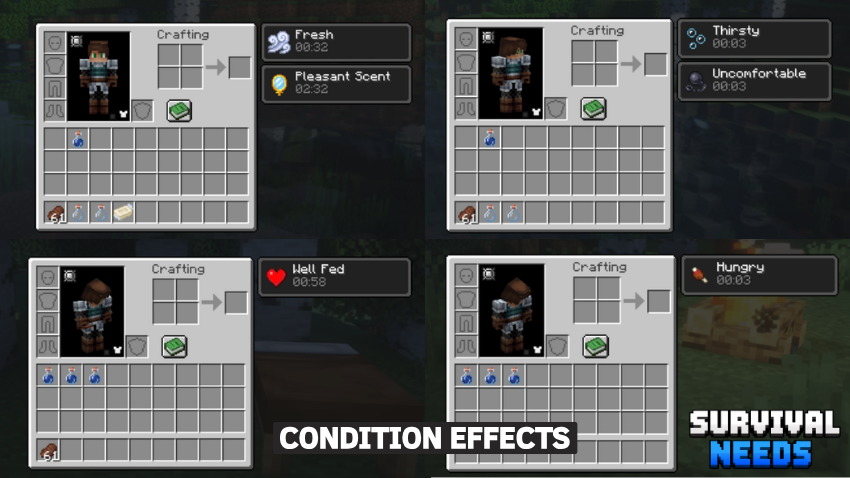
- Well Fed: Regeneration I
- Hydrated: Speed I
- Well Rested: Haste I
- Inspired: Luck I
- In Good Company: Luck I
- Fresh: Resistance I
- Relieved: Jump Boost I
- Pleasant Scent: Granted after using Soap. Increases Social gain by 20% and provides Absorption I
Negative Effects
- Hungry: Weakness I
- Thirsty: Mining Fatigue I and prevents sprinting
- Tired: Mining Fatigue I
- Exhausted: Mining Fatigue I, Slowness I, and prevents sprinting
- Uncomfortable: Slowness I
- Bored: Unluck I
- Lonely: Bad Omen
- Filthy: Infested I
All effects can be enabled or disabled individualy in the .toml file or in Mods - Config in game.
Works in singleplayer, multiplayer, and LAN.
Mod Collection ⚔️


Credits
HUD fantasy icons by outobugi / Dopesan, from NORDIC UI - Interface Overhaul. Used with credit according to the original mod permissions.

Project description from CurseForge.
Pick your setup
Survival Needs by Minecraft version and loader
Choose the version and loader you play, then open the matching release.
Minecraft version
1.20.1
1 loader buildCheck the dependencies, then try the file in a copied instance before changing a world you care about.
Recent files
Survival Needs versions and loaders
minecraftneeds-1.0.1.jar
20 Aug 2026
Client Source doesn’t say Server Source doesn’t say Dependencies No extras listed Listed on Release listing
Check the 1.20.1 · Forge setup 1.20.1Forge release
minecraftneeds-1.0.1.jar
11 Jun 2026
Client Source doesn’t say Server Source doesn’t say Dependencies No extras listed Listed on Release listing
Check the 1.21.1 · NeoForge setup 1.21.1NeoForge release
minecraftneeds-1.0.0.jar
7 Jun 2026
Client Source doesn’t say Server Source doesn’t say Dependencies No extras listed Listed on Release listing
Check the 1.21.1 · NeoForge setup 1.21.1NeoForge release
Looking for an older file? The official CurseForge project page is in Resources.
 mod
mod CurseForge + Modrinth · Minecraft
Spatial Tools Compatible
A standalone structure tools mod for copying, cutting, previewing, transforming, and pasting complex builds, with built-in support for AE2, GTCEu, Mekanism, and FramedBlocks.
 mod
mod CurseForge + Modrinth · Minecraft
Tinkers' Devotion
True Tinkers' Construct Integration: Mobs spawn with TC equipment, and loot/recipes/trades are all replaced
 mod
mod CurseForge + Modrinth · Minecraft
Field Guide
Discover Plants, Animals and Monsters with a Spyglass. Collect them all and take notes in your personal Field Guide!