Minecraft version
Back to mods 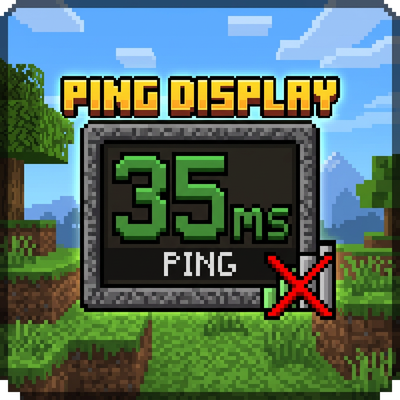
CurseForge · Minecraft mod
Ping Display
Replace boring ping bars with real numbers in Tab! Customizable colors, NPC hiding, easy /pingdisplay commands.
Choose a version Pick your version below, then grab the matching file.
Quick answer
Which Ping Display release should I use?
Latest stable file PingDisplay-1.20.1-1.0.0.jar
Game version 1.20.1
Loader Forge
Ping Display PingDisplay-1.20.1-1.0.0.jar targets 1.20.1 with Forge. The project page does not say whether this file belongs on the client, dedicated server, or both. No extra mods listed for this file.
Where it goes
Is Ping Display required on the client, server, or both?
The project page does not say whether this file belongs on the client, dedicated server, or both.
Client Source doesn’t say
Dedicated server Source doesn’t say
Loader for this release Forge
Required install it here Optional supported, not mandatory Not supported do not install here Source doesn’t say do not assume
The source does not explicitly classify this release as client-only or server-only.
What else does Ping Display PingDisplay-1.20.1-1.0.0.jar need?
PingDisplay-1.20.1-1.0.0.jar. Change the file and its required mods may change too.
This file does not list any required mods. Do not add a library just because a different file uses it.
This file does not list any required or optional mods.
Before you install it
Add Ping Display without breaking your instance.
Built for Ping Display PingDisplay-1.20.1-1.0.0.jar. Pick another file and the loader, install side or required mods may change.
- 01
Stick to this file
Use PingDisplay-1.20.1-1.0.0.jar. It targets 1.20.1 with Forge; another release may have different loader, side or dependency requirements.
- 02
Bring the mods it needs
This file does not list any required mods. Do not add a library just because a different file uses it.
- 03
Put it on the correct side
The project page does not say whether this file belongs on the client, dedicated server, or both.
- 04
Pick the file you checked
Use the “Get this file” button beside PingDisplay-1.20.1-1.0.0.jar. It opens that exact file at the source.
About this project
What does Ping Display add?
PingDisplay
A lightweight client-side mod for Minecraft that replaces the useless ping bars in the Tab list with actual numbers. See the real ping of every player with colored indicators, customize everything through commands, and enjoy a cleaner Tab list.
Features
Replace ping bars with real numerical values
5 customizable color tiers (Perfect, Good, Okay, Bad, Terrible)
Full RGB color customization for each tier
Player heads displayed next to names
Server header and footer support preserved
Automatic NPC and bot filtering
In-game configuration via commands
Persistent TOML config file
Works on any server (vanilla, Spigot, Paper, Forge)
Client-side only — no server installation required
No Mixins, no dependencies, no performance impact
How to Use
Connect to any server
Hold Tab to open the player list
See real ping numbers instead of bars
Use /pingdisplay to view available commands
Customize colors with /pingdisplay config color <tier> <r> <g> <b>
Commands
/pingdisplay— Show help menu/pingdisplay toggle— Enable or disable the mod/pingdisplay hidenpc— Toggle NPC/bot hiding/pingdisplay reload— Reload config from disk/pingdisplay config show— Display current settings/pingdisplay config color <tier> <r> <g> <b>— Change tier color
All commands can be used in-game at any time. Changes are saved automatically.
Ping Tiers
| Tier | Range | Default Color (R,G,B) |
|---|---|---|
| Perfect | ≤ 75 ms | 85, 255, 85 |
| Good | ≤ 150 ms | 255, 255, 85 |
| Okay | ≤ 250 ms | 255, 170, 0 |
| Bad | ≤ 400 ms | 255, 100, 0 |
| Terrible | > 400 ms | 255, 85, 85 |
Each tier represents a ping range and uses its own customizable color. Players with ping above the previous tier's max fall into the next tier automatically.
Configuration
Config file: config/pingdisplay-client.toml
# PingDisplay client config
# Colors in R,G,B format (0-255)

enabled = true
hideNpc = true

# Tier colors
perfect = 85,255,85
good = 255,255,85
okay = 255,170,0
bad = 255,100,0
terrible = 255,85,85
| Setting | Description | Default |
|---|---|---|
| enabled | Enable or disable the mod | true |
| hideNpc | Hide bot players (offline UUID + 0 ping) | true |
| perfect | RGB color for Perfect tier | 85,255,85 |
| good | RGB color for Good tier | 255,255,85 |
| okay | RGB color for Okay tier | 255,170,0 |
| bad | RGB color for Bad tier | 255,100,0 |
| terrible | RGB color for Terrible tier | 255,85,85 |
Config is stored in: config/pingdisplay-client.toml
Requirements
- Minecraft 1.20.1
- Forge 47.0.0+
Project description from CurseForge.
Pick your setup
Ping Display by Minecraft version and loader
Choose the version and loader you play, then open the matching release.
Check the dependencies, then try the file in a copied instance before changing a world you care about.
Recent files
Ping Display versions and loaders
PingDisplay-1.20.1-1.0.0.jar
16 Jun 2026
Client Source doesn’t say Server Source doesn’t say Dependencies No extras listed Listed on Release listing
Check the 1.20.1 · Forge setup 1.20.1Forge release
Looking for an older file? The official CurseForge project page is in Resources.
 mod
mod CurseForge + Modrinth · Minecraft
ToastsBows
1 expansion with many bows and 2 quiver and 6 arrows.
 mod
mod CurseForge + Modrinth · Minecraft
TofuCraftReload
This mod is a remake of Old Mod TofuCraft made by tsuteto. add soybean As a new all-purpose food!
 mod
mod CurseForge + Modrinth · Minecraft
Chef's Workbench
Build a functional Minecraft kitchen to cook, fry, bake, steam, and boil food with specialized cooking stations.