
Minecraft version
Back to mods 
CurseForge · Minecraft mod
VFX Generator [NeoForge Port]
Place customizable visual effects anywhere in-world, with configurable particles, colors, motion, timing, and behavior.
Choose a version Pick your version below, then grab the matching file.
Quick answer
Which VFX Generator [NeoForge Port] release should I use?
Latest stable file v1.0.0 - [NeoForge 1.21.1]
Game version 1.21.1
Loader NeoForge
VFX Generator [NeoForge Port] v1.0.0 - [NeoForge 1.21.1] targets 1.21.1 with NeoForge. The project page does not say whether this file belongs on the client, dedicated server, or both. No extra mods listed for this file.
Where it goes
Is VFX Generator [NeoForge Port] required on the client, server, or both?
The project page does not say whether this file belongs on the client, dedicated server, or both.
Client Source doesn’t say
Dedicated server Source doesn’t say
Loader for this release NeoForge
Required install it here Optional supported, not mandatory Not supported do not install here Source doesn’t say do not assume
The source does not explicitly classify this release as client-only or server-only.
What else does VFX Generator [NeoForge Port] v1.0.0 - [NeoForge 1.21.1] need?
v1.0.0 - [NeoForge 1.21.1]. Change the file and its required mods may change too.
This file does not list any required mods. Do not add a library just because a different file uses it.
This file does not list any required or optional mods.
Before you install it
Add VFX Generator [NeoForge Port] without breaking your instance.
Built for VFX Generator [NeoForge Port] v1.0.0 - [NeoForge 1.21.1]. Pick another file and the loader, install side or required mods may change.
- 01
Stick to this file
Use v1.0.0 - [NeoForge 1.21.1]. It targets 1.21.1 with NeoForge; another release may have different loader, side or dependency requirements.
- 02
Bring the mods it needs
This file does not list any required mods. Do not add a library just because a different file uses it.
- 03
Put it on the correct side
The project page does not say whether this file belongs on the client, dedicated server, or both.
- 04
Pick the file you checked
Use the “Get this file” button beside v1.0.0 - [NeoForge 1.21.1]. It opens that exact file at the source.
About this project
What does VFX Generator [NeoForge Port] add?

This is an unofficial NeoForge 1.21.1 port/fork of the VFX Generator by PlatinPython.

📖 About 📖
This mod adds one block: the VFX Generator. With it, you can set up custom particle effects similar to what you can do with command blocks, but through a clean visual UI. You can select a particle from a pre-defined list, then configure its color, velocity, range, collision behavior, and more.
The block also accepts redstone signals for on/off states.
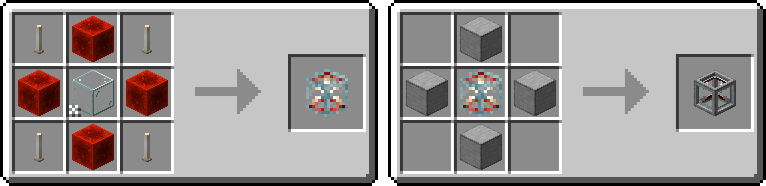
The VFX Generator uses a scrollable visual editor, so you can adjust particle settings directly from the block instead of writing commands or editing config files.

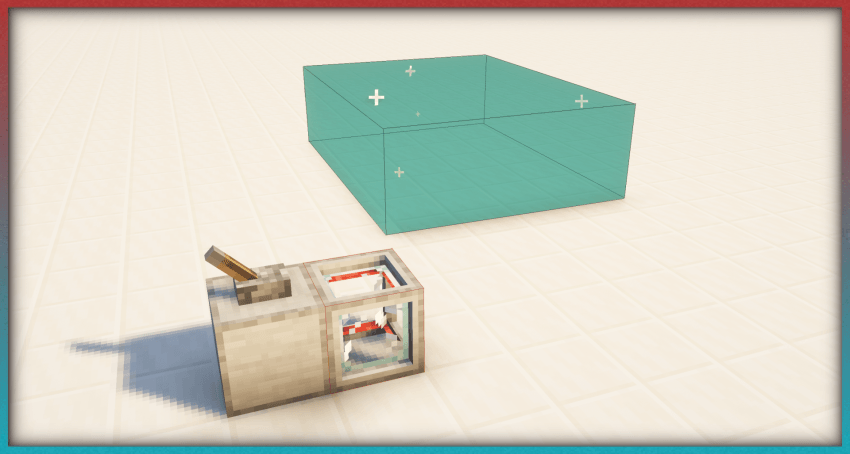
In the bottom-left corner of the VFX Generator UI, you’ll see a button that enables a visual display of the particle emitter area. This is incredibly useful for precise positioning and scaling.
Differences from the original mod:
- Added support for NeoForge 1.21.1.
- The original mod also allowed importing custom particle textures, but that required a resource reload on every world/server join. In bigger modpacks, that can take quite a while, so this feature has been removed for now. I may try to re-implement it in the future in a way that does not require resource reloading.
- Optimized the block model. The original block model consisted of 53 elements, while the new one retains the look of the original using only 12 elements.

This mod has a ton of really cool creative uses. You can find more examples on the original mod's page.


Living Wind
Dynamic wind & ambience

Sky Lands Port
Floating islands & exploration

Windy: Configurable
Animated wind particles

Sign Plates
Decorative letters & symbols

Fast Travel Waypoints
Waystone travel from your map
Blast Travel: Enhanced
Cannons for player transport

FastMove: Enhanced
Slide, wall-run & dive-roll
Cozy Home Port
Furniture & decorations

Fragrant Flowers: Expanded
3D flowers resource pack

Bushier Flowers: Continued
Denser flowers & bouquets

Placeable Plants: Expanded
Plants on almost any block

Jukebox 360°
Better jukebox & note audio
Glued: Reborn
Glue mobs in place

Beacon Bound
Beacon-limited jetpack flight

PatPat Lite Reforged
Pat mobs & players
Project description from CurseForge.
Pick your setup
VFX Generator [NeoForge Port] by Minecraft version and loader
Choose the version and loader you play, then open the matching release.
Check the dependencies, then try the file in a copied instance before changing a world you care about.
Recent files
VFX Generator [NeoForge Port] versions and loaders
v1.0.0 - [NeoForge 1.21.1]
VFX_Generator-NeoForge-1.21.1-v1.0.0.jar
19 Jun 2026
Client Source doesn’t say Server Source doesn’t say Dependencies No extras listed Listed on Release listing
Check the 1.21.1 · NeoForge setup 1.21.1NeoForge release
Looking for an older file? The official CurseForge project page is in Resources.
 mod
CurseForge + Modrinth · Minecraft
Glass-craft
Glasscraft adds a Glasscutter that lets you safely harvest glass, glass panes, glowstone and sea lanterns
 mod
CurseForge + Modrinth · Minecraft
Reliable Replacer
A lightweight utility for replacing one block with another, both during worldgen and afterward.
 mod
CurseForge · Minecraft
Trident AC
Anti-cheat and moderation toolkit for modded Forge servers: switchable cheat checks, mod approve/block lists, staff ranks, spectate, vanish, consent-based screenshots and reports. Built to work alongside gun and vehicle mods.