Minecraft version
Back to mods 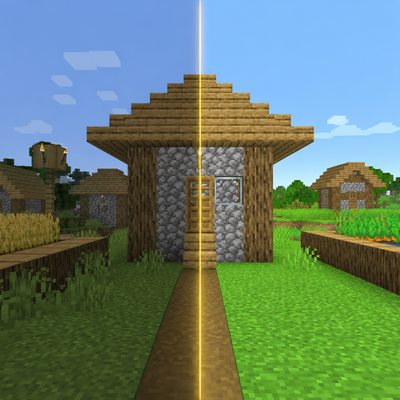
CurseForge · Minecraft mod
Fullbright No Shading
A clean client-side fullbright and no-shading mod for brighter, sharper Minecraft visuals.
Choose a version Pick your version below, then grab the matching file.
Quick answer
Which Fullbright No Shading release should I use?
Latest stable file fullbright-no-shading-1.0.0.jar
Game version 1.21, 1.21.8, 1.21.5
Loader Fabric
Fullbright No Shading fullbright-no-shading-1.0.0.jar targets 1.21, 1.21.8, 1.21.5 with Fabric. The project page does not say whether this file belongs on the client, dedicated server, or both. No extra mods listed for this file.
Where it goes
Is Fullbright No Shading required on the client, server, or both?
The project page does not say whether this file belongs on the client, dedicated server, or both.
Client Source doesn’t say
Dedicated server Source doesn’t say
Loader for this release Fabric
Required install it here Optional supported, not mandatory Not supported do not install here Source doesn’t say do not assume
The source does not explicitly classify this release as client-only or server-only.
What else does Fullbright No Shading fullbright-no-shading-1.0.0.jar need?
fullbright-no-shading-1.0.0.jar. Change the file and its required mods may change too.
This file does not list any required mods. Do not add a library just because a different file uses it.
This file does not list any required or optional mods.
Before you install it
Add Fullbright No Shading without breaking your instance.
Built for Fullbright No Shading fullbright-no-shading-1.0.0.jar. Pick another file and the loader, install side or required mods may change.
- 01
Stick to this file
Use fullbright-no-shading-1.0.0.jar. It targets 1.21, 1.21.8, 1.21.5 with Fabric; another release may have different loader, side or dependency requirements.
- 02
Bring the mods it needs
This file does not list any required mods. Do not add a library just because a different file uses it.
- 03
Put it on the correct side
The project page does not say whether this file belongs on the client, dedicated server, or both.
- 04
Pick the file you checked
Use the “Get this file” button beside fullbright-no-shading-1.0.0.jar. It opens that exact file at the source.
About this project
What does Fullbright No Shading add?
Fullbright No Shading
Fullbright No Shading is a lightweight client-side Fabric mod that makes Minecraft visuals brighter, cleaner, and easier to read.
It combines powerful fullbright controls with no-shading options inspired by clean visual enhancement mods, giving caves, villages, entities, items, blocks, fluids, and clouds a sharper and more consistent look.
Features
- Toggleable fullbright
- Fullbright strength slider up to 1200%
- Increase/decrease brightness with keybinds
- Open config GUI with a keybind
- Cloth Config GUI support
- Mod Menu integration
- No Block Shading option
- No Cloud Shading option
- No Entity Shading option
- Saves settings automatically
- Client-side only
FPS / Performance
This mod can help FPS slightly in some cases because no-shading options reduce some visual lighting/shading work, especially for block, cloud, and entity rendering.
It is not a full performance mod like Sodium, but it is lightweight and should not noticeably reduce FPS. For most players, it should feel neutral or slightly better while making the game look much clearer.
Recommended With
- Sodium
- Mod Menu
- Cloth Config API
Credits
Made by R3MU
Credits to Spunkyinsaan & StartsMercury.
Project description from CurseForge.
Pick your setup
Fullbright No Shading by Minecraft version and loader
Choose the version and loader you play, then open the matching release.
Minecraft version
1.21.10
1 loader buildMinecraft version
1.21.9
1 loader buildMinecraft version
1.21.8
1 loader buildMinecraft version
1.21.7
1 loader buildMinecraft version
1.21.6
1 loader buildMinecraft version
1.21.5
1 loader buildMinecraft version
1.21.4
1 loader buildMinecraft version
1.21.3
1 loader buildMinecraft version
1.21.2
1 loader buildMinecraft version
1.21.1
1 loader buildMinecraft version
1.21
1 loader buildCheck the dependencies, then try the file in a copied instance before changing a world you care about.
Recent files
Fullbright No Shading versions and loaders
fullbright-no-shading-1.0.0.jar
26 Jun 2026
Client Source doesn’t say Server Source doesn’t say Dependencies No extras listed Listed on Release listing
Check the 1.21.11 · Fabric setup 1.21Fabric1.21.81.21.5 release
Looking for an older file? The official CurseForge project page is in Resources.
 mod
CurseForge · Minecraft
Locate Plus
Find any block, entity or item, not just structures. Scans, surveys, inspects and teleports you there safely. Server-side only, no client install needed.
 mod
CurseForge · Minecraft
Build Blueprint
See any build as see-through ghost blocks in your world, with a materials list, layers and build copying.
 mod
CurseForge · Minecraft
Custom Hitmarker
Adds a customizable hitmarker with smooth animations, adjustable colors, and optional hit sounds