Sable Optional for Voxy - Make it compatible Make it Compatible: Voxy 1.1.1 (NeoForge 1.21.1)
optionalMatching file found Matched file: Sable NeoForge 2.0.6 for mc1.21.1

CurseForge · Minecraft mod
Compatibility patches between voxy and other mods
Quick answer
Voxy - Make it compatible Make it Compatible: Voxy 1.1.1 (NeoForge 1.21.1) targets 1.21.1 with NeoForge. The project page does not say whether this file belongs on the client, dedicated server, or both. No extra mods listed for this file.
Where it goes
The project page does not say whether this file belongs on the client, dedicated server, or both.
The source does not explicitly classify this release as client-only or server-only.
Make it Compatible: Voxy 1.1.1 (NeoForge 1.21.1). Change the file and its required mods may change too.
This file does not list any required mods. Do not add a library just because a different file uses it.
3 extra mods were pulled in by other dependencies. Indented rows show who needs each one. We only count dependency files that match this setup. A file for another loader does not fill the gap.
Before you install it
Built for Voxy - Make it compatible Make it Compatible: Voxy 1.1.1 (NeoForge 1.21.1). Pick another file and the loader, install side or required mods may change.
Use Make it Compatible: Voxy 1.1.1 (NeoForge 1.21.1). It targets 1.21.1 with NeoForge; another release may have different loader, side or dependency requirements.
This file does not list any required mods. Do not add a library just because a different file uses it.
The project page does not say whether this file belongs on the client, dedicated server, or both.
Use the “Get this file” button beside Make it Compatible: Voxy 1.1.1 (NeoForge 1.21.1). It opens that exact file at the source.
About this project
Compatibility patches between Voxy's distant terrain and other mods on NeoForge 1.21.1: fog, clouds, Sable ships, LittleTiles, water and Xaero's World Map. Each patch turns on only when the mods it bridges are installed. Voxy has no official NeoForge 1.21.1 build, so this needs the voxy-forged port.
Support me and get early access on my Patreon.
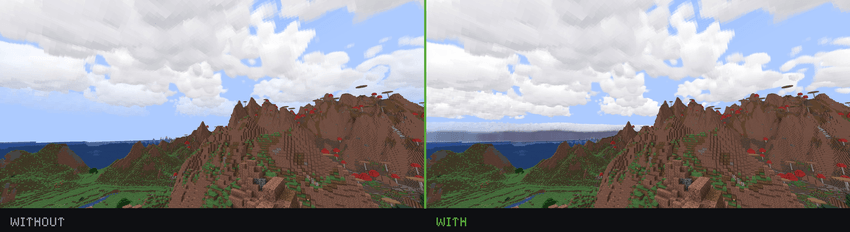
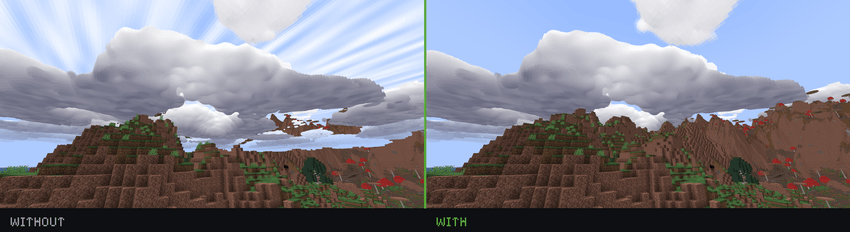
Minecraft 1.21.1, Java 21, NeoForge 21.1 and the voxy-forged port of Voxy. Client side; a dedicated server needs it too for Sable ships to stay loaded at distance. Most settings are in Sodium's video settings, where options for missing mods are greyed out. The rest are in config/micvoxy-client.toml.
Related mods
NeoForge 1.21.1, client side. Free to use in modpacks.
Project description from CurseForge.
Pick your setup
Choose the version and loader you play, then open the matching release.
Check the dependencies, then try the file in a copied instance before changing a world you care about.
Recent files
make-it-compatible-voxy-1.1.1.jar
2 Oct 2026
make-it-compatible-voxy-1.1.0.jar
21 Sept 2026
make-it-compatible-voxy-neoforge-1.21.1.jar
26 Jul 2026
make-it-compatible-voxy-neoforge-1.21.1.jar
20 Jul 2026
12 Jul 2026
Looking for an older file? The official CurseForge project page is in Resources.
 mod
Adds melee weapons themed around a zombie apocalypse.
 mod
Up to 8x faster chunk generation in structure-heavy packs when used alongside C2ME & Lithium, and ~70% shorter autosave lag spikes for smoother server TPS. Also adds extra TPS optimizations beyond structures. Works with other optimizers or standalone.
 mod
Type [item], [armor], [inv] or [ender] in chat to link held items, armor, Shulker Boxes, Bundles, inventory & Ender chest. Server-side — vanilla clients supported!