Creative Admin Optional for better-creative-2.1.1.jar
optionalMatching file found Matched file: creative-admin-2.1.1.jar
CurseForge · Minecraft mod
Minecraft gives you no control over the creative tabs. Install a few mods and the bar turns into pages of tabs you have to click through to reach the three you actually use. This mod lets you sort them, pin the ones you need, and hide the rest.
Quick answer
better-creative-2.1.1.jar targets 1.21.1 with NeoForge. The project page does not say whether this file belongs on the client, dedicated server, or both. No extra mods listed for this file.
Where it goes
The project page does not say whether this file belongs on the client, dedicated server, or both.
The source does not explicitly classify this release as client-only or server-only.
better-creative-2.1.1.jar. Change the file and its required mods may change too.
This file does not list any required mods. Do not add a library just because a different file uses it.
1 extra mod was pulled in by another dependency. Indented rows show who needs each one. We only count dependency files that match this setup. A file for another loader does not fill the gap.
Before you install it
Built for better-creative-2.1.1.jar. Pick another file and the loader, install side or required mods may change.
Use better-creative-2.1.1.jar. It targets 1.21.1 with NeoForge; another release may have different loader, side or dependency requirements.
This file does not list any required mods. Do not add a library just because a different file uses it.
The project page does not say whether this file belongs on the client, dedicated server, or both.
Use the “Get this file” button beside better-creative-2.1.1.jar. It opens that exact file at the source.
About this project


Better Creative puts you in charge of the creative inventory tab bar: sort the tabs, pin the ones you use and hide the rest.
Two hundred tabs in your pack, three you actually open.

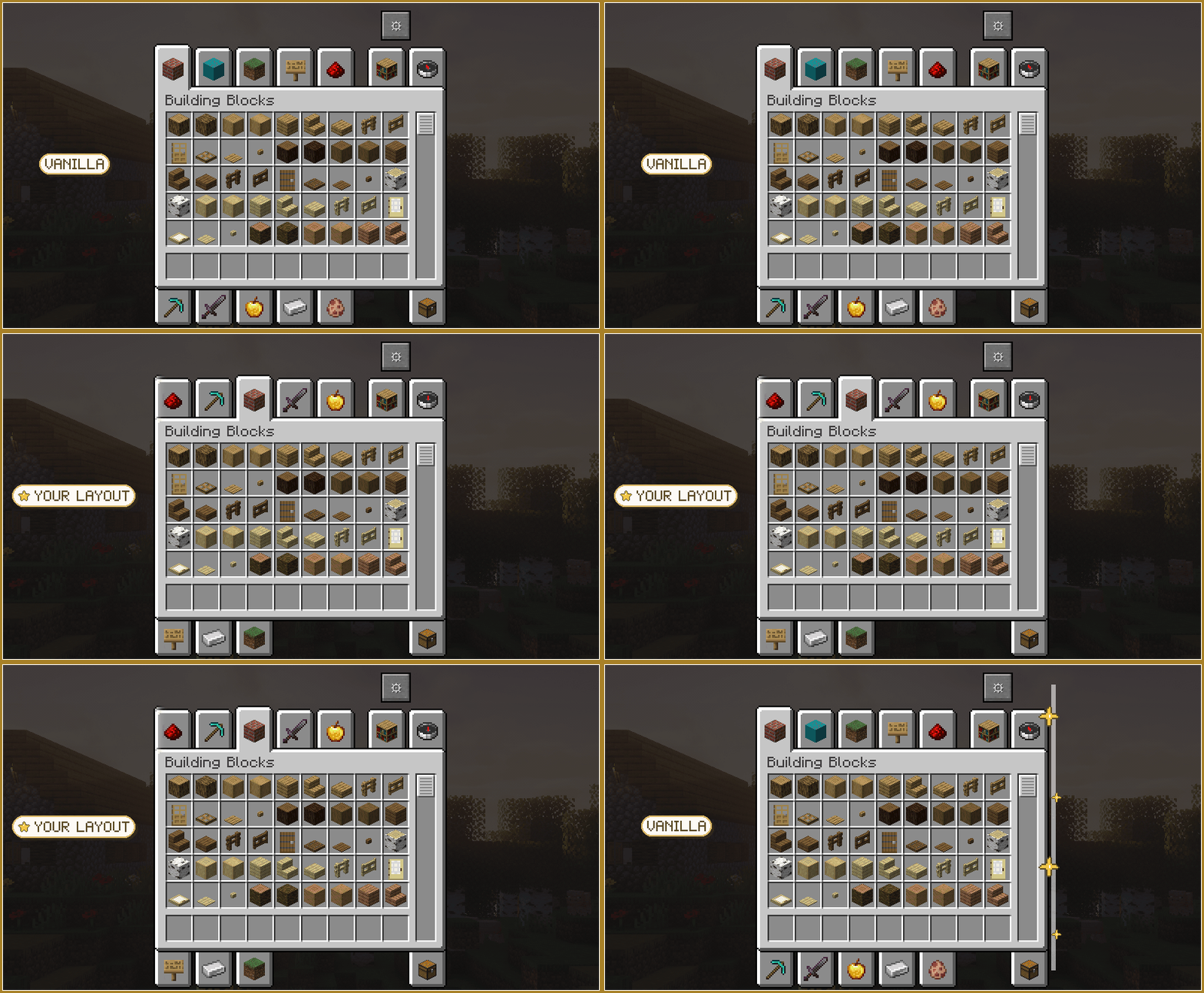
 Sort: vanilla order, A to Z, Z to A, or your own by drag and drop.
 Pin: your favourite tabs always come first, whatever the order.
 Hide: drop the tabs you never open, or all but the pinned ones in one click.
 Presets: save named layouts and switch between them.
 Pack-proof: tabs are tracked by id, so adding or removing mods never scrambles your layout.

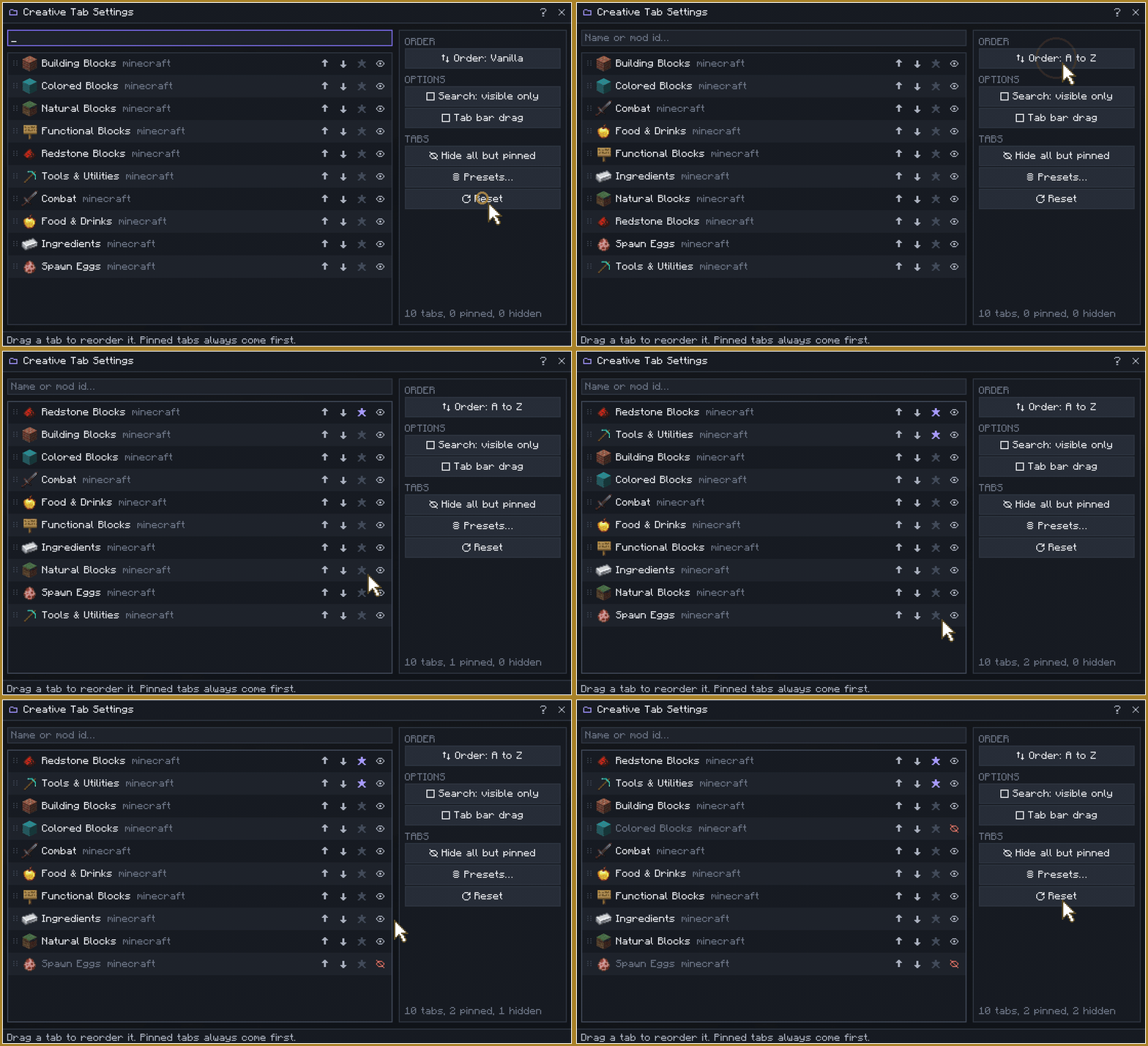
 One click away: a gear button in the creative inventory, or Mods, Better Creative, Config.
 Built-in help: a help page explains every control and every limit.
 Nothing to set up: client side only, works on vanilla servers.

 Pack whitelist: ship
 config/better-creative/policy.json to list only the tabs you allow.
 Server locks: with Creative Admin on the server, locked tabs disappear and stay off.
 JEI and EMI: the tab registry is never touched, so they see the game as it is.
 Modpacks welcome: no need to ask, as long as the pack uses the official file, unmodified.
A bug or an idea? Open an issue.

Better Creative vous rend maître de la barre d'onglets de l'inventaire créatif : triez les onglets, épinglez ceux que vous utilisez et masquez le reste.
Deux cents onglets dans votre pack, trois que vous ouvrez vraiment.

Trier : ordre vanilla, de A à Z, de Z à A, ou le vôtre par glisser-déposer.
Épingler : vos onglets favoris passent toujours en tête, quel que soit l'ordre.
Masquer : retirez les onglets inutiles, ou tous sauf les épinglés en un clic.
Préréglages : enregistrez des dispositions nommées et passez de l'une à l'autre.
Robuste : les onglets sont suivis par identifiant : ajouter ou retirer un mod ne dérange rien.

À un clic : un bouton engrenage dans l'inventaire créatif, ou Mods, Better Creative, Config.
Aide intégrée : une page d'aide explique chaque contrôle et chaque limite.
Rien à installer : uniquement côté client, fonctionne sur les serveurs vanilla.

Liste blanche : fournissez config/better-creative/policy.json pour ne lister que les onglets autorisés.
Verrous serveur : avec Creative Admin sur le serveur, les onglets verrouillés disparaissent pour de bon.
JEI et EMI : le registre des onglets n'est jamais modifié : ils voient le jeu tel quel.
Modpacks bienvenus : sans rien demander, tant que le pack utilise le fichier officiel non modifié.
Un bug ou une idée ? Ouvrez un ticket.
Creative Admin enforces creative restrictions on the server, by profile. Neither mod needs the other.
Creative Admin applique des restrictions créatives côté serveur, par profil. Aucun des deux mods n'a besoin de l'autre.

Author / Auteur: THEFricadelle | License / Licence: All Rights Reserved
Project description from CurseForge.
Pick your setup
Choose the version and loader you play, then open the matching release.
Check the dependencies, then try the file in a copied instance before changing a world you care about.
Recent files
3 Oct 2026
29 Sept 2026
22 Jul 2026
20 Jul 2026
Looking for an older file? The official CurseForge project page is in Resources.
 mod
modMinecraft library with shared features for my mods
 mod
modA lightweight storage addon for the Create Mod featuring Storage Boxes and Backpacks
 mod
modA mod that provides universal tools, super alloy furnaces, and various QOL modifications.