Back to mods
Souls Combat HUD project artwork

CurseForge · Minecraft mod

Souls Combat HUD

Adds a soulslike HUD featuring equipment slots, boss bar, status gauges and team display.

Choose a version Pick your version below, then grab the matching file.

Quick answer

Which Souls Combat HUD release matches Forge?

Updated today
Best match for your filters souls_combat_hud-forge-1.3.7.jar
Game version 1.20.1
Loader Forge

Souls Combat HUD souls_combat_hud-forge-1.3.7.jar targets 1.20.1 with Forge. The project page does not say whether this file belongs on the client, dedicated server, or both. No extra mods listed for this file.

Where it goes

Is Souls Combat HUD required on the client, server, or both?

The project page does not say whether this file belongs on the client, dedicated server, or both.

Client Source doesn’t say
Dedicated server Source doesn’t say
Loader for this release Forge
Required install it here Optional supported, not mandatory Not supported do not install here Source doesn’t say do not assume

The source does not explicitly classify this release as client-only or server-only.

What else does Souls Combat HUD souls_combat_hud-forge-1.3.7.jar need?

souls_combat_hud-forge-1.3.7.jar on Forge. Every mod below is checked against that same setup.

No extra mods listed for this file

This file does not list any required mods. Do not add a library just because a different file uses it.

12 listed on this file 12 pulled in by those mods
Iron's Spells 'n Spellbooks Optional for Souls Combat HUD souls_combat_hud-forge-1.3.7.jar
optional
Matching file found Matched file: v1.20.1-3.16.4
Thirst Was Reclaimed Optional for Souls Combat HUD souls_combat_hud-forge-1.3.7.jar
optional
Matching file found Matched file: ThirstWasReclaimed-1.20.1-3.0.5.jar
Paragliders Optional for Souls Combat HUD souls_combat_hud-forge-1.3.7.jar
optional
Matching file found Matched file: Paraglider-forge-20.1.3
Legendary Survival Overhaul Optional for Souls Combat HUD souls_combat_hud-forge-1.3.7.jar
optional
Matching file found Matched file: legendarysurvivaloverhaul-1.20.1-2.4.7.jar
Mana and Artifice Optional for Souls Combat HUD souls_combat_hud-forge-1.3.7.jar
optional
Matching file found Matched file: mna-forge-1.20.1-3.1.11-all.jar
Ars Nouveau Optional for Souls Combat HUD souls_combat_hud-forge-1.3.7.jar
optional
Matching file found Matched file: ars_nouveau-1.20.1-4.12.7-all.jar
Auto HUD Optional for Souls Combat HUD souls_combat_hud-forge-1.3.7.jar
optional
Matching file found Matched file: [Forge 1.20.1] Auto HUD 8.14
Epic Fight Optional for Souls Combat HUD souls_combat_hud-forge-1.3.7.jar
optional
Matching file found Matched file: 20.14.17-mc1.20.1-forge
FTB Teams (NeoForge) Optional for Souls Combat HUD souls_combat_hud-forge-1.3.7.jar
optional
Matching file found Matched file: ftb-teams-forge-2001.3.2.jar
Mine and Slash Optional for Souls Combat HUD souls_combat_hud-forge-1.3.7.jar
optional
Matching file found Matched file: Mine_and_Slash-1.20.1-v6.4.13
More Offhand Slots Optional for Souls Combat HUD souls_combat_hud-forge-1.3.7.jar
optional
Matching file found Matched file: moreoffhandslots-forge-20.1.0.2.jar
ParCool! ~ Minecraft Parkour ~ Optional for Souls Combat HUD souls_combat_hud-forge-1.3.7.jar
optional
Matching file found Matched file: 1.20.1-4.0.2.0
playerAnimator Needed by Iron's Spells 'n Spellbooks
pulled in
Matching file found Matched file: player-animation-lib-forge-1.0.2-rc1+1.20.jar
Curios API Needed by Iron's Spells 'n Spellbooks
pulled in
Matching file found Matched file: curios-forge-5.14.1+1.20.1.jar
Iron's Lib Needed by Iron's Spells 'n Spellbooks
pulled in
Matching file found Matched file: irons_lib-1.20.1-2.4.0
GeckoLib Needed by Iron's Spells 'n Spellbooks
pulled in
Matching file found Matched file: geckolib-forge-1.20.1-4.8.5.jar
Lootr (Forge & NeoForge) Needed by Mana and Artifice
pulled in
Matching file found Matched file: lootr-forge-1.20-0.7.35.94.jar
Lucent Needed by Mana and Artifice
pulled in
Matching file found Matched file: Lucent 1.20.1-v1.5.5
Fabric API Needed by Auto HUD
pulled in
No matching file
YetAnotherConfigLib Needed by Auto HUD
pulled in
Matching file found Matched file: 3.6.6 for forge 1.20.1
Mod Menu Needed by Auto HUD
pulled in
No matching file
Architectury API Needed by FTB Teams (NeoForge)
pulled in
Matching file found Matched file: [Forge 1.20(.1)] v9.2.14
FTB Library (NeoForge) Needed by FTB Teams (NeoForge)
pulled in
Matching file found Matched file: ftb-library-forge-2001.2.13.jar
Library of Exile Needed by Mine and Slash
pulled in
Matching file found Matched file: Library_of_Exile-1.20.1-v2.1.14

12 extra mods were pulled in by other dependencies. Indented rows show who needs each one. We only count dependency files that match this setup. A file for another loader does not fill the gap.

Before you install it

Add Souls Combat HUD without breaking your instance.

Built for Souls Combat HUD souls_combat_hud-forge-1.3.7.jar on Forge. Pick another file and the loader, install side or required mods may change.

  1. 01

    Stick to this file

    Use souls_combat_hud-forge-1.3.7.jar. It targets 1.20.1 with Forge; another release may have different loader, side or dependency requirements.

  2. 02

    Bring the mods it needs

    This file does not list any required mods. Do not add a library just because a different file uses it.

  3. 03

    Put it on the correct side

    The project page does not say whether this file belongs on the client, dedicated server, or both.

  4. 04

    Pick the file you checked

    Use the “Get this file” button beside souls_combat_hud-forge-1.3.7.jar. It opens that exact file at the source.

About this project

What does Souls Combat HUD add?

Preview of the HUD

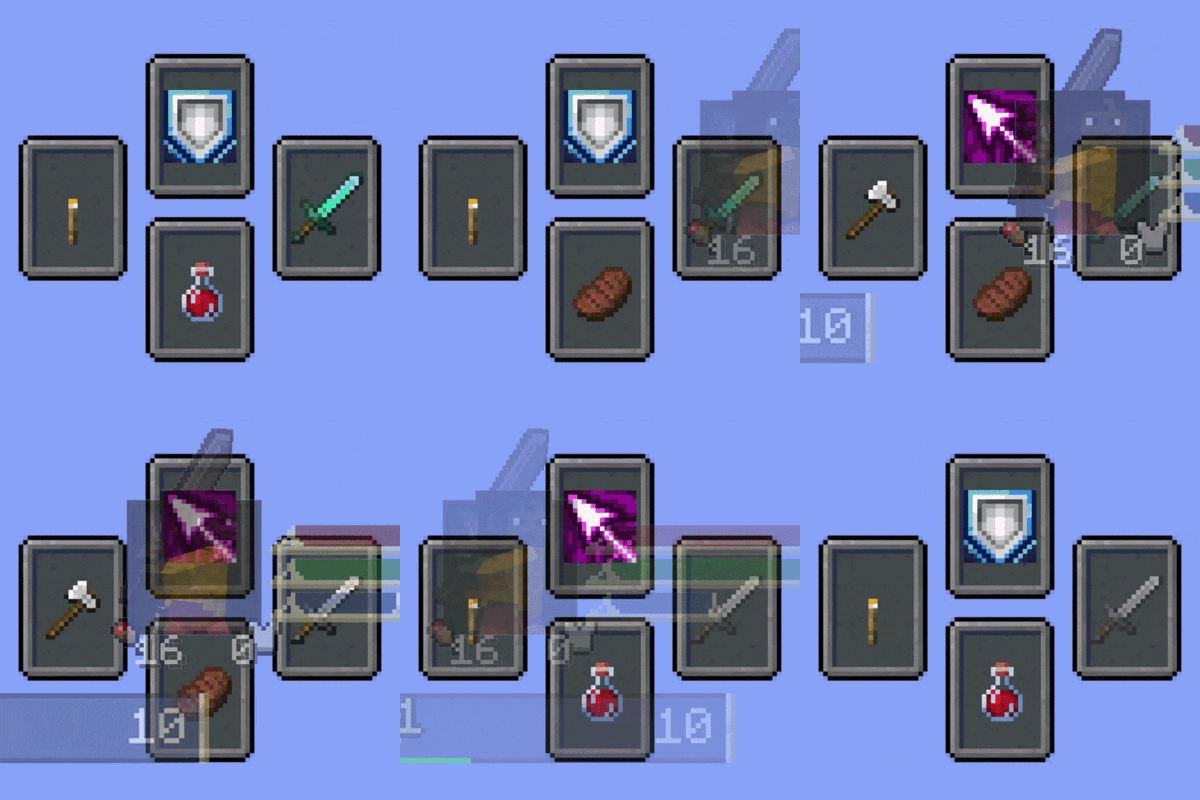
This client side mod adds a soulslike HUD found in FromSoftware games. The mod includes:

  • Equipment slots selector
    • Compatability with Iron's Spells n' Spellbooks
    • Compatability with MoreOffhandSlots
    • Keep hotbar hidden with AutoHUD
  • Status Gauges including status of your teammates.
  • Alternative skill overlay UI for Epic Fight
  • Custom bossbar
  • Support for client only and client-server features.

Each feature can be disabled through the config.

Before using the mod I also recommend:

  • Configurable mod to update config values without restarting.
  • A mod that allows you to shift the chatbox, otherwise change the anchor.
  • To disable existing UI of mods, such as Iron's Spells spell bar.

Check out my partner mod, Souls Message Banners.


Equipment Slots

The equipment slots is essentially an extended hotbar selector. They can be cycled through your arrow keys.

Weapon slot - Indicates your selected weapon. By pressing your Right Arrow key, your main hand will cycle to weapons in your hotbar. If you are not currently holding a weapon, it will jump to the weapon it indicates.

  • If Epic Fight is installed, items in Combat Preferred is included.
  • Items can be added/removed through the config.

Offhand slot - Indicates your offhand slot. By pressing your Left Arrow key, you are able to cycle through your offhand items (only with MoreOffhandSlots).

Spell slot - Indicates your active spell. By pressing your Up Arrow key, you can cycle through your spells.

  • This includes preview slots to see which spells you are cycling to.

Consumable slot - Indicates your food items. By pressing your Down Arrow key, you can cycle through your consumable items.

  • This includes preview slots to see which items you are cycling to.
  • The mod also adds a "Use Consumable key" (G key), which will automatically jump to the item and consume without holding right click.

    • Thus cycling wont jump to your consumables unless configured.
  • Iron's Spells scrolls are included

Status Gauges

Preview of status gauges with value text enabled This replaces certain elements found in the vanilla hotbar.

Crest

  • Displays player hunger and armor level
  • Displays player character preview / paper doll
    • Face Mode
    • Model Mode
      • Supports Epic Fight player model

Status bars

  • Displays status of the player
    • Stamina
      • Epic Fight
      • Parcool
      • Paragliders
      • Mine and Slash
    • Mana
      • Iron's Spells
      • Mine and Slash
  • The bar widths dynamically change depending on how much the player's stats have changed from the baseline max values.
    • Server owners can set their baseline values and projected max/late game values in the server config
    • Clients can do the same or override the server values, but they can also make the bar widths constant.
  • Player gauge appearance can be customized in assets/souls_combat_hud/souls_bars/player_gauge.json.

Party Gauges

Preview of Sort Party GUI

This displays the status of your teammates. This feature is only enabled if the mod is installed serverside.

  • Supports vanilla teams and FTB teams.
  • Team color will display as a crest outline.
  • Sort party screen, open with O key
  • Certain stat tracking can be restricted via server config.
  • Party gauge appearance can be customized in assets/souls_combat_hud/souls_bars/party_gauge.json.

Bossbar

Preview of Custom Bossbar This replaces the vanilla bossbar with a soulslike bossbar.

  • You can set a custom bossbar for certain bosses via translation keys (e.g. entity.minecraft.ender_dragon) inside assets/<namespace>/souls_bars/entities.

  • You may need to see the config of your boss mods to disable custom bars if you wish to make it appear.

Vanilla HUD Changes

Preview of hotbar differences

  • Bossbar and certain parts of the hotbar are automatically hidden by default, configurable.
    • A custom experience overlay replaces the experience bar, also includes total xp points.
    • A custom oxygen bar replaces the air level meter.
  • Item highlight name and record label are shifted closer to the hotbar, configurable.
    • By default, the item name shifting when changing from/to creative is disabled.
    • Cold Sweat mod repositions this text, make sure to disable Custom hotbar layout.
    • No Hunger mod makes armor level reappear, make sure to disable Render armor at hunger.

Notes

  • Incase you are encountering "Payload may not be larger than 32767 bytes", install Packet Fixer.

Project description from CurseForge.

Pick your setup

Souls Combat HUD by Minecraft version and loader

Choose the version and loader you play, then open the matching release.

2 available setups

Check the dependencies, then try the file in a copied instance before changing a world you care about.

Recent files

Souls Combat HUD versions and loaders

35 of 36 releases match
Clear filters

Looking for an older file? The official CurseForge project page is in Resources.