&color=#1bd96a)
Minecraft version
Back to mods 
CurseForge · Minecraft mod
Chronoclones
Record yourself moving items, killing mobs, breaking blocks, building a house... pretty much anything a player can do! Then have an army of clones do it time and time again.
Choose a version Pick your version below, then grab the matching file.
Quick answer
Which Chronoclones release should I use?
Latest stable file 1.1 - NeoForge 1.21.1
Game version 1.21.1
Loader NeoForge
Chronoclones 1.1 - NeoForge 1.21.1 targets 1.21.1 with NeoForge. The project page does not say whether this file belongs on the client, dedicated server, or both. No extra mods listed for this file.
Where it goes
Is Chronoclones required on the client, server, or both?
The project page does not say whether this file belongs on the client, dedicated server, or both.
Client Source doesn’t say
Dedicated server Source doesn’t say
Loader for this release NeoForge
Required install it here Optional supported, not mandatory Not supported do not install here Source doesn’t say do not assume
The source does not explicitly classify this release as client-only or server-only.
What else does Chronoclones 1.1 - NeoForge 1.21.1 need?
1.1 - NeoForge 1.21.1. Change the file and its required mods may change too.
This file does not list any required mods. Do not add a library just because a different file uses it.
This file does not list any required or optional mods.
Before you install it
Add Chronoclones without breaking your instance.
Built for Chronoclones 1.1 - NeoForge 1.21.1. Pick another file and the loader, install side or required mods may change.
- 01
Stick to this file
Use 1.1 - NeoForge 1.21.1. It targets 1.21.1 with NeoForge; another release may have different loader, side or dependency requirements.
- 02
Bring the mods it needs
This file does not list any required mods. Do not add a library just because a different file uses it.
- 03
Put it on the correct side
The project page does not say whether this file belongs on the client, dedicated server, or both.
- 04
Pick the file you checked
Use the “Get this file” button beside 1.1 - NeoForge 1.21.1. It opens that exact file at the source.
About this project
What does Chronoclones add?

&color=#f16436)
Record yourself moving items, killing mobs, breaking blocks, building a house… pretty much anything a player can do! Then have an army of clones do it time and time again.
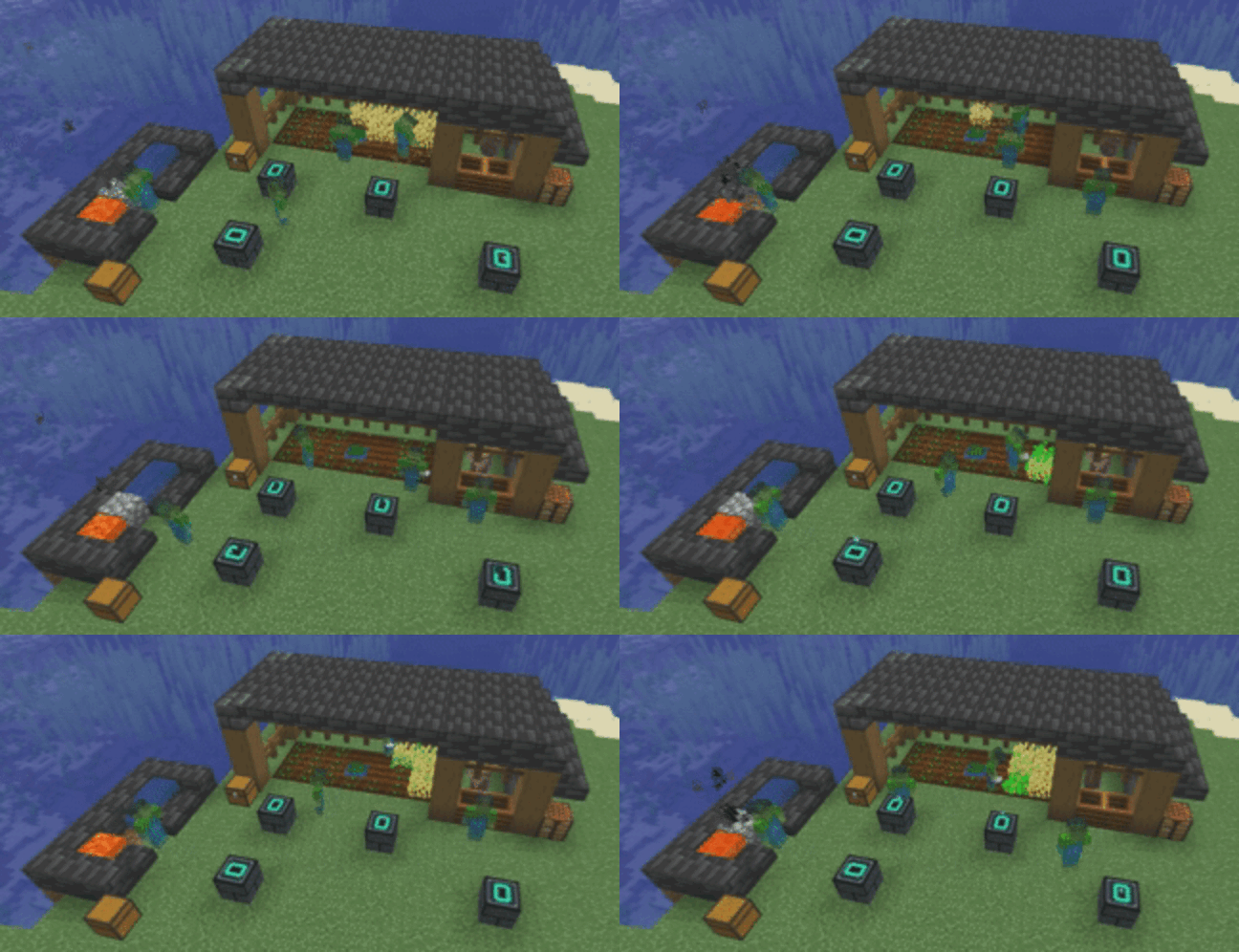
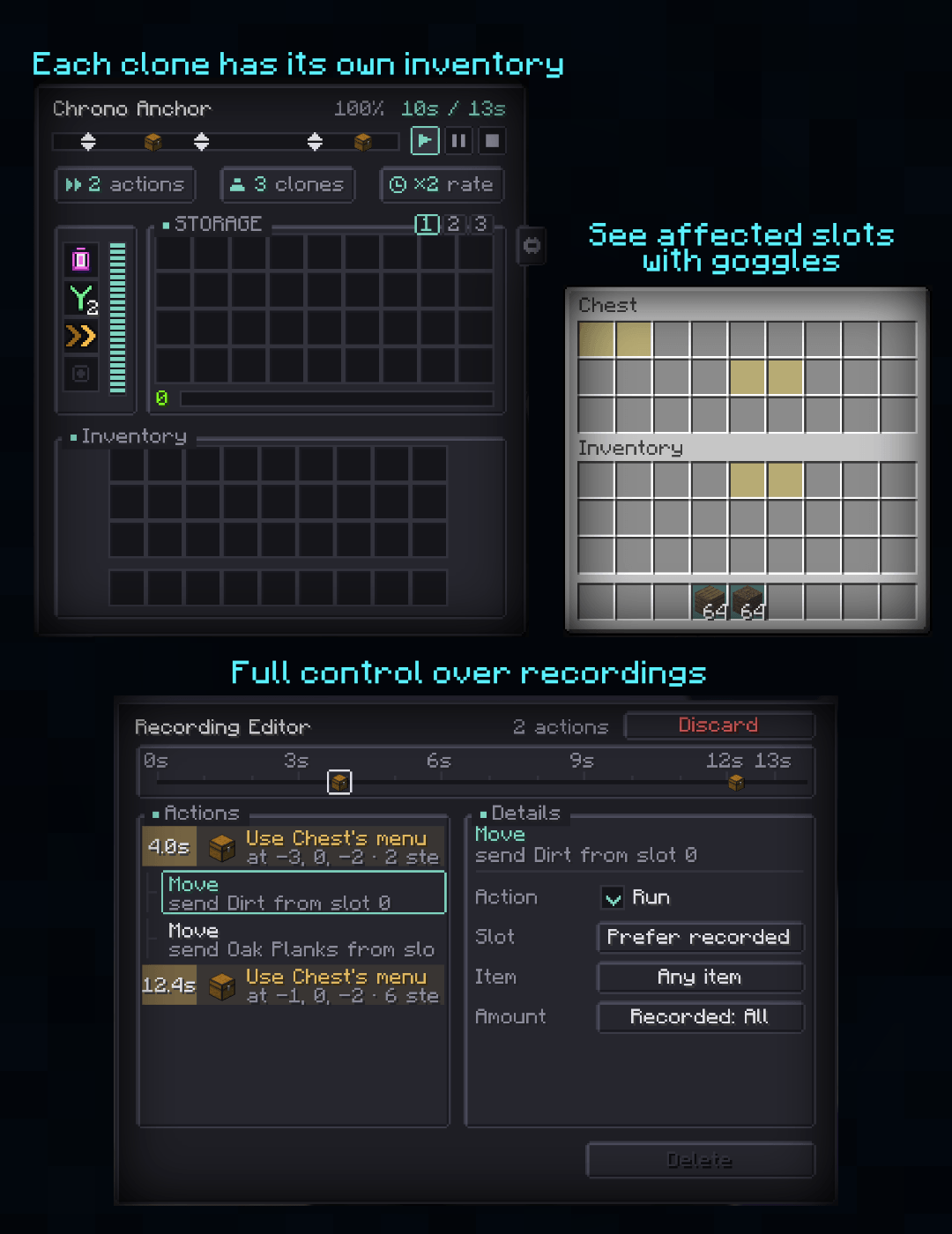
Getting Started
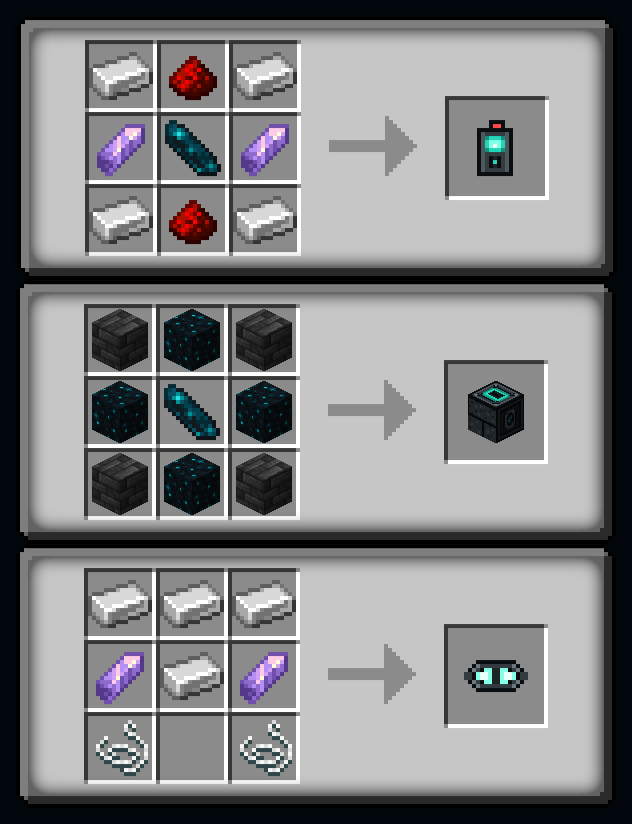
This mod adds a single block and several items to the game. To start, you'll want three things:
- Chrono Recorder — right-click to start or stop recording
- Chrono Anchor — where your recording plays from
- Chrono Goggles — see previews of nearby recordings
Supported Interactions
- Break/place blocks
- Interacting with blocks
- Moving items around
- Crafting items
- Trade with villagers
- Enchant and anvil items
- Physical movement
- Attacking and killing mobs
- Interacting with mobs, including shearing, feeding, and more
- And more…
If I find an interaction isn't supported, I'll probably add it!
Upgrades
- Chrono Accelerator - make your recording play faster
- Chrono Splitter - adds more clones to a recording
Configuration
maxRadius- max distance a clone can act from an anchormaxRecordingTicks- how long a recording can go on formaxActions- max number of actions in a recordingmaxActionsPerTick- per-level budget of actions per tickmaxActionTicks- max number of ticks an action can takeallowPvp- whether clones can attack playersgoggleRadius- how far the goggles reveal recordingsgogglesShowOthers- whether goggles show other players' recordings
See config file for more info
2026 Curseforge Modjam Winner

Warning: Since these clones mimic real players, expect weird behavior or rejections when multiple clones are interacting with the same thing.
Roadmap
- Better upgrade system
Redstone supportdone- Improved editor
- Improved visuals (most are placeholders)
- More interactions and controls
Backport to 26.1, 1.21.x, and 1.20.1 (maybe)doneFabric supportdone- Third-party mod integrations
Work in progress: This is a powerful mod, and so the bugs can be powerful too. Make a backup of your world if you try to push the limits. Expect bugs and compatibility issues until they are found and fixed. If you find something that is not working as expected or you have a suggestion, please leave an issue.
Project description from CurseForge.
Pick your setup
Chronoclones by Minecraft version and loader
Choose the version and loader you play, then open the matching release.
Minecraft version
1.21.1
2 loader buildsMinecraft version
1.20.1
2 loader buildsCheck the dependencies, then try the file in a copied instance before changing a world you care about.
Recent files
Chronoclones versions and loaders
1.1 - NeoForge 1.21.1
chronoclones-1.21.1-neoforge-1.1.0.jar
27 Sept 2026
Client Source doesn’t say Server Source doesn’t say Dependencies No extras listed Listed on Release listing
Check the 1.21.1 · NeoForge setup 1.21.1NeoForge release
1.1 - NeoForge 26.2
chronoclones-26.2-neoforge-1.1.0.jar
27 Sept 2026
Client Source doesn’t say Server Source doesn’t say Dependencies No extras listed Listed on Release listing
Check the 26.2 · NeoForge setup NeoForge26.2 release
1.1 - Fabric 1.20.1
chronoclones-1.20.1-fabric-1.1.0.jar
27 Sept 2026
Client Source doesn’t say Server Source doesn’t say Dependencies 1 required · 1 unchecked Listed on Release listing
Check the 1.20.1 · Fabric setup Fabric1.20.1 release
1.1 - Fabric 1.21.1
chronoclones-1.21.1-fabric-1.1.0.jar
27 Sept 2026
Client Source doesn’t say Server Source doesn’t say Dependencies 1 required · 1 unchecked Listed on Release listing
Check the 1.21.1 · Fabric setup Fabric1.21.1 release
1.1 - Fabric 26.2
chronoclones-26.2-fabric-1.1.0.jar
27 Sept 2026
Client Source doesn’t say Server Source doesn’t say Dependencies 1 required · 1 unchecked Listed on Release listing
Check the 26.2 · Fabric setup Fabric26.2 release
1.1 - Forge 1.20.1
chronoclones-1.20.1-forge-1.1.0.jar
27 Sept 2026
Client Source doesn’t say Server Source doesn’t say Dependencies No extras listed Listed on Release listing
Check the 1.20.1 · Forge setup 1.20.1Forge release
1.0 - Forge 1.20.1
chronoclones-1.20.1-forge-1.0.0.jar
30 Aug 2026
Client Source doesn’t say Server Source doesn’t say Dependencies No extras listed Listed on Release listing
Check the 1.20.1 · Forge setup 1.20.1Forge release
1.0 - Fabric 1.20.1
chronoclones-1.20.1-fabric-1.0.0.jar
30 Aug 2026
Client Source doesn’t say Server Source doesn’t say Dependencies 1 required · 1 unchecked Listed on Release listing
Check the 1.20.1 · Fabric setup Fabric1.20.1 release
1.0 - Fabric 1.21.1
chronoclones-1.21.1-fabric-1.0.0.jar
30 Aug 2026
Client Source doesn’t say Server Source doesn’t say Dependencies 1 required · 1 unchecked Listed on Release listing
Check the 1.21.1 · Fabric setup Fabric1.21.1 release
1.0 - NeoForge 1.21.1
chronoclones-1.21.1-neoforge-1.0.0.jar
30 Aug 2026
Client Source doesn’t say Server Source doesn’t say Dependencies No extras listed Listed on Release listing
Check the 1.21.1 · NeoForge setup 1.21.1NeoForge release
1.0 - Fabric 26.2
chronoclones-26.2-fabric-1.0.0.jar
30 Aug 2026
Client Source doesn’t say Server Source doesn’t say Dependencies 1 required · 1 unchecked Listed on Release listing
Check the 26.2 · Fabric setup Fabric26.2 release
1.0 - NeoForge 26.2
chronoclones-26.2-neoforge-1.0.0.jar
30 Aug 2026
Client Source doesn’t say Server Source doesn’t say Dependencies No extras listed Listed on Release listing
Check the 26.2 · NeoForge setup NeoForge26.2 release
Looking for an older file? The official CurseForge project page is in Resources.
 mod
mod CurseForge · Minecraft
TribalPower
Shamanic technomancy: rhythmic spirit power, automated workshops, wireless transport, elemental rituals, unique creatures, and the aurora-lit March.
 mod
mod CurseForge · Minecraft
Tidy Pockets
Instant inventory sorting, slot locking, hotbar refill, tool-break protection and mouse shortcuts, all client-side, with quick cartoon animations.
 mod
mod CurseForge · Minecraft
Pocket Dimension Suitcase
Carry your own private island dimension in a suitcase, with a linked storage network you can access from anywhere on it.