Minecraft version
Back to mods 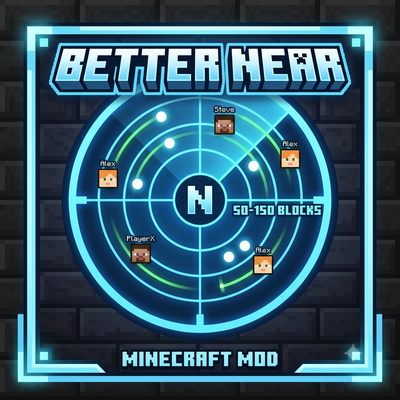
CurseForge · Minecraft mod
BetterNear
Shows nearby players within a range of 50 to 150 blocks.
Choose a version Pick your version below, then grab the matching file.
Quick answer
Which BetterNear release should I use?
Latest stable file betternear-1.16.5-forge edition.jar
Game version 1.16.5
Loader Forge
betternear-1.16.5-forge edition.jar targets 1.16.5 with Forge. The project page does not say whether this file belongs on the client, dedicated server, or both. No extra mods listed for this file.
Where it goes
Is BetterNear required on the client, server, or both?
The project page does not say whether this file belongs on the client, dedicated server, or both.
Client Source doesn’t say
Dedicated server Source doesn’t say
Loader for this release Forge
Required install it here Optional supported, not mandatory Not supported do not install here Source doesn’t say do not assume
The source does not explicitly classify this release as client-only or server-only.
What else does betternear-1.16.5-forge edition.jar need?
betternear-1.16.5-forge edition.jar. Change the file and its required mods may change too.
This file does not list any required mods. Do not add a library just because a different file uses it.
This file does not list any required or optional mods.
Before you install it
Add BetterNear without breaking your instance.
Built for betternear-1.16.5-forge edition.jar. Pick another file and the loader, install side or required mods may change.
- 01
Stick to this file
Use betternear-1.16.5-forge edition.jar. It targets 1.16.5 with Forge; another release may have different loader, side or dependency requirements.
- 02
Bring the mods it needs
This file does not list any required mods. Do not add a library just because a different file uses it.
- 03
Put it on the correct side
The project page does not say whether this file belongs on the client, dedicated server, or both.
- 04
Pick the file you checked
Use the “Get this file” button beside betternear-1.16.5-forge edition.jar. It opens that exact file at the source.
About this project
What does BetterNear add?
Better Near
You must have fabric API installed
Better Near is a handy quality-of-life mod designed to help players locate each other within a range of 50 to 150 blocks. Perfect for SMPs, mini-games, or playing with friends!
Features:
Player Detection: Easily scan and detect nearby players within a radius of 50 to 150 blocks.
Quick UI Scaling: Toggle between different interface/radar scale modes instantly without leaving the game.
Lightweight & Fast: Minimal impact on performance.
Controls:
Press
K— Cycle through scale multipliers:0.25x,0.50x,0.75x,1.0x,1.25x,1.50x,1.75x,2.0x. (Key can be rebound in standard Minecraft keybindings)Warning: You can't change the size of UI on minecraft 1.21.11!
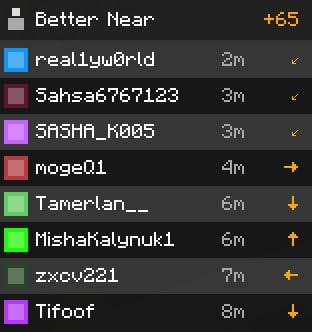
Project description from CurseForge.
Pick your setup
BetterNear by Minecraft version and loader
Choose the version and loader you play, then open the matching release.
Minecraft version
1.21.4
1 loader buildMinecraft version
1.21.1
1 loader buildMinecraft version
1.16.5
1 loader buildCheck the dependencies, then try the file in a copied instance before changing a world you care about.
Recent files
BetterNear versions and loaders
betternear-1.16.5-forge edition.jar
betternear-fixed-0.60x.jar
18 Aug 2026
Client Source doesn’t say Server Source doesn’t say Dependencies No extras listed Listed on Release listing
Check the 1.16.5 · Forge setup 1.16.5Forge release
BetterNear-Fabric-1.21.11.jar
BetterNear-Fabric-1.21.11 (5).jar
31 Jul 2026
Client Source doesn’t say Server Source doesn’t say Dependencies 1 required · 1 unchecked Listed on Release listing
Check the 1.21.11 · Fabric setup Fabric1.21.11 release
BetterNear1.21.1v1.jar
28 Jul 2026
Client Source doesn’t say Server Source doesn’t say Dependencies 1 required · 1 unchecked Listed on Release listing
Check the 1.21.1 · Fabric setup Fabric1.21.1 release
betternear-1.21.4.jar
betternear-1.21.4 (1).jar
28 Jul 2026
Client Source doesn’t say Server Source doesn’t say Dependencies 1 required · 1 unchecked Listed on Release listing
Check the 1.21.4 · Fabric setup Fabric1.21.4 release
Looking for an older file? The official CurseForge project page is in Resources.
 mod
mod CurseForge + Modrinth · Minecraft
RPG Attribute System
A lightweight RPG-style system that scales player attributes based on level.
 mod
mod CurseForge · Minecraft
flaying
Flay your fallen foes. Mobs leave carcasses on the ground upon death, requiring a sword to harvest loot
 mod
mod CurseForge + Modrinth · Minecraft
TotemDoll
Lets you replace the appearance of the Totem of Undying with selectable Minecraft-style dolls