Minecraft version
Back to mods 
CurseForge · Minecraft mod
Mouse Unlock
Free your mouse without pausing Minecraft, with AFK mouse hold and optional cinematic idle camera features.
Choose a version Pick your version below, then grab the matching file.
Quick answer
Which Mouse Unlock release should I use?
Latest stable file mouseunlock-1.3.7-neoforge-1.21.1.jar
Game version 1.21.1
Loader NeoForge
Mouse Unlock mouseunlock-1.3.7-neoforge-1.21.1.jar targets 1.21.1 with NeoForge. The project page does not say whether this file belongs on the client, dedicated server, or both. No extra mods listed for this file.
Where it goes
Is Mouse Unlock required on the client, server, or both?
The project page does not say whether this file belongs on the client, dedicated server, or both.
Client Source doesn’t say
Dedicated server Source doesn’t say
Loader for this release NeoForge
Required install it here Optional supported, not mandatory Not supported do not install here Source doesn’t say do not assume
The source does not explicitly classify this release as client-only or server-only.
What else does Mouse Unlock mouseunlock-1.3.7-neoforge-1.21.1.jar need?
mouseunlock-1.3.7-neoforge-1.21.1.jar. Change the file and its required mods may change too.
This file does not list any required mods. Do not add a library just because a different file uses it.
This file does not list any required or optional mods.
Before you install it
Add Mouse Unlock without breaking your instance.
Built for Mouse Unlock mouseunlock-1.3.7-neoforge-1.21.1.jar. Pick another file and the loader, install side or required mods may change.
- 01
Stick to this file
Use mouseunlock-1.3.7-neoforge-1.21.1.jar. It targets 1.21.1 with NeoForge; another release may have different loader, side or dependency requirements.
- 02
Bring the mods it needs
This file does not list any required mods. Do not add a library just because a different file uses it.
- 03
Put it on the correct side
The project page does not say whether this file belongs on the client, dedicated server, or both.
- 04
Pick the file you checked
Use the “Get this file” button beside mouseunlock-1.3.7-neoforge-1.21.1.jar. It opens that exact file at the source.
About this project
What does Mouse Unlock add?
Mouse Unlock
Unlock your mouse cursor without opening the pause menu.
Mouse Unlock is a lightweight client-side utility mod that lets you temporarily free your mouse cursor while staying in-game. Press a configurable hotkey to unlock the cursor, interact with applications on another monitor, then simply click back into Minecraft to continue playing.
Unlike pressing Esc, Mouse Unlock doesn't open the pause menu or any other GUI, making it ideal for streamers, content creators, multi-monitor setups, and anyone who frequently switches between Minecraft and other applications.
Supported Versions
Mouse Unlock is currently available for:
- Minecraft 1.21.1 – NeoForge
- Minecraft 1.20.1 – Fabric
- Minecraft 1.20.1 – Forge
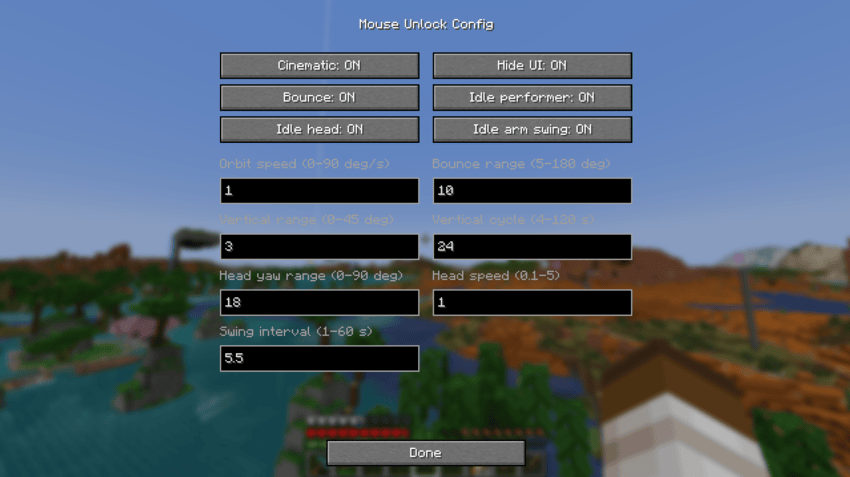
The NeoForge and Fabric versions include an easy-to-use Config screen accessible from the mod list.
The Forge version provides the same core functionality, but currently uses in-game commands and the configuration file for advanced settings.
Features
- ✅ Configurable hotkey to unlock the mouse cursor
- ✅ No pause menu or other screens
- ✅ Automatically recaptures the cursor when returning to Minecraft
- ✅ AFK Hold – keep the last-used mouse button held while using another application
- ✅ Optional cinematic camera while the cursor is unlocked
- ✅ Orbit or bouncing camera movement
- ✅ Adjustable horizontal and vertical cinematic movement
- ✅ Optional Idle Performer – your character can look around and occasionally swing their arm while you're away
- ✅ Optional automatic HUD hiding (equivalent to pressing F1)
- ✅ Easy Config GUI on NeoForge and Fabric
- ✅ Advanced configuration through in-game commands
- ✅ Lightweight and client-side only
- ✅ No server installation required
Configuration
Config GUI
On supported versions, Mouse Unlock can be configured directly from the Minecraft mod list.
NeoForge:
Mods → Mouse Unlock → Config
Fabric:
Mods → Mouse Unlock → Config
The Fabric version requires Mod Menu for the Config button to be displayed.
From the Config screen you can easily adjust:
- Cinematic mode
- HUD hiding
- Orbit / bounce mode
- Orbit speed and range
- Vertical camera movement
- Idle Performer
- Head movement
- Arm swinging
- Idle animation speed and intervals
Advanced users can also use the in-game commands listed below.
AFK Hold
Mouse Unlock includes a separate AFK Hold hotkey.
Use a mouse button normally, then activate AFK Hold. Mouse Unlock remembers the last mouse button you used and keeps it held while releasing your cursor.
This is useful for activities such as:
- Cobblestone generators
- Continuous mining
- Holding the use button
- Other simple AFK actions
AFK Hold intentionally keeps your current camera perspective and does not activate cinematic mode, hide the HUD, or enable Idle Performer.
Return to Minecraft to stop AFK Hold and resume normal control.
Cinematic Mode
Instead of leaving a completely static Minecraft window while you're using another application, Mouse Unlock can automatically switch to a third-person cinematic view.
The camera can smoothly orbit or bounce around your character, with configurable speed and movement range.
Vertical camera movement can also be adjusted independently or completely disabled.
Idle Performer
For an even less static view, Idle Performer can add subtle movement to your character while Mouse Unlock is active.
Your character can:
- Look around
- Move their head from side to side
- Occasionally swing their arm
Idle Performer is optional and can be configured independently from the cinematic camera.
Commands
Most settings can be changed directly through the Config screen.
For advanced configuration, Mouse Unlock also provides in-game commands:
/mouseunlock cinematic .../mouseunlock ui .../mouseunlock idle .../mouseunlock status
Use Minecraft's command suggestions to see all available options.
Perfect for
- 🎥 Streamers using OBS, Twitch Chat, StreamElements, or similar tools
- 🖥️ Players with multiple monitors
- 💬 Quickly replying to Discord messages
- 🌐 Looking something up in a browser without interrupting your game
- ⚙️ Managing music, chat, or streaming software while playing
- ⛏️ Simple AFK activities without keeping Minecraft focused
- 🎬 Keeping your Minecraft view visually active while you're using another application
Client-side only
Mouse Unlock is a client-side quality-of-life mod.
It does not need to be installed on the server. You can use it when playing on multiplayer servers without requiring other players or the server itself to install Mouse Unlock.
Camera movement, HUD hiding, and Idle Performer are visual client-side features.
Project description from CurseForge.
Pick your setup
Mouse Unlock by Minecraft version and loader
Choose the version and loader you play, then open the matching release.
Minecraft version
1.20.1
2 loader buildsCheck the dependencies, then try the file in a copied instance before changing a world you care about.
Recent files
Mouse Unlock versions and loaders
mouseunlock-1.3.7-neoforge-1.21.1.jar
29 Aug 2026
Client Source doesn’t say Server Source doesn’t say Dependencies No extras listed Listed on Release listing
Check the 1.21.1 · NeoForge setup 1.21.1NeoForge release
mouseunlock-1.3.7-fabric-1.20.1.jar
29 Aug 2026
Client Source doesn’t say Server Source doesn’t say Dependencies No extras listed Listed on Release listing
Check the 1.20.1 · Fabric setup Fabric1.20.1 release
mouseunlock-1.3.5-forge-1.20.1.jar
29 Aug 2026
Client Source doesn’t say Server Source doesn’t say Dependencies No extras listed Listed on Release listing
Check the 1.20.1 · Forge setup 1.20.1Forge release
mouseunlock-1.3.4.jar
14 Aug 2026
Client Source doesn’t say Server Source doesn’t say Dependencies No extras listed Listed on Release listing
Check the 1.21.1 · NeoForge setup 1.21.1NeoForge release
mouseunlock-1.1.0.jar
2 Aug 2026
Client Source doesn’t say Server Source doesn’t say Dependencies No extras listed Listed on Release listing
Check the 1.21.1 · NeoForge setup 1.21.1NeoForge release
mouseunlock-1.0.1.jar
1 Aug 2026
Client Source doesn’t say Server Source doesn’t say Dependencies No extras listed Listed on Release listing
Check the 1.21.1 · NeoForge setup 1.21.1NeoForge release
Looking for an older file? The official CurseForge project page is in Resources.
 mod
mod CurseForge + Modrinth · Minecraft
Chef's Workbench
Build a functional Minecraft kitchen to cook, fry, bake, steam, and boil food with specialized cooking stations.
 mod
mod CurseForge · Minecraft
Create: Server Optimizer
Reduces server-side Create tick load and improves TPS in large factories and compatible add-ons.
 mod
mod CurseForge · Minecraft
Ord3n
A lightweight client-side inventory utility that lets you free your hands, reorganize items and quickly store them in nearby chests.