Minecraft version
Back to mods 
CurseForge · Minecraft mod
Exotic Worlds
Sail west and come home from the east. Cross the world's edge and you come back in from the opposite side. No walls, no teleports, one seamless world.
Choose a version Pick your version below, then grab the matching file.
Quick answer
Which Exotic Worlds release should I use?
Latest stable file 1.4.6+mc1.21.1
Game version 1.21.1
Loader Fabric, NeoForge
Exotic Worlds 1.4.6+mc1.21.1 targets 1.21.1 with Fabric, NeoForge. The project page does not say whether this file belongs on the client, dedicated server, or both. No extra mods listed for this file.
Where it goes
Is Exotic Worlds required on the client, server, or both?
The project page does not say whether this file belongs on the client, dedicated server, or both.
Client Source doesn’t say
Dedicated server Source doesn’t say
Loader for this release Fabric, NeoForge
Required install it here Optional supported, not mandatory Not supported do not install here Source doesn’t say do not assume
The source does not explicitly classify this release as client-only or server-only.
What else does Exotic Worlds 1.4.6+mc1.21.1 need?
1.4.6+mc1.21.1. Change the file and its required mods may change too.
This file does not list any required mods. Do not add a library just because a different file uses it.
This file does not list any required or optional mods.
Before you install it
Add Exotic Worlds without breaking your instance.
Built for Exotic Worlds 1.4.6+mc1.21.1. Pick another file and the loader, install side or required mods may change.
- 01
Stick to this file
Use 1.4.6+mc1.21.1. It targets 1.21.1 with Fabric, NeoForge; another release may have different loader, side or dependency requirements.
- 02
Bring the mods it needs
This file does not list any required mods. Do not add a library just because a different file uses it.
- 03
Put it on the correct side
The project page does not say whether this file belongs on the client, dedicated server, or both.
- 04
Pick the file you checked
Use the “Get this file” button beside 1.4.6+mc1.21.1. It opens that exact file at the source.
About this project
What does Exotic Worlds add?
Exotic Worlds
Sail west and come home from the east. Exotic Worlds wraps your world around. Walk, fly or sail across the world's edge and you come back in from the opposite side. There is no barrier and no teleport, and nothing marks the spot where you crossed.
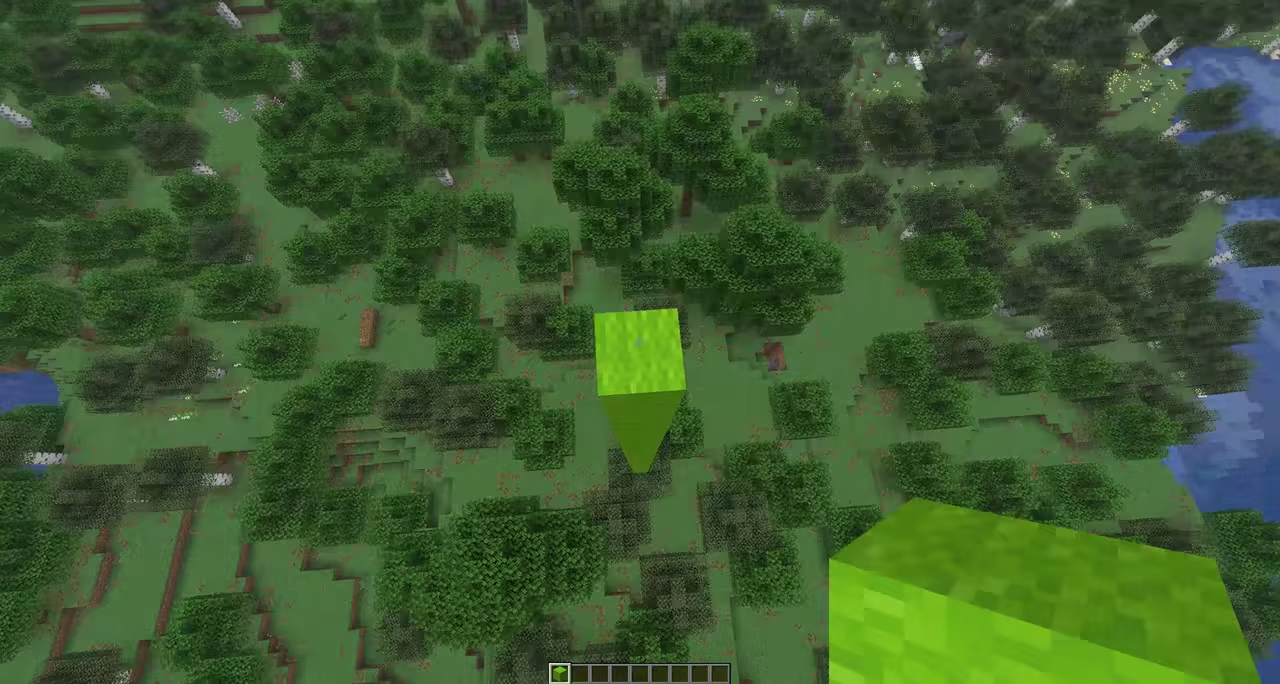
Make a world small enough that every player on the server lives a short walk away, or just keep going in one direction until you spot your own base ahead of you. Mobs, arrows, maps and compasses all treat the world as round; the details are in how it works.
World shapes
Toroidal
The world loops both ways. Go east and you come back from the west, go north and you come back from the south.
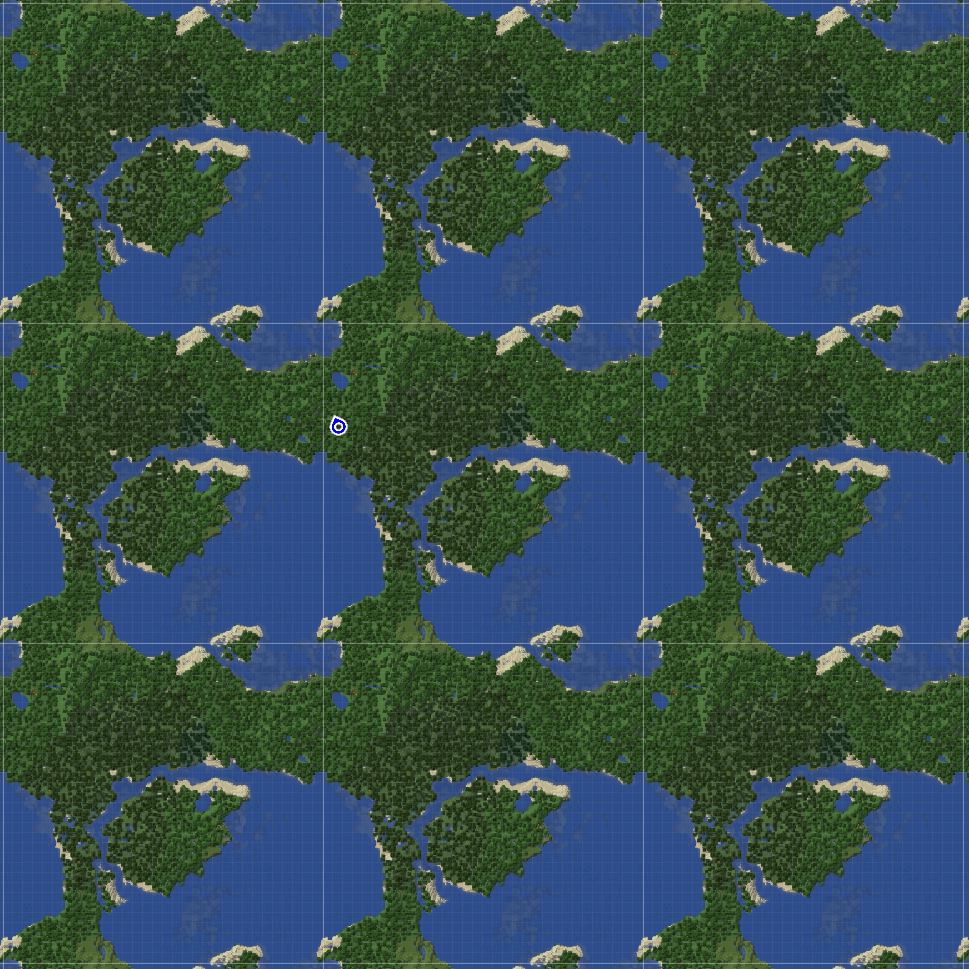
A tiny toroidal world on JourneyMap. The same world repeats in every direction, and the white lines mark the edge.
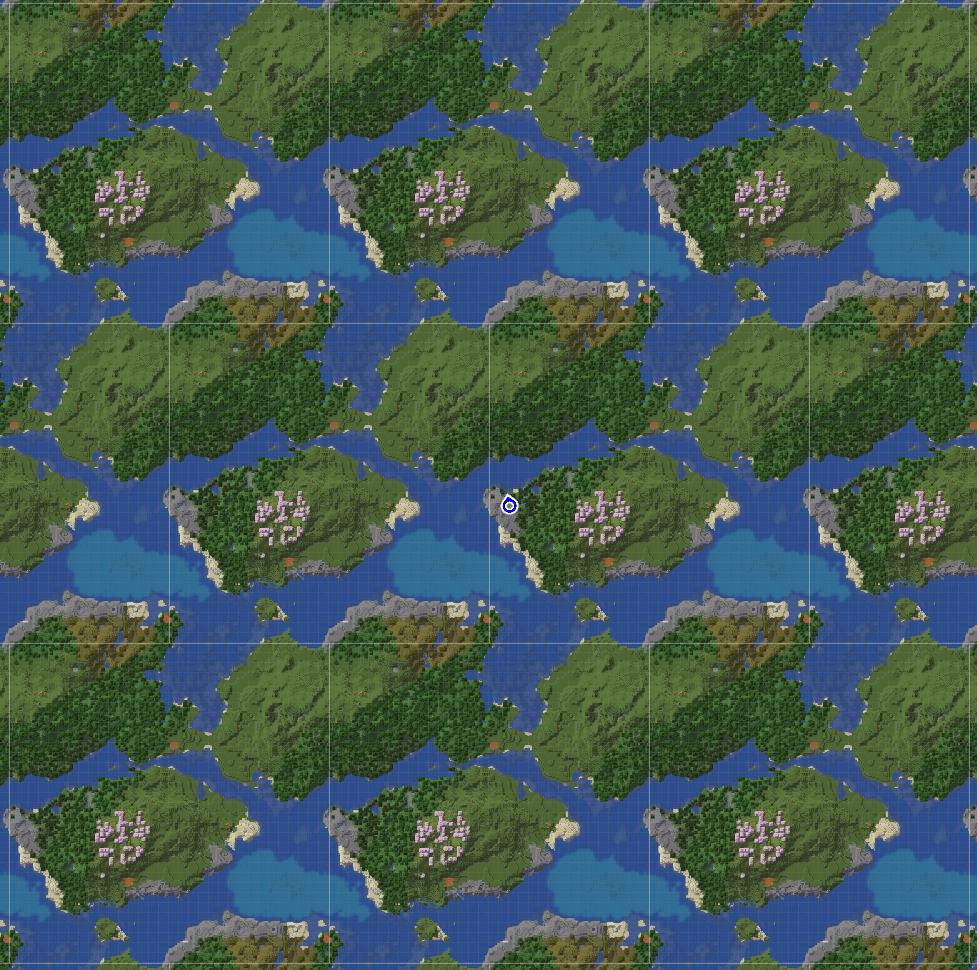
The same world with a shift. Each row of copies is offset sideways from the rows next to it.
Cylinder
The world loops one way, east to west or north to south, and goes on forever the other way, as in vanilla. The Nether and the End loop along the same direction.
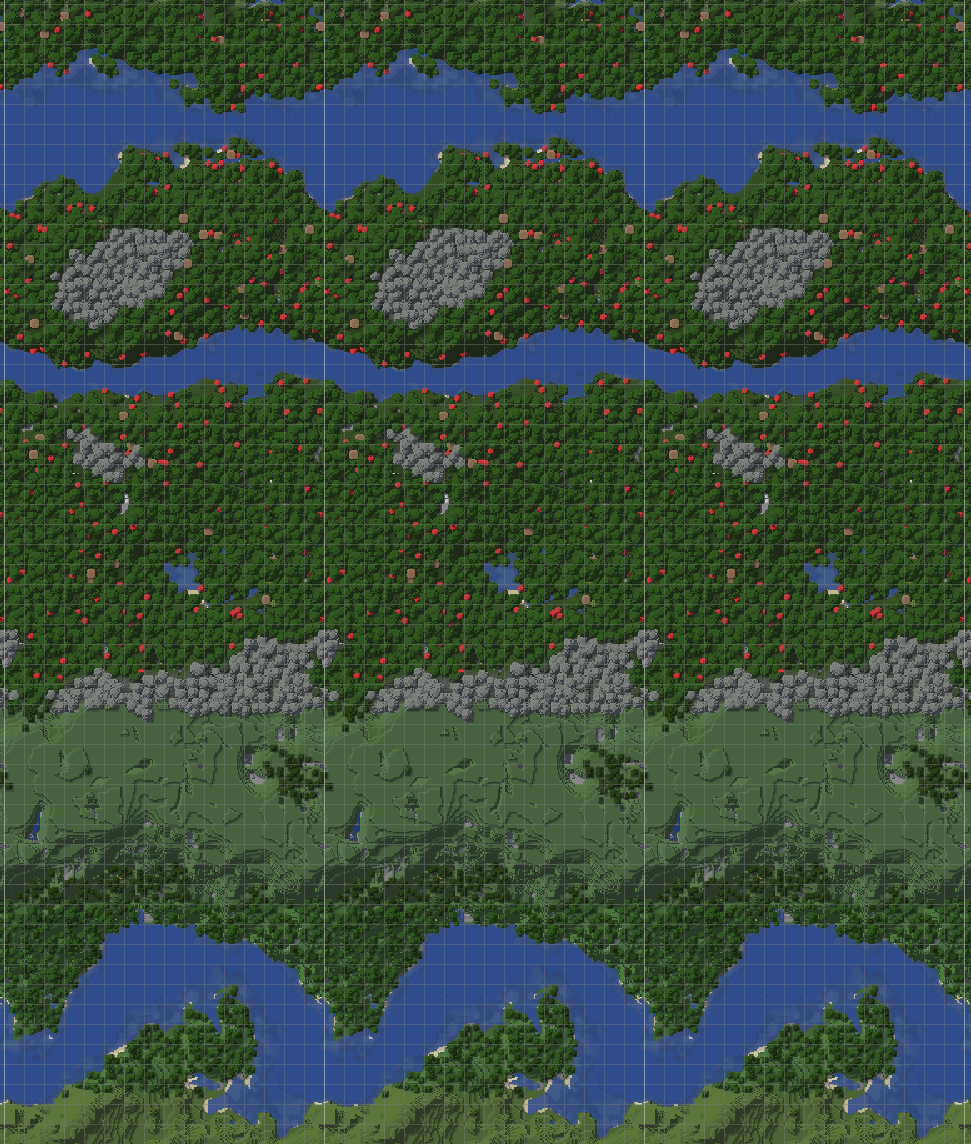
A cylinder. The world repeats along X and runs on along Z.
Settings
Pick a shape under World Shape on the world-creation screen, then tune it:
- Size: five presets from Tiny to Huge, or your own size in chunks, with X and Z set separately.
- Nether scale: 1:2, 1:4 or 1:8 against the overworld. The End gets a size of its own.
- Shift (toroidal only): crossing the north or south edge also moves you east or west, so getting back to where you started can take several laps.
- Compact biomes: shrinks biomes so a full range of climates fits into a small world. Without it a small world may be all forest or all desert.
- Guaranteed land and Guaranteed fortress and bastion: keep a small world from coming out all ocean, and a small Nether from having no fortress or bastion at all.
The shape is chosen when the world is created. An existing world cannot be converted into a shaped one, and a shaped world cannot be turned back.
Dedicated servers
One line in server.properties creates a shaped world. Use level-type=exotic_worlds:torus_medium for a toroidal world or level-type=exotic_worlds:cylinder_medium for a cylinder. Both come in five sizes (tiny, small, medium, large, huge). Custom sizes and the full walkthrough are in the dedicated server guide.
Compatibility
Runs on NeoForge and Fabric.
- Sodium and Iris Shaders.
- JourneyMap, Xaero's Minimap and Xaero's World Map.
- Distant Horizons: the far side of the world shows across the world's edge, out to half the world width.
Every mod we have checked against a shaped world, with the game versions and loaders it applies to, is in the supported mods list.
Bug reports
Found something broken, especially near the world's edge? Report it on the issue tracker.
Project description from CurseForge.
Pick your setup
Exotic Worlds by Minecraft version and loader
Choose the version and loader you play, then open the matching release.
Minecraft version
26.2
2 loader buildsMinecraft version
26.1.2
2 loader buildsMinecraft version
1.21.1
2 loader buildsCheck the dependencies, then try the file in a copied instance before changing a world you care about.
Recent files
Exotic Worlds versions and loaders
1.4.6+mc1.21.1
exotic_worlds-1.4.6-mc1.21.1.jar
13 Nov 2026
Client Source doesn’t say Server Source doesn’t say Dependencies No extras listed Listed on Release listing
Check the 1.21.1 · Fabric setup Fabric1.21.1NeoForge release
1.4.6+mc26.1.2
exotic_worlds-1.4.6-mc26.1.2.jar
13 Nov 2026
Client Source doesn’t say Server Source doesn’t say Dependencies No extras listed Listed on Release listing
Check the 26.1.2 · Fabric setup FabricNeoForge26.1.2 release
1.4.6+mc26.2
exotic_worlds-1.4.6-mc26.2.jar
13 Nov 2026
Client Source doesn’t say Server Source doesn’t say Dependencies No extras listed Listed on Release listing
Check the 26.2 · Fabric setup FabricNeoForge26.2 release
1.4.6+mc26.3
exotic_worlds-1.4.6-mc26.3.jar
13 Nov 2026
Client Source doesn’t say Server Source doesn’t say Dependencies No extras listed Listed on Release listing
Check the 26.3 · Fabric setup FabricNeoForge26.3 release
1.3.3+mc1.21.1
exotic_worlds-1.3.3-mc1.21.1.jar
5 Nov 2026
Client Source doesn’t say Server Source doesn’t say Dependencies No extras listed Listed on Release listing
Check the 1.21.1 · Fabric setup Fabric1.21.1NeoForge release
1.3.3+mc26.1.2
exotic_worlds-1.3.3-mc26.1.2.jar
5 Nov 2026
Client Source doesn’t say Server Source doesn’t say Dependencies No extras listed Listed on Release listing
Check the 26.1.2 · Fabric setup FabricNeoForge26.1.2 release
1.3.3+mc26.2
exotic_worlds-1.3.3-mc26.2.jar
5 Nov 2026
Client Source doesn’t say Server Source doesn’t say Dependencies No extras listed Listed on Release listing
Check the 26.2 · Fabric setup FabricNeoForge26.2 release
1.3.3+mc26.3
exotic_worlds-1.3.3-mc26.3.jar
5 Nov 2026
Client Source doesn’t say Server Source doesn’t say Dependencies No extras listed Listed on Release listing
Check the 26.3 · Fabric setup FabricNeoForge26.3 release
1.2.5+mc1.21.1
exotic_worlds-1.2.5-mc1.21.1.jar
30 Oct 2026
Client Source doesn’t say Server Source doesn’t say Dependencies No extras listed Listed on Release listing
Check the 1.21.1 · Fabric setup Fabric1.21.1NeoForge release
1.2.5+mc26.1.2
exotic_worlds-1.2.5-mc26.1.2.jar
30 Oct 2026
Client Source doesn’t say Server Source doesn’t say Dependencies No extras listed Listed on Release listing
Check the 26.1.2 · Fabric setup FabricNeoForge26.1.2 release
1.2.5+mc26.2
exotic_worlds-1.2.5-mc26.2.jar
29 Oct 2026
Client Source doesn’t say Server Source doesn’t say Dependencies No extras listed Listed on Release listing
Check the 26.2 · Fabric setup FabricNeoForge26.2 release
1.2.5+mc26.3
exotic_worlds-1.2.5-mc26.3.jar
29 Oct 2026
Client Source doesn’t say Server Source doesn’t say Dependencies No extras listed Listed on Release listing
Check the 26.3 · Fabric setup FabricNeoForge26.3 release
Looking for an older file? The official CurseForge project page is in Resources.
 mod
CurseForge + Modrinth · Minecraft
NuclearCraft: Neoteric
This is a re-creation of old but gold NuclearCraft on a modern MC version
 mod
CurseForge · Minecraft
Pathbound
A world that breathes: living wildlife, steam, magic and machines, monsters of the deep and floating mountains, all in one journey.
 mod
CurseForge + Modrinth · Minecraft
Dark Doppelganger : Iron's Spells and Spellbooks Addon
Boss that uses Irons spells to attack you, copies your name, armor, and weapons!