Minecraft version
Back to mods 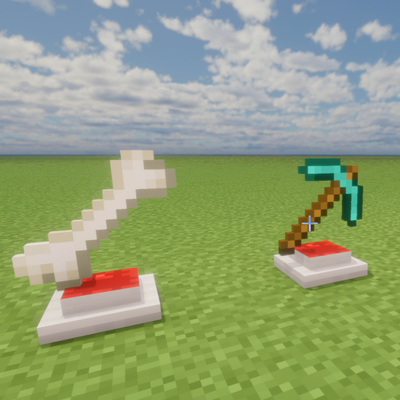
CurseForge · Minecraft mod
Hologram Block
3D rotating holograms of any item in Minecraft!
Choose a version Pick your version below, then grab the matching file.
Quick answer
Which Hologram Block release should I use?
Latest stable file HologramProjector-1.20.1-2.0.0
Game version 1.20.1
Loader NeoForge
Hologram Block HologramProjector-1.20.1-2.0.0 targets 1.20.1 with NeoForge. The project page does not say whether this file belongs on the client, dedicated server, or both. No extra mods listed for this file.
Where it goes
Is Hologram Block required on the client, server, or both?
The project page does not say whether this file belongs on the client, dedicated server, or both.
Client Source doesn’t say
Dedicated server Source doesn’t say
Loader for this release NeoForge
Required install it here Optional supported, not mandatory Not supported do not install here Source doesn’t say do not assume
The source does not explicitly classify this release as client-only or server-only.
What else does Hologram Block HologramProjector-1.20.1-2.0.0 need?
HologramProjector-1.20.1-2.0.0. Change the file and its required mods may change too.
This file does not list any required mods. Do not add a library just because a different file uses it.
This file does not list any required or optional mods.
Before you install it
Add Hologram Block without breaking your instance.
Built for Hologram Block HologramProjector-1.20.1-2.0.0. Pick another file and the loader, install side or required mods may change.
- 01
Stick to this file
Use HologramProjector-1.20.1-2.0.0. It targets 1.20.1 with NeoForge; another release may have different loader, side or dependency requirements.
- 02
Bring the mods it needs
This file does not list any required mods. Do not add a library just because a different file uses it.
- 03
Put it on the correct side
The project page does not say whether this file belongs on the client, dedicated server, or both.
- 04
Pick the file you checked
Use the “Get this file” button beside HologramProjector-1.20.1-2.0.0. It opens that exact file at the source.
About this project
What does Hologram Block add?
🌌 Hologram Projector Mod
Showcase your rarest treasures, weapons, and blocks in stunning 3D holographic style!

🎬 ▶️ Watch the YouTube Shorts Showcase Video!
Hologram Projector is a modern, sci-fi utility mod for Minecraft that introduces a powerful pedestal capable of projecting giant, glowing, 3D rotating holograms of any item or block in the game!
✨ Core Features
- 🔮 Floating 3D Holograms: Place any item, weapon, tool, armor, or block onto the pedestal to project a magnificent enlarged 3D hologram above it.
- 🔄 Smooth 360° Animation: Holograms slowly rotate 360 degrees while gently floating up and down in a smooth sine-wave motion.
- 💡 Glowing Light Effect: Rendered with maximum brightness logic (
Light 15), making your trophies and legendary loot shine brightly even in total darkness. - 🖱️ Seamless 1-Click Control:
- Right-Click with an Item: Places the item into the projector and starts the hologram immediately.
- Right-Click again: Clears the hologram and cleanly returns the item back to your inventory.
- 📦 Dedicated Creative Tab: Quickly find the Hologram Projector under its own custom Creative Inventory tab.
⚙️ In-Game Configuration & Customization
Customize your holographic projections in real-time without ever restarting the game!
🪟 Visual Settings & Opacity Control
- 🎨 Custom Hologram Tint: Enable or disable custom color tinting to either display original item textures or give them a futuristic neon glow.
- 🪟 Real-Time Opacity Slider: Adjust the hologram's translucency from a subtle ghost-like 10% transparency up to 100% solid opacity.
- 💡 Full Brightness Glow: Toggle maximum illumination so your 3D floating holograms shine brilliantly even in pitch-black darkness.
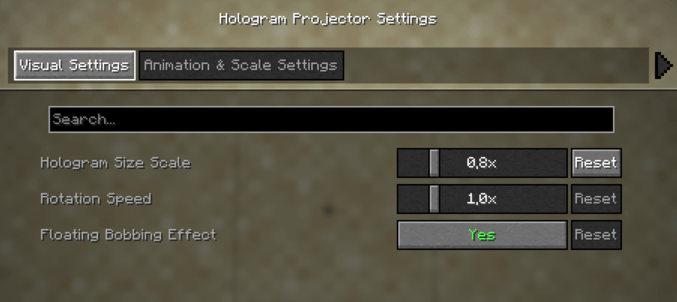
🌈 Interactive 48-Color Visual Palette
- 🖱️ One-Click Selection: Click "Open Color Palette..." to choose from 48 curated vibrant colors — including classic holographic cyans, neon matrix greens, laser reds, plasma purples, cyberpunk pinks, and clean grayscales.
- ✨ Instant Preview: Hover over any color to inspect its HEX code, see your live selected color badge, and have it immediately apply to your world when confirmed.
- 📱 Fully Responsive: Automatically scales and fits smoothly across any screen resolution and GUI scale setting.
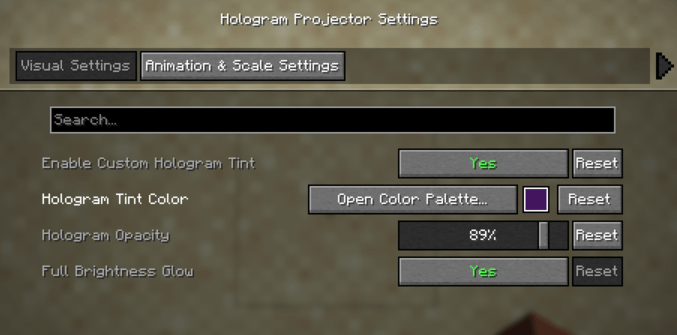
📐 Dynamic Animations & Full 3D Item Support
- 📐 3D Hologram Scale: Scale your floating projections anywhere from compact 0.2x miniatures up to massive 3.0x centerpiece displays.
- 🔄 Rotation & Smooth Bobbing: Customize the 3D spinning speed and toggle the gentle floating bobbing animation.
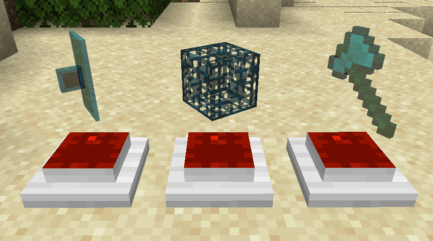
- 🛡️ Full Special Item Support: Flawlessly renders standard items, blocks, and complex 3D entity models — including Shields, Banners, Skulls, Tridents, and Spawners — with proper translucency and color blending!
🔌 Dependencies & Requirements
- NeoForge: Required to run the mod.
- Cloth Config API (NeoForge) (Recommended / Optional): Required to access the in-game Configuration GUI and visual color picker screen via the Mods menu. (If not installed, the mod still functions completely fine with default settings or manual JSON config edits!)
🛠️ How to Use
- Obtain the Hologram Projector block from the Creative Menu or craft it.
- Place the pedestal down in your base, trophy room, museum, or shop.
- Right-Click the pedestal while holding any item (Diamond Sword, Shield, Netherite Ingot, Enchanted Golden Apple, Dragon Egg, etc.).
- Sit back and watch your rare items hover in mid-air as glowing 3D holograms!
⚙️ Technical Details
- Minecraft Version:
1.21.1(1.21.x Compatible but not fully tested) - Mod Loader:
NeoForge - Side: Client & Server Compatible
💖 Credits & Feedback
Created with passion by Emiukob. Feel free to use this mod in your modpacks! 🚀
Project description from CurseForge.
Pick your setup
Hologram Block by Minecraft version and loader
Choose the version and loader you play, then open the matching release.
Minecraft version
1.20.1
2 loader buildsCheck the dependencies, then try the file in a copied instance before changing a world you care about.
Recent files
Hologram Block versions and loaders
HologramProjector-1.20.1-2.0.0
HologramProjector-1.20.1-2.0.0.jar
25 Sept 2026
Client Source doesn’t say Server Source doesn’t say Dependencies No extras listed Listed on Release listing
Check the 1.20.1 · NeoForge setup 1.20.1NeoForge release
HologramProjector-1.21.1-1.0.0.jar
10 Aug 2026
Client Source doesn’t say Server Source doesn’t say Dependencies No extras listed Listed on Release listing
Check the 1.21.1 · NeoForge setup 1.21.1NeoForge release
HologramProjector-1.20.1-1.0.0.jar
10 Aug 2026
Client Source doesn’t say Server Source doesn’t say Dependencies No extras listed Listed on Release listing
Check the 1.20.1 · Forge setup 1.20.1ForgeNeoForge release
Looking for an older file? The official CurseForge project page is in Resources.
 mod
CurseForge · Minecraft
Create Control Panels
Addon for Create Mod that adds Control Engineering style control panels that have buttons, levers, gauges and much more added to them.
 mod
CurseForge · Minecraft
Signal and Sound
Build radio towers, tune receivers, and play live internet stations through wireless speakers. Includes tabletop radios, pocket radios, and remotes for Minecraft 1.21.1 NeoForge.
 mod
CurseForge · Minecraft
Clone Systems
Cloning and Automation