Minecraft version
Back to mods 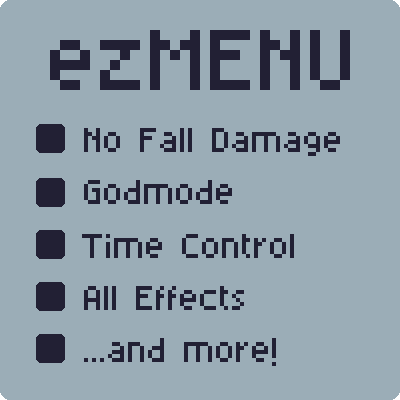
CurseForge · Minecraft mod
ezMENU
A GTA-trainer-style menu for Minecraft. Press M to toggle potion effects, enchant your held item, control time & weather, and enable extras like god mode, multi-jump and one-hit punch.
Choose a version Pick your version below, then grab the matching file.
Quick answer
Which ezMENU release should I use?
Latest stable file ezmenu-1.4.1.jar
Game version 26.2
Loader Fabric
ezmenu-1.4.1.jar targets 26.2 with Fabric. The project page does not say whether this file belongs on the client, dedicated server, or both. No extra mods listed for this file.
Where it goes
Is ezMENU required on the client, server, or both?
The project page does not say whether this file belongs on the client, dedicated server, or both.
Client Source doesn’t say
Dedicated server Source doesn’t say
Loader for this release Fabric
Required install it here Optional supported, not mandatory Not supported do not install here Source doesn’t say do not assume
The source does not explicitly classify this release as client-only or server-only.
What else does ezmenu-1.4.1.jar need?
ezmenu-1.4.1.jar. Change the file and its required mods may change too.
This file does not list any required mods. Do not add a library just because a different file uses it.
This file does not list any required or optional mods.
Before you install it
Add ezMENU without breaking your instance.
Built for ezmenu-1.4.1.jar. Pick another file and the loader, install side or required mods may change.
- 01
Stick to this file
Use ezmenu-1.4.1.jar. It targets 26.2 with Fabric; another release may have different loader, side or dependency requirements.
- 02
Bring the mods it needs
This file does not list any required mods. Do not add a library just because a different file uses it.
- 03
Put it on the correct side
The project page does not say whether this file belongs on the client, dedicated server, or both.
- 04
Pick the file you checked
Use the “Get this file” button beside ezmenu-1.4.1.jar. It opens that exact file at the source.
About this project
What does ezMENU add?
McMenu brings a classic trainer menu to Minecraft. One key — M by default, rebindable — opens a clean tabbed menu that shows you what is possible right now and what is already active.
✨ Features
Effects — Toggle any status effect on yourself with infinite duration, or clear them all with one click. The checkboxes always tell the truth: drink a potion and its box is ticked, active entries glow green.
Enchantments — Hold any item and McMenu lists exactly the enchantments that fit it, applied at max level with a single click. Already-present enchantments show as checked and can be removed individually — datapack enchantments included.
Extras — The trainer classics:
- God mode & flight in survival
- No hunger & no fall damage
- One-hit punch
- Repair / unbreakable held item
- Full heal (health, food, fire, air)
- Multi-jump (double, triple, quadruple)
- Jump height slider — from normal up to 10 blocks
Time & Weather — Morning / noon / evening / night presets, a slider for the exact time of day, clear / rain / thunder buttons, and a freeze-time toggle.
🧭 Smart menu
The menu is context-sensitive: with an empty hand it opens on Effects, with an item in hand on Enchantments. A language switch (Auto / English / Deutsch) lets the mod speak German independently of your game language.
🔒 Fair by default
McMenu follows the same rules as vanilla cheat commands (/effect, /time, /gamemode):
- Singleplayer with cheats on — everything just works.
- Singleplayer with cheats off — actions are politely rejected (enable cheats via Open to LAN → Allow Cheats).
- Servers — install the mod on the server too; only operators (permission level 2) can use it. On servers without McMenu the menu shows a notice and sends nothing.
📦 Requirements
- Minecraft 26.2 · Fabric Loader ≥ 0.19.3 · Fabric API (required) · Java 25
Note: attribute-based cheats (jump height, no fall damage, one-hit punch) and "no hunger" reset on relog — flip them back on from the menu.
Project description from CurseForge.
Pick your setup
ezMENU by Minecraft version and loader
Choose the version and loader you play, then open the matching release.
Check the dependencies, then try the file in a copied instance before changing a world you care about.
Recent files
ezMENU versions and loaders
ezmenu-1.4.1.jar
9 Aug 2026
Client Source doesn’t say Server Source doesn’t say Dependencies No extras listed Listed on Release listing
Check the 26.2 · Fabric setup Fabric26.2 release
Looking for an older file? The official CurseForge project page is in Resources.
 mod
mod CurseForge · Minecraft
MalisisDoorsReborn
Animated doors and custom door creation with millions of possibilities! — Re-imagined from the original MalisisDoors mod by Ordinastie.
 mod
mod CurseForge · Minecraft
Easy Origins API
This is a api for the origins mod. It adds several new functions that can be used in origins that vastly improve what was possible before or straight up adds things unachievable beforehand.
 mod
mod CurseForge · Minecraft
PVPHQ TierTagger
Displays any Players PVPHQ Rank next to their name on any Server.