Minecraft version
Back to mods 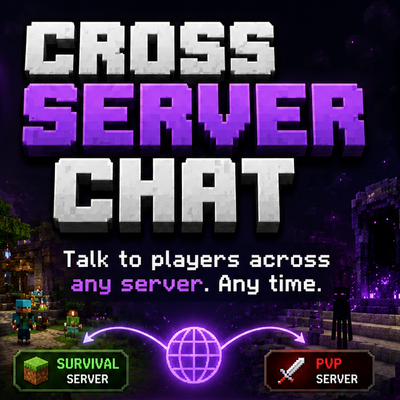
CurseForge · Minecraft mod
Cross Server Chat
CrossServerChat is a simple yet powerful serverside networking tool that links chat, The mod is server-only, so players do not need to install anything. Discord acts as the shared mailbox. No proxy, Redis, or Velocity setup is required.
Choose a version Pick your version below, then grab the matching file.
Quick answer
Which Cross Server Chat release should I use?
Latest stable file cross_server_chat-1.2
Game version 1.20.1
Loader Forge
Cross Server Chat cross_server_chat-1.2 targets 1.20.1 with Forge. The project page does not say whether this file belongs on the client, dedicated server, or both. No extra mods listed for this file.
Where it goes
Is Cross Server Chat required on the client, server, or both?
The project page does not say whether this file belongs on the client, dedicated server, or both.
Client Source doesn’t say
Dedicated server Source doesn’t say
Loader for this release Forge
Required install it here Optional supported, not mandatory Not supported do not install here Source doesn’t say do not assume
The source does not explicitly classify this release as client-only or server-only.
What else does Cross Server Chat cross_server_chat-1.2 need?
cross_server_chat-1.2. Change the file and its required mods may change too.
This file does not list any required mods. Do not add a library just because a different file uses it.
This file does not list any required or optional mods.
Before you install it
Add Cross Server Chat without breaking your instance.
Built for Cross Server Chat cross_server_chat-1.2. Pick another file and the loader, install side or required mods may change.
- 01
Stick to this file
Use cross_server_chat-1.2. It targets 1.20.1 with Forge; another release may have different loader, side or dependency requirements.
- 02
Bring the mods it needs
This file does not list any required mods. Do not add a library just because a different file uses it.
- 03
Put it on the correct side
The project page does not say whether this file belongs on the client, dedicated server, or both.
- 04
Pick the file you checked
Use the “Get this file” button beside cross_server_chat-1.2. It opens that exact file at the source.
About this project
What does Cross Server Chat add?
Cross Server Chat:
Cross Server Chat is a simple yet powerful serverside networking tool that links chat, TAB, and operator commands across multiple Minecraft worlds through one Discord channel. The mod is server-only, so players do not need to install anything. Each world keeps its own identity with a [ServerName] tag, while Discord acts as the shared mailbox. No proxy, Redis, or Velocity setup is required.
Cross-Server Chat:
- Share player chat across every linked world in the format [Camelot] Poe: hello
- Optional Discord webhook so messages use the player's name and skin
- Optional Discord-to-Minecraft chat as [Discord] name: message
- Optional join and leave broadcasts on every linked world
- Works beside Discord Integration when you use a different bot and a different channel
- Loop-safe identity so a world never echoes its own messages back to itself
Network TAB:
- Custom header and footer with Minecraft color codes
- Live network list with %worlds%, player counts, and TPS
- Per-viewer name colors: you can be gold while other players stay white
- Visual HTML editor written to config/CrossServerChat/tab-editor.html
- Instant apply with /cross_server reload, no server restart
- Optional ranks from ranks.toml, e.g. [Dev] Poe in chat and TAB
Network Commands:
- /server_all <command> plus /y confirmation to run an operator command on every linked world
- /cross_server reload and /csc reload to reload config.toml and tab.toml
- Command packets are removed from Discord after other worlds have read them
Setup Guide:
1. Create a Discord bot:
- Open the Discord Developer Portal and create a new application
- Open Bot, create the bot, and copy the token
- Enable Message Content Intent
- Invite the bot with View Channel, Send Messages, Read Message History, and Manage Messages
- Do not reuse the Discord Integration bot
2. Create a dedicated Discord channel:
- Make a channel only this mod will use
- Do not reuse the Discord Integration chat channel
- Enable Discord Developer Mode, right-click the channel, and copy the Channel ID
- Optional: create a webhook in that channel if you want player names and skins in Discord. The same webhook URL can be used on every world
3. Edit config/CrossServerChat/config.toml on every world:
- serverName must be unique per world, for example Camelot, Tristram, Test
- botToken, channelId, and webhookUrl must be the same on every world
- allowDiscordChat = true if people should be able to talk from Discord into Minecraft
- broadcastJoin and broadcastLeave default to false
- hideCommandMessages = true keeps /server_all packets from sitting in the Discord channel
- Run /cross_server reload or restart after saving you custom player list tab
4. Edit TAB:
- Open config/CrossServerChat/tab-editor.html in a browser
- Design the header, footer, world list, your TAB name color, and other players' TAB name color
- Copy or save the TOML into config/CrossServerChat/tab.toml
- Run /cross_server reload
5. Ranks:
- Edit config/CrossServerChat/ranks.toml
- Put player names (or UUIDs) on a rank list
- Prefixes such as &b[Dev]&r show in chat, TAB (%rank%)
- Copy the same ranks.toml to every linked world
- Run /cross_server reload
Placeholders:
- %title% %subtitle% %server% %online% %local% %max% %tps%
- %worlds% %world% %count% %players% %player% %rank% %level% %chapter% %more%
- %rank% is the prefix from ranks.toml (empty if the player is on no list)
- %level% is Mine and Slash combat level when mineAndSlash = true
- %chapter% is the current FTB Quests chapter when ftbQuests = true (completed quests, not readme ticks)
- Optional ftbChapterMarkers in tab.toml sets start:end quest IDs per chapter; ftbQuestIds is only a filter when markers are empty
Join my Discord server: Here
Terms of use:
 You are welcome to include this mod in any modpack
 You may not re-release this mod as your own
Project description from CurseForge.
Pick your setup
Cross Server Chat by Minecraft version and loader
Choose the version and loader you play, then open the matching release.
Check the dependencies, then try the file in a copied instance before changing a world you care about.
Recent files
Cross Server Chat versions and loaders
cross_server_chat-1.2
cross_server_chat-1.2.jar
9 Sept 2026
Client Source doesn’t say Server Source doesn’t say Dependencies No extras listed Listed on Release listing
Check the 1.20.1 · Forge setup 1.20.1Forge release
cross_server_chat-1.1
cross_server_chat-1.1.jar
30 Aug 2026
Client Source doesn’t say Server Source doesn’t say Dependencies No extras listed Listed on Release listing
Check the 1.20.1 · Forge setup 1.20.1Forge release
cross_server_chat-1.0.jar
cross_server_chat-1.0-all.jar
24 Aug 2026
Client Source doesn’t say Server Source doesn’t say Dependencies No extras listed Listed on Release listing
Check the 1.20.1 · Forge setup 1.20.1Forge release
Looking for an older file? The official CurseForge project page is in Resources.
 mod
mod CurseForge · Minecraft
Nyxa Client
Nyxa Client is a Minecraft 1.20.1 client mod featuring a yellow and black theme, cinematic zoom, tons of customizable crosshairs, and 21 modules designed to enhance your gameplay while keeping everything clean and simple.
 mod
mod CurseForge + Modrinth · Minecraft
AE2 Import Export Card
Adds an Import & Export & Block Picker Card for Applied Energistics 2
 mod
mod CurseForge · Minecraft
Mouse Unlock
Free your mouse without pausing Minecraft, with AFK mouse hold and optional cinematic idle camera features.