Sodium Needed by PrismPanel — A Better UI for Sodium PrismPanel-0.0.2+mc1.21.1-neoforge.jar
requiredMatching file found Matched file: Sodium 0.8.13 for NeoForge 1.21.1

CurseForge · Minecraft mod
A polished client-side companion interface for Sodium video settings.
Quick answer
PrismPanel — A Better UI for Sodium PrismPanel-0.0.2+mc1.21.1-neoforge.jar targets 1.21.1 with NeoForge. The project page does not say whether this file belongs on the client, dedicated server, or both. All 1 required mods have matching files.
Where it goes
The project page does not say whether this file belongs on the client, dedicated server, or both.
The source does not explicitly classify this release as client-only or server-only.
PrismPanel-0.0.2+mc1.21.1-neoforge.jar. Change the file and its required mods may change too.
Install Sodium first. We found matching files for this game-version and loader setup.
We only count dependency files that match this setup. A file for another loader does not fill the gap.
Before you install it
Built for PrismPanel — A Better UI for Sodium PrismPanel-0.0.2+mc1.21.1-neoforge.jar. Pick another file and the loader, install side or required mods may change.
Use PrismPanel-0.0.2+mc1.21.1-neoforge.jar. It targets 1.21.1 with NeoForge; another release may have different loader, side or dependency requirements.
Install Sodium first. We found matching files for this game-version and loader setup.
The project page does not say whether this file belongs on the client, dedicated server, or both.
Use the “Get this file” button beside PrismPanel-0.0.2+mc1.21.1-neoforge.jar. It opens that exact file at the source.
About this project
 A refined control panel for Sodium — built for clarity, speed, and a cleaner way to configure Minecraft.
PrismPanel redesigns the presentation of Sodium's video settings while preserving the settings, behavior, and performance controls players already rely on. It replaces the centered configuration layout with a polished left-aligned workspace, clearer navigation, comfortable spacing, and a consistent dark-glass visual language.
PrismPanel does not bundle or redistribute Sodium. Sodium remains a required, separately installed dependency. 
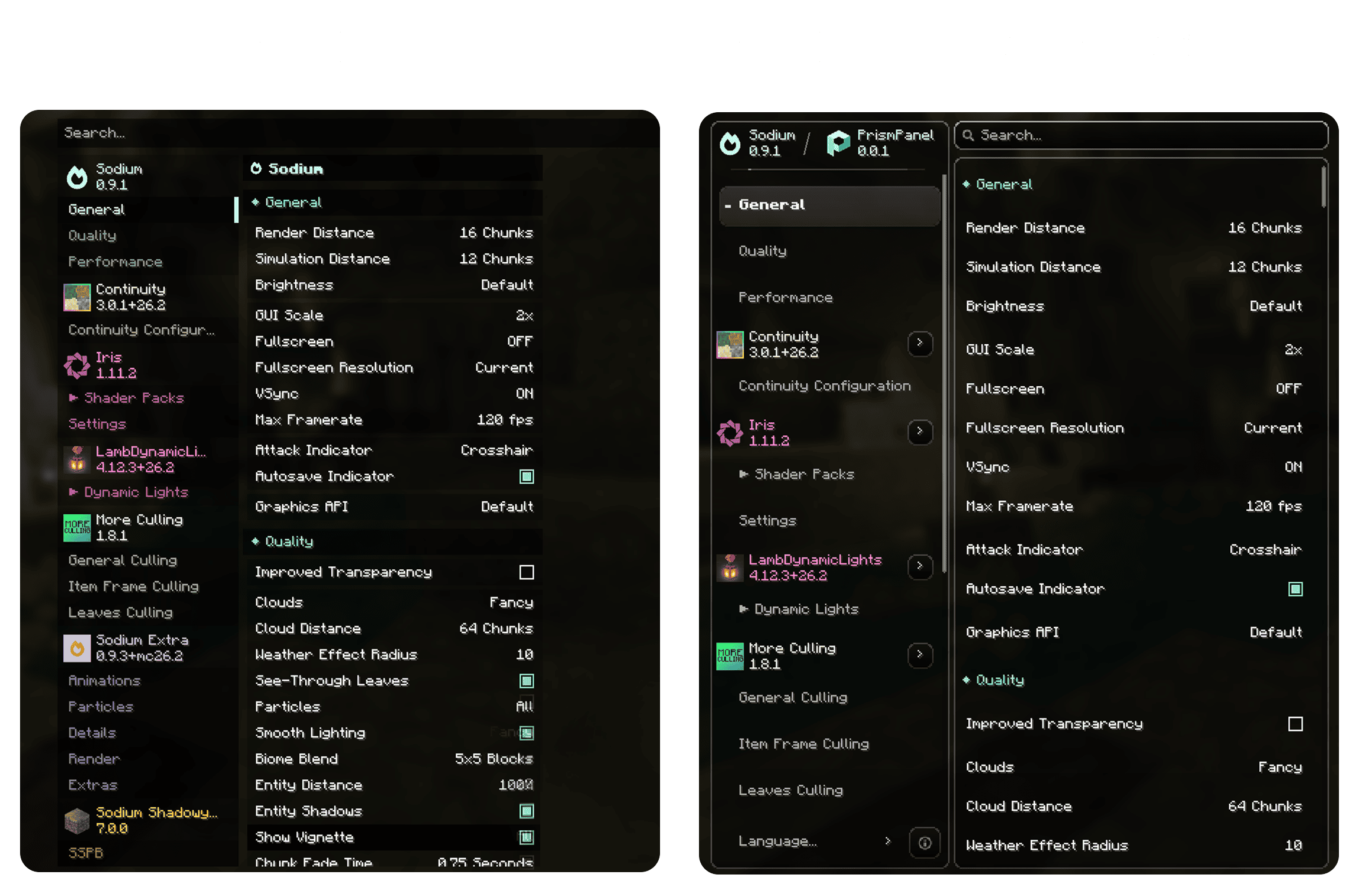


Every Sodium option remains the source of truth. PrismPanel changes how the interface is presented—not what Sodium's settings do.
PrismPanel detects supported companion mods and gives their settings a dedicated place in the interface instead of mixing every add-on into one long page.
Compatibility work currently includes popular Sodium-side tools such as:
Compatibility depends on using versions of those mods that support the same Minecraft, loader, and Sodium release. PrismPanel does not override dependency rules defined by other projects.
The built-in System Info panel presents useful local GPU, CPU, memory, and supported sensor information through a dedicated interface. Hardware data is collected only while the relevant panel is open.
Copyright © Haider x. All Rights Reserved.
Redistribution, modification, republication, or commercial use is not permitted without prior written authorization from the owner. Refer to the included license file for the complete terms.
Project description from CurseForge.
Pick your setup
Choose the version and loader you play, then open the matching release.
Check the dependencies, then try the file in a copied instance before changing a world you care about.
Recent files
18 Sept 2026
18 Sept 2026
PrismPanel-0.0.1+mc26.3-neoforge.jar
17 Sept 2026
PrismPanel-0.0.1+mc26.3-fabric.jar
17 Sept 2026
PrismPanel-0.0.1+mc26.2-neoforge.jar
29 Aug 2026
PrismPanel-0.0.1+mc26.2-fabric.jar
29 Aug 2026
PrismPanel-0.0.1+mc26.1.2-neoforge.jar
29 Aug 2026
PrismPanel-0.0.1+mc26.1.2-fabric.jar
29 Aug 2026
PrismPanel-0.0.1+mc26.1.1-neoforge.jar
29 Aug 2026
PrismPanel-0.0.1+mc26.1.1-fabric.jar
29 Aug 2026
PrismPanel-0.0.1+mc26.1-neoforge.jar
29 Aug 2026
PrismPanel-0.0.1+mc26.1-fabric.jar
29 Aug 2026
Looking for an older file? The official CurseForge project page is in Resources.
 mod
modAdds a way for you to tell the wandering trader to go away.
 mod
modA mod that provides universal tools, super alloy furnaces, and various QOL modifications.
 mod
modAn add-on for Hephaestus Forge focused on adding modular tools.