Minecraft version
Back to mods 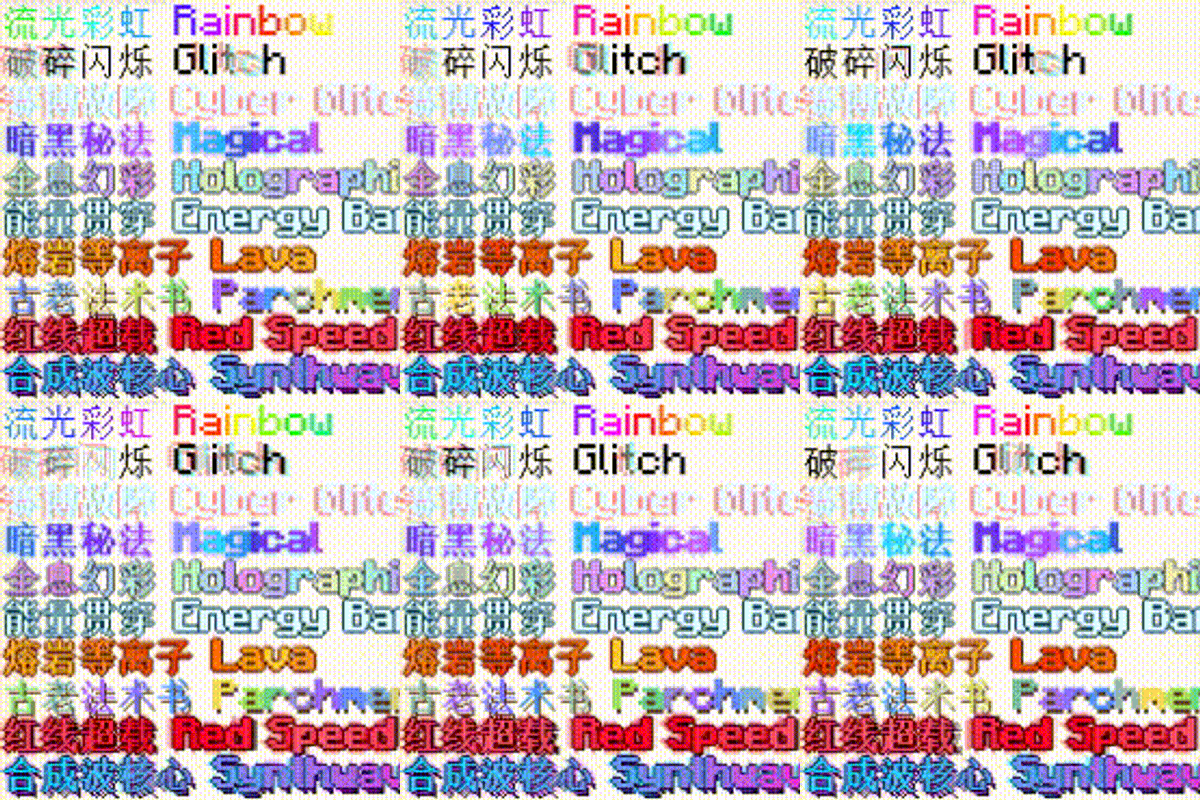
CurseForge · Minecraft mod
Luminotype
Ten animated text effects for item names, tooltips, chat and quest text.
Choose a version Pick your version below, then grab the matching file.
Quick answer
Which Luminotype release should I use?
Latest stable file Luminotype 2.2.0 (Forge 1.20.1)
Game version 1.20.1
Loader Forge
Luminotype 2.2.0 (Forge 1.20.1) targets 1.20.1 with Forge. The project page does not say whether this file belongs on the client, dedicated server, or both. No extra mods listed for this file.
Where it goes
Is Luminotype required on the client, server, or both?
The project page does not say whether this file belongs on the client, dedicated server, or both.
Client Source doesn’t say
Dedicated server Source doesn’t say
Loader for this release Forge
Required install it here Optional supported, not mandatory Not supported do not install here Source doesn’t say do not assume
The source does not explicitly classify this release as client-only or server-only.
What else does Luminotype 2.2.0 (Forge 1.20.1) need?
Luminotype 2.2.0 (Forge 1.20.1). Change the file and its required mods may change too.
This file does not list any required mods. Do not add a library just because a different file uses it.
This file does not list any required or optional mods.
Before you install it
Add Luminotype without breaking your instance.
Built for Luminotype 2.2.0 (Forge 1.20.1). Pick another file and the loader, install side or required mods may change.
- 01
Stick to this file
Use Luminotype 2.2.0 (Forge 1.20.1). It targets 1.20.1 with Forge; another release may have different loader, side or dependency requirements.
- 02
Bring the mods it needs
This file does not list any required mods. Do not add a library just because a different file uses it.
- 03
Put it on the correct side
The project page does not say whether this file belongs on the client, dedicated server, or both.
- 04
Pick the file you checked
Use the “Get this file” button beside Luminotype 2.2.0 (Forge 1.20.1). It opens that exact file at the source.
About this project
What does Luminotype add?
Luminotype
Twenty-seven text effects for Minecraft — ten that colour, seventeen that move. Works on item names, lore, tooltips, chat, books, signs, and FTB Quests text.
Minecraft 1.20.1 · Forge 47.4.x · Client-side
What it does
Put a control code in front of any text.
&p流光彩虹 Rainbow
&xsh shaken text
&{grad from=5BCEFA to=F5A9B8}gradient&{/}
No resource pack, no dependencies. Drop the jar in mods/ and the codes work.
Two families
Ten colour codes, one letter each. They recolour, outline and add glow; the letters stay put.
| Code | Effect |
|---|---|
&p |
Rainbow — colour streams across the text |
&g |
Glitch — intermittent fracturing |
&h |
Cyber — red/cyan aberration, pixel ghosting, dark backing |
&q |
Magical Neon — violet-to-cyan, bold, layered glow |
&y |
Holographic — liquid iridescence, metallic edge, white specular |
&s |
Energy Bar — translucent cyan bar sweeping through the glyphs |
&t |
Lava Plasma — flowing core, dark outline, flame halo |
&v |
Parchment — aged spellbook wash, brown drop shadow |
&u |
Red Speed Neon — heavy bloom, speed lines, motion ghosts |
&m |
Synthwave — cyan-to-magenta 3D extrusion, VHS scan glitch |
Seventeen animated effects, &x plus two letters. They move, rotate and reveal.
| Code | Effect | Code | Effect | |
|---|---|---|---|---|
&xsh |
Shake | &xra |
Rainbow cycle | |
&xwa |
Wave | &xgr |
Two-colour gradient | |
&xwi |
Wiggle | &xpu |
Pulse | |
&xsw |
Swing | &xfa |
Fade | |
&xbo |
Bounce | &xsd |
Deepened shadow | |
&xpe |
Pendulum | &xgl |
Glitch jitter | |
&xtu |
Turbulence | &xne |
Neon glow | |
&xsc |
Scroll | &xty |
Typewriter | |
&xsp |
Fixed hue per letter |
Two letters are matched before one, so &xsh is shake rather than &xs followed by an h. One-letter shortcuts exist for the common ones: &xs &xw &xr &xu &xf &xg &xb &xp &xt &xc &xd &xh &xl &xi &xe.
Parameters
&{shake a=3 f=2}violent shake&{/}
&{grad from=ff0000 to=0000ff sp=8}red to blue&{/}
&{pulse base=0.2 f=3}strong pulse&{/}
&{typewriter f=5}fast typing&{/}
| Param | Meaning |
|---|---|
a |
Amplitude |
f |
Speed; characters per second for the typewriter |
w |
Phase offset between adjacent letters |
r |
Radius — pendulum orbit, neon glow size |
p |
Passes — neon, default 10 |
from to |
Gradient endpoints, six hex digits |
sp |
How many letters a gradient spans |
uni |
One-way rather than there-and-back |
base |
Floor brightness for pulse |
An unrecognised parameter name is ignored and the default used — a typo should not stop an item name from rendering.
Combining
&q&xsh          arcane shake
&{shake; wave a=0.5}both&{/}
&xsh shaken&r plain again
\&xsh literal code
&{/} closes a long-form scope. &r (or §r) clears every effect and vanilla formatting.
Where it works
Item names and lore, full tooltips, chat, books, signs — anything the game renders as a text component. With FTB Quests installed, quest titles, subtitles, descriptions and reward text too.
Optional compatibility
Detected at runtime, wired up only if present. None are required.
- FTB Quests / FTB Library — codes work in quest text, and a reflective API writes them into quest data from a script
- ModernUI — text keeps its correct font fallback instead of dropping to the default face
Scripting
Mod id luminotype, package cn.blockforge.luminotype.
const DynamicTextApi = Java.loadClass('cn.blockforge.luminotype.api.DynamicTextApi')
const FtbQuestTextApi = Java.loadClass('cn.blockforge.luminotype.compat.FtbQuestTextApi')

FtbQuestTextApi.setTitle('5A1B2C3D4E5F6071', '&u&xsh Red Overload')
DynamicTextApi.refresh()
Pass quest ids as strings — they are full 64-bit values and JavaScript numbers lose precision on them. Edit quest data during server-side script loading; clients parse the codes when the data syncs.
FtbQuestTextApi is fully reflective: with FTB Quests absent every method returns false rather than throwing, so it can be called unguarded.
Configuration
config/luminotype-client.toml, generated on first run.
| Key | Default | |
|---|---|---|
enabled |
true |
Master switch |
rainbowSpeed |
1.35 |
0.05–8.0 |
glitchFrequency |
16 |
1–60 |
refreshIntervalMs |
40 |
16–1000. Raise to spend less CPU |
maxTextLength |
512 |
Animated characters per run, 16–8192 |
compatibleScreens |
["*"] |
Which screens may animate |
Plus a switch per colour effect. compatibleScreens is a substring match against the lowercased screen class name, so ["inventory"] is enough. * matches everything; hud covers text drawn with no screen open.
Turning an effect off still hides its code — the text falls back to its plain colour rather than showing a literal &p.
Performance
Text with no control codes costs nothing: the parser scans once, finds no code, returns the original.
Of the animated effects, sixteen move or recolour a single glyph and cost about what a colour code does. &xne neon is the exception — it draws each glyph eleven times. Fine on a title, noticeable on a full page of lore.
Three levers: raise refreshIntervalMs, lower maxTextLength, narrow compatibleScreens.
Notes
&m is vanilla's strikethrough code. This mod claims it for Synthwave. Use §m for strikethrough. No other vanilla code conflicts.
&xsc scroll leaves its container — it pushes the whole line left. That is the effect, not a bug, but do not put it on an item name.
&xty typewriter is keyed by the string. The same text drawn in two places shares one reveal; different text keeps separate progress. Progress is forgotten a second after it stops being drawn, so a tooltip retypes on each hover.
Client-side rendering. The animation happens during font rendering, so a server does not need the mod — but control codes live in server-side data such as item NBT and quest files, and a player without the mod sees the literal code. For a modpack, require it on all clients.
Known limitations
&#RRGGBB custom colours are not supported. Writing one renders it literally. For an arbitrary two-colour gradient use &{grad from=… to=…}, which does work.
Project description from CurseForge.
Pick your setup
Luminotype by Minecraft version and loader
Choose the version and loader you play, then open the matching release.
Check the dependencies, then try the file in a copied instance before changing a world you care about.
Recent files
Luminotype versions and loaders
Luminotype 2.2.0 (Forge 1.20.1)
luminotype-2.2.0.jar
30 Aug 2026
Client Source doesn’t say Server Source doesn’t say Dependencies No extras listed Listed on Release listing
Check the 1.20.1 · Forge setup 1.20.1Forge release
Luminotype
luminotype-2.1-r10.jar
30 Aug 2026
Client Source doesn’t say Server Source doesn’t say Dependencies No extras listed Listed on Release listing
Check the 1.20.1 · Forge setup 1.20.1Forge release
Looking for an older file? The official CurseForge project page is in Resources.
 mod
mod CurseForge · Minecraft
InSight Chests
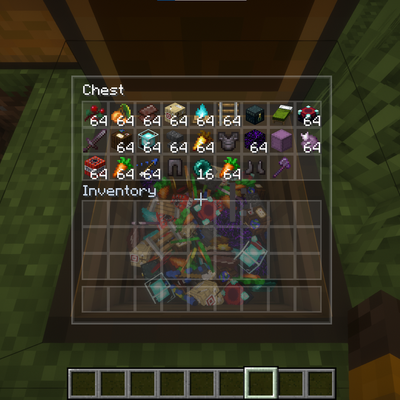
A client-side mod providing smooth camera transitions, semi-transparent menus, and physical 3D item rendering inside chests.
 mod
mod CurseForge · Minecraft
DMZImmersive
Change DragonMineZ attribute point gain to a more immersive way
 mod
mod CurseForge + Modrinth · Minecraft
VM Translation Utility
The VM Chinese Translation Group mod is used to check Chinese localization patches and some other utility features